Marketing Can't Keep Up With Releases
Features ship every week. The video comes weeks later. Some never get one.
Launches land lateTurn your product into studio-quality videos, interactive demos, and docs.
Show how a team lead invites teammates and assigns their first task.
Create videoProduct understood
Features ship every week. The video comes weeks later. Some never get one.
Launches land lateSomeone writes the script. Someone records the screen. Someone edits and adds a voiceover. Then it all starts again for the next feature.
Hours lost on every releaseYou pay to build new features. Without a clear walkthrough, customers never find them or use them.
Development spend wastedGuideClarity turns each new feature into a ready-to-publish software demo video. Your users see what you built the day you ship it.
Build and ship new features.
Learns your product and creates the video for you.
Ready to publish, on brand.
Every Release Gets a Video and More
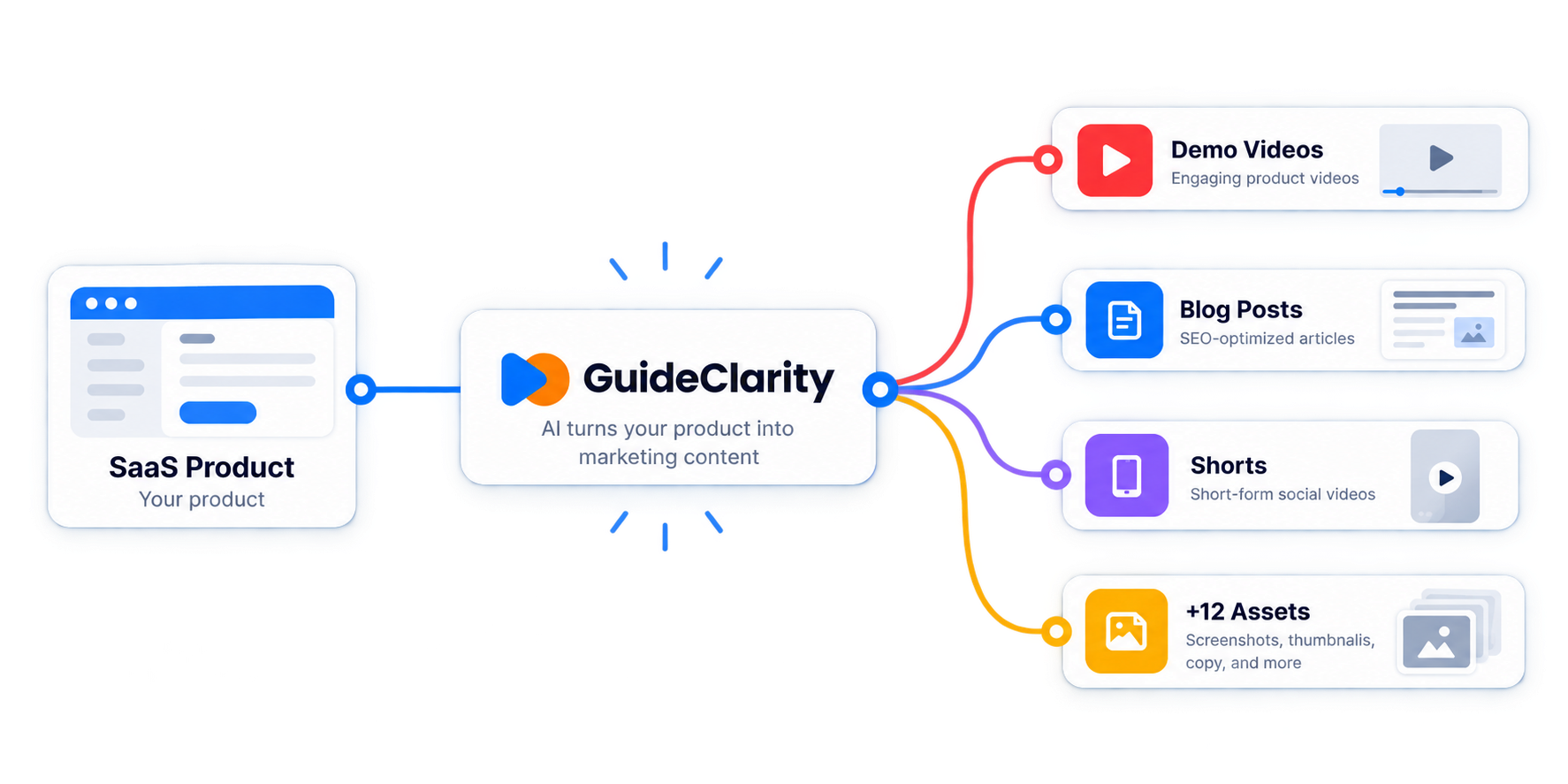
One release gives you a demo video, shorts, a blog post, social posts, screenshots and an announcement. No waiting for weeks.
Explainer Videos for Every Update
Show customers what changed and why it matters. Short explainer videos and walkthroughs help them use new features.
Feature Demo Videos Sales Can Send
Send a clear walkthrough before or after each call. Your product team stays focused on building.
Turn One Feature Into Weeks of Posts
One release becomes shorts, clips and LinkedIn posts. You post every week without hunting for topics.
Launch Videos Without a Video Team
Small SaaS teams get launch-ready videos without hiring a writer, a video editor or a designer.
Try the product demo video creator for free.
Start Free TrialA product demo video shows how your software works. It walks through a real feature on screen, with a voiceover that explains each step. SaaS teams use them on landing pages, in sales emails and inside the product. A good one is short and shows one job the user wants done.
Use an AI demo video creator like GuideClarity. You ship a feature and the AI does the rest. It explores your product, captures the key screens and writes the script. Then it builds the video and adds an AI voiceover. You review it, change what you want and publish.
No. GuideClarity can create the video automatically. It explores your product and captures the key screens itself. You can also record your own walkthrough if you prefer. Either way, the AI handles the script, the editing and the voiceover.
Keep a feature demo video short. One to two minutes works for most features. Shorts for social media should stay under 60 seconds. Longer walkthroughs fit onboarding and training. Show one feature per video and lead with the result the user gets.
Yes. One feature can become a product demo video, a short explainer video and vertical shorts. GuideClarity also writes a blog post, social posts and step-by-step docs from it. You get a full launch kit from one release.
It depends on the job. Screen Studio and Loom are good when you want to record your own screen. Arcade and Supademo are good for interactive click-through demos. GuideClarity fits SaaS teams that want a video made for every release, without manual editing.
Yes. The free plan includes 3 video guide recordings with AI voiceover and 6 marketing videos. Paid plans start at $49 per month billed yearly, or $59 month to month. Paid plans come with a 14-day money-back guarantee.
 GuideClarity
Early access
GuideClarity
Early access
Leave your email and we will let you know as soon as your access is ready.
No credit card. No spam. Only access updates.
We use your email only to contact you about GuideClarity access. See our Privacy Policy. This site is protected by reCAPTCHA and the Google Privacy Policy and Terms of Service apply.
GuideClarity is in private beta, and right now we are only accepting invited users. We will send short notifications to you as soon as the app is publicly available.
We appreciate your patience and look forward to having you on board.
GuideClarity
Log in to turn your latest release into launch-ready content.
New to GuideClarity?