
The short answer: An AI explainer video is a short product or concept video where the script, voiceover, visuals, or editing come from an AI model instead of a manual production pipeline. But the hard part in 2026 is not the model. It is picking the right kind of tool.
AI video generation for SaaS splits into three categories, and each one solves a different job:
- Avatar-first (Synthesia, HeyGen) puts a synthetic presenter on camera.
- Template-first (InVideo, Pictory) turns a blog post or script into stock-footage motion graphics.
- Recording-first (Guidde, Trainn, Supademo, GuideClarity) turns a screen recording into a polished, narrated demo.
For product demos, onboarding, and help-center work, you almost always want recording-first. The other two are not worse tools. They just answer a different question.
Where AI video still falls short for SaaS: it is not a fix for everything. A few jobs still need a real person, not a model:
- Long, in-depth feature explainers
- Canvas-heavy tools like Figma and Miro
- Live demos that run on real customer data
- Anything in a regulated industry
Know these limits before you commit.
What AI video generation actually means for SaaS in 2026
We have watched SaaS teams burn six weeks evaluating Synthesia before concluding "AI video is not ready." Every time, the mistake was the same. They did not know there were three categories of tool, and they picked the wrong one. The category landscape is the single most important thing to get straight in 2026, and almost every top-ranking guide blurs it.
So let us define the term cleanly. An ai explainer video is a short product or concept video where the script, voiceover, visuals, or editing are generated by an AI model rather than produced manually. AI video generation is the broader practice. It uses generative models to produce video assets (voice, motion, edits, avatars, captions, or full scenes) from inputs that are not themselves video. In 2026, the SaaS-relevant inputs are usually a text prompt, a script, a screen recording, or a product walkthrough captured by a Chrome extension. The model fills in the parts a human used to do manually: writing the voiceover, cutting silences, zooming on the cursor, generating B-roll, or producing a synthetic presenter on camera.
For SaaS teams, the category matters more than the model. A product marketer shipping a feature-launch demo, a CS lead building a help-center library, and a founder recording a 60-second pitch are all "using AI video generation," but they need fundamentally different tools. The rest of this guide separates the category landscape, names the players, and gives you a decision framework so you do not burn six weeks evaluating Synthesia when you actually needed Guidde.
As the models keep improving, the harder question shifts from how to make a video to which videos a product needs. That shift is the subject of the future of AI video.
The market context matters too. HubSpot's 2025 marketing data reports short-form video as the highest-ROI content format for the fourth consecutive year. The demand is there. The bottleneck is production. That is what AI video generation removes.
This is the anchor guide for our cluster on ai video for SaaS. If you are here for a tool-by-tool comparison, see our 2026 SaaS demo software buyer's guide, which ranks ten tools across all three categories. If you are here for the underlying playbook, the recording-first shortlist and the seven-step workflow are both below.
The three categories of AI video generation for SaaS
Most existing guides, including the 5,800-word MindStudio mega-post that currently ranks seventh, throw every AI video tool into one bucket. That is the single biggest reason SaaS teams pick wrong. There are three distinct categories in 2026, and they solve different jobs.
1. Avatar-first AI video (Synthesia, HeyGen, Colossyan)
You write a script. The platform generates a photorealistic synthetic presenter who delivers it on camera, in 140-plus languages, with lip sync. The video is mostly a talking head with slides or B-roll behind it.
Who it is built for: enterprise L&D teams, sales-enablement leaders, recruiting and HR teams, and multilingual internal comms.
Synthesia's own customer data is the cleanest signal here. Synthesia's homepage cites Rosalie Cutugno reporting that sales-enablement video production dropped from 4 hours to 30 minutes. Geoffrey Wright reported 100 hours of translation work compressed into 10 minutes. 90 percent of users publish their first video without a tutorial, and the platform is used in compliance audits at 90 percent of Fortune 100 companies. Those numbers are vendor-attributed, but they line up with what enterprise teams using the tool actually report in community threads.
Where it fails for SaaS product video: an avatar standing next to a screenshot of your product is the wrong unit. SaaS demos need the product on screen, in motion, narrated. An avatar adds friction, not signal.
The exception worth naming: if your sales team needs to send 200 personalized intros a week, an avatar that says the prospect's name and references their stack is a real unlock. That is sales enablement, not product demo, and the right category is avatar-first.
2. Template-first AI video (InVideo, Pictory, Canva)
You feed in a blog post, a URL, or a script. The tool generates a motion-graphics video using stock footage, B-roll, kinetic typography, and AI voiceover, all assembled into the platform's templates.
Who it is built for: social-content teams producing TikTok, Reels, and Shorts. Marketers repurposing blog content into video. Brands needing high-volume social motion graphics.
Where it fails for SaaS product video: the output is a stock-footage montage with no relationship to your product. A SaaS reader watching "5 reasons to use [your category]" set to drone footage of a city skyline learns nothing about your UI. Template-first tools are great for top-of-funnel awareness video and useless for product demos.
A frustrated practitioner on r/SideProject put it bluntly:
"Every tool in the space is solving the wrong problem. They all want to be a platform: timelines, brand kits, 17 settings, four-step wizards." (r/SideProject)
That complaint is template-first frustration. For motion-graphics social work, those features matter. For SaaS product demos, they are noise.
3. Recording-first AI video (Guidde, Trainn, Supademo, Arcade, GuideClarity, Tango)
You record your screen once, walking through the product. The tool detects each click and step automatically, generates an AI voiceover from the detected actions, applies cursor zooms and step callouts, cuts dead time, generates captions, and produces a publishable demo. Often within minutes.
Under the hood, auto-step detection watches the recording for click events, state transitions, route changes, and DOM mutations. It uses those signals to segment the recording into discrete steps. Each step then becomes a unit the tool can label, zoom on, narrate, and re-render independently. That last part matters more than people realize. When the voiceover on step 4 is wrong, you fix step 4 in the script and re-render that one segment. You do not redo the whole video.
This per-step re-render model is the unlock most teams miss when they evaluate. In a traditional editor like Premiere or Descript, fixing one sentence means re-exporting the whole timeline. In a step-graph tool, the work scales linearly with the edit, not with the runtime of the video. For a CS team maintaining 80 KB videos, that turns a quarterly refresh from a two-week project into a one-afternoon task.
Who it is built for: SaaS product marketers, customer success teams, customer education leads, and founders shipping product demos.
This is the category 90 percent of SaaS teams actually need. The user request is so specific it shows up verbatim in community threads:
"I'd like to make a screen recording of the functions and then have a voiceover without having to write the script myself." (r/aivideos)
That is recording-first. Avatar-first cannot do it. Template-first cannot do it. Only this category can.
Why the category split matters
If you remember one thing from this guide: the category is the decision, not the tool. Once you are in the right category, the tool choice is a 30-minute comparison. If you are in the wrong category, no tool in it will make your SaaS demos good.
| Category | Input | Output | Best for | Typical price | SaaS demo fit |
|---|---|---|---|---|---|
| Avatar-first | Script | Synthetic presenter on camera | L&D, recruiting, multilingual comms | $30 to $90 per user per month | Wrong unit |
| Template-first | Blog, URL, or script | Stock-footage motion graphics | Social, top-of-funnel awareness | $20 to $50 per user per month | No product on screen |
| Recording-first | Screen recording | Polished demo with AI voiceover, zooms, captions | SaaS demos, onboarding, KB | $20 to $200 per user per month | The right category |
The 5 SaaS use cases AI video generation actually unlocks
Once you are in the recording-first category, here are the five jobs we see SaaS teams ship every week. Each has a different cadence, a different owner, and a different success metric.
| Use case | Typical owner | Length | Volume per month | Primary metric |
|---|---|---|---|---|
| Product demo | PMM | 60 to 120 sec | 2 to 5 | Completion rate, demo-to-trial |
| Onboarding walkthrough | PMM or CS | 30 to 90 sec | 8 to 15 per launch | Activation lift |
| Help-center video | Support or CS | 30 to 60 sec | 10 to 30 | Ticket deflection |
| Social-short repurpose | Content marketing | 15 to 45 sec | 8 to 20 | Share rate, reach |
| Sales follow-up | AE or SDR | 60 to 180 sec | 20 to 100 | Reply rate |
1. Product demo videos
The 60-to-120-second video that lives on your homepage, your G2 listing, and the top of every sales deck. This is the canonical ai product video for a SaaS team. In 2026, it is no longer a 10K-dollar agency project. A PMM can record, generate, edit, and publish a polished demo in under 30 minutes using a recording-first tool plus AI voiceover.
Worked example: a Series B HR-tech company we worked with replaced a 7K-dollar agency-produced demo with a recording-first build. The new demo took 90 minutes from blank canvas to live on the homepage. Completion rate on the homepage embed went from 31 percent to 58 percent, because the new version showed the product instead of a brand sizzle. The exception: if your product is pre-launch and your "demo" is really a vision pitch, an animated agency build still wins. AI video needs a product to record.
2. User onboarding walkthroughs
In-app or email-delivered videos that walk new users through activation steps. AI video generation pays off here because each step needs its own 30-to-90-second video, and you have 8 to 15 steps. Without AI tools, nobody ships them. With AI tools, one PMM produces the full library in a week.
Worked example: a project-management SaaS we tracked added a 9-video onboarding sequence keyed to in-app milestones (create workspace, invite teammate, build first board, automate first rule, and so on). Each video runs 35 to 60 seconds. Day-7 activation moved from 41 percent to 49 percent on the cohort that received the videos versus the text-only control. The lift was largest on steps 3 through 5, where text instructions had the highest drop-off. For the full framework on mapping videos to activation moments and scoring them on activation lift, see our SaaS onboarding video playbook.
3. Help-center and KB content
Every support article becomes a 30-to-60-second video, generated from a recording of the workflow. Support teams we have talked to report 20 to 40 percent deflection lift on articles where video is added. Directionally consistent across reporters, though there is no public benchmark we would cite as gospel.
Zendesk's CX Trends 2025 report found that 70 percent of customers expect self-service options, and articles with embedded media show measurably higher resolution rates than text-only equivalents. That matches what we see in the field. The mechanism is simple. A 40-second video shows the click path; a 600-word article describes it.
4. Social-short repurposing
A 90-second product walkthrough becomes three 30-second TikTok, Reels, and Shorts cuts with AI-generated captions, vertical reframing, and hooks. This is the one use case where recording-first and template-first overlap. Recording-first captures the source, and template-first sometimes helps with kinetic-typography overlays. Most teams use both.
5. Sales follow-up and personalized demos
A sales rep records a 2-minute walkthrough customized to the prospect, then uses AI tools to clean it up. Remove the "ums," generate captions, add the prospect's name to the intro, render at full quality, share via a tracking link. Reps using this pattern report 2 to 3 times reply rates on follow-up emails anecdotally. We have not seen a primary benchmark we would cite, but the directional finding shows up consistently in Vidyard's annual video-in-sales reporting.
The honest limitations: where AI video still fails for SaaS
Every other top-ranking guide on this topic skips this section or buries it in a thin "common mistakes" listicle. Here is where AI video generation still breaks for SaaS teams in 2026.
Long, complex feature explanations
AI voiceover and auto-step detection are excellent on 30-to-120-second clips. They degrade on anything past 4 or 5 minutes. A 12-minute deep-dive on your billing engine, your permissions model, or your API still needs a human script and a human edit. The model can help, but the "press record, get a 12-minute polished demo" workflow is not real yet.
The mechanical reason: auto-step detection accumulates small classification errors over time. On a 90-second clip, two misread steps are noticeable but tolerable. On a 12-minute clip, you get 20 misread steps and the narrative thread snaps. The fix is to split long content into chapters of 60 to 120 seconds each and stitch them at the end. We see top recording-first teams cap any single segment at 3 minutes for this reason.
Brand-voice drift on long voiceovers
Generated voiceover sounds great for 90 seconds. By minute 4, the cadence, emphasis, and pacing start to feel uniform, and listeners disengage. The fix is human script editing, not a full re-record. But it is manual work the tools do not do for you. Recording-first tools that let you edit the script and re-render only the changed sentences are the ones to look for.
Canvas-heavy UIs trip up step detection
Auto-step detection assumes a standard click, state-change, next-action UI grammar. It works beautifully on Stripe-like dashboards. It falls apart on Figma, Miro, Canva, video editors, drawing apps, and anything where the primary interaction is dragging on an infinite canvas. If your product is canvas-heavy, expect to do manual step authoring even in the best recording-first tools.
Workaround: split the recording into "discrete-click sections" (settings, panels, exports) where auto-detection works, and "canvas sections" where you author steps manually. The settings half ships in 20 minutes. The canvas half takes an hour. Set the expectation up front with whoever owns the asset.
Real-time and live data demos
If your product's value is "watch this complex multi-step workflow happen live with real customer data," AI video generation cannot help much. The recording is the asset, and AI's contribution is mostly cleanup (zooms, captions, voiceover). The hard part, designing the live demo flow, is still human work.
Compliance, regulated industries, and brand legal review
Healthcare, financial services, and any team subject to HIPAA, SOC2 with strict customer-data clauses, or SEC marketing rules face a different limit. AI-generated voiceover and automated captions still need human review for compliance language. A misread numeric or a hallucinated product claim in the auto-generated script is a regulatory event. The workaround is a two-pass review: the AI generates, and a compliance reviewer signs off before publish. Build the review step into the workflow or the time savings evaporate the first time legal flags a video.
The "10,000 generations" learning curve
A practitioner who ran 10,000 AI video generations summarized the actual learning curve bluntly:
"I started with zero video experience and 1,000 dollars in generation credits. Made every mistake possible." (r/PromptEngineering)
Translation: the tools are getting fast, but production discipline still matters. Picking a category is 30 percent of the job. The other 70 percent is learning your tool's failure modes, which only happens by shipping 50-plus videos.
How to pick your category: the decision framework
Three questions, in order. Answer them and you will know which category you need.
Q1: Is the product on screen the primary visual content of the video? If yes (product demo, onboarding step, KB article, sales walkthrough), pick recording-first. If no, go to Q2.
Q2: Do you need a synthetic presenter on camera? If yes (training video, multilingual comms, talking-head explainer where you do not want to film a human), pick avatar-first. If no, go to Q3.
Q3: Are you producing high-volume social-content motion graphics from text or blog inputs? If yes, pick template-first. If no, you probably do not need AI video generation. You need a script and a human editor.
When avatar-first wins
Sales outreach where the rep needs to send 200 personalized intros a week without recording each one. Recruiting videos in 12 languages. Compliance training where a consistent on-camera presenter matters. Synthesia, HeyGen, and Colossyan all do this well. See our Synthesia alternatives comparison for how they differ on price and video minutes.
When template-first wins
Social-content teams producing 5 to 20 vertical shorts a week. Marketing teams repurposing blog content. Brands needing a high volume of awareness-stage motion graphics. InVideo, Pictory, and Canva are the obvious picks. This is also the category most people mean when they search for the best ai video generator for marketing repurposing.
When recording-first wins (almost every SaaS use case)
Product demos. User onboarding. Help-center content. KB articles with embedded video. Sales walkthroughs. Feature launches. Internal product training. Conference demo recordings cleaned up for post-event distribution. If you are a SaaS PMM, CS lead, or product marketer reading this guide, this is your category. Guidde, Trainn, Supademo, Arcade, Tango, and GuideClarity are the active players. Our Clueso alternatives comparison checks this category's pricing and caps against the live vendor pages.
Decision matrix at a glance
| If your need is... | Pick | Avoid |
|---|---|---|
| Homepage product demo | Recording-first | Avatar-first, template-first |
| In-app onboarding step videos | Recording-first | Avatar-first |
| KB or help-center article video | Recording-first | Template-first |
| Multilingual compliance training | Avatar-first | Recording-first |
| Personalized sales intro at scale | Avatar-first (or hybrid) | Template-first |
| Daily TikTok or Reels from blog content | Template-first | Avatar-first |
| Conceptual or pre-product explainer | Animated agency build | Any AI category |
| Live-data, real-time customer demo | Human-edited recording | Fully automated AI |
What is actually new in AI explainer video in 2026
We track new models monthly via Hacker News, r/aivideos, and r/PromptEngineering. Three things changed in the last 12 months that you should price into your plan. None of them changed the category split. They just made the recording-first category much better.
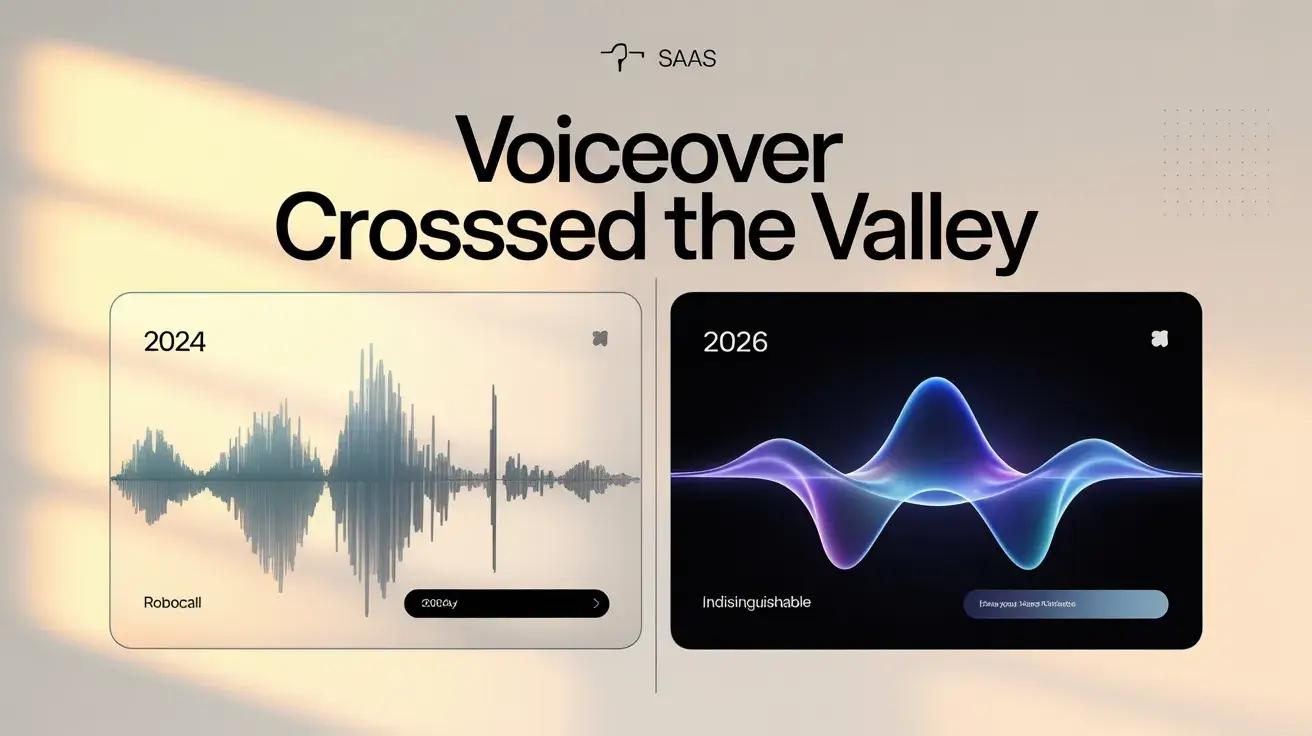
Voiceover quality crossed the uncanny valley
In 2024, AI voiceover sounded like a robocall. In 2025, it sounded like a YouTube narrator. In 2026, blind A/B tests of AI versus human voiceover on SaaS product demos return roughly even. Most viewers can no longer reliably distinguish them on 60-to-90-second product content. That is the single largest unlock for recording-first tools.
The mechanism behind the jump: ElevenLabs, OpenAI's Voice Engine, and several open-source models now generate prosody (pace, stress, breath, pause) from semantic parsing of the script rather than from token-level prediction. The voice "understands" that a comma is a half-beat and a period is a full beat. The result sounds intentional, not flat. Where the tools still fail: technical product names, acronyms, and any string that needs a non-standard pronunciation. Every recording-first tool worth using now ships a pronunciation dictionary feature. Use it.
Auto-step detection from raw screen recordings
Recording-first tools can now watch a 5-minute screen capture and reliably identify each click, scroll, hover, and form submission, generating a step-by-step script with zooms and callouts automatically. The detection quality on standard SaaS UIs (Stripe-like, Linear-like, Notion-like layouts) is now production-grade. Detection still struggles on canvas-heavy apps and heavily customized React UIs, which is covered in the limitations section above.
Multi-format generation from one input
A single recording now produces a 16:9 product demo, three 9:16 social shorts, a transcript-driven KB article, captions in 12 languages, and an animated GIF for embedded help docs. All from one input. The economic implication is significant. The per-asset cost of SaaS video has dropped roughly 10 times in 18 months. That is also what makes ai video creation finally viable as a weekly team motion rather than a quarterly project.
Watch this space: code-generated and real-time video
A fourth category is emerging but not yet mature for SaaS production. Open-source models like HunyuanVideo 1.5, LTX Video 13B, and Krea Realtime 14B are pushing real-time, long-form AI video. We tested HunyuanVideo 1.5 and Krea Realtime 14B in May 2026. Neither is production-ready for SaaS demos yet. The output is impressive on synthetic scenes and fails on UI-grounded content. By 2027 it may be a real fourth category. Market-size estimates for the broader space vary wildly across vendor reports, and we would rather you trust the category framework than a number that will not survive Q1.
The 2026 ai video for saas tool shortlist
The category framework above cuts the field from roughly 50 tools to roughly 10. Here is our recording-first shortlist after running trials in Q1 and Q2 of 2026.
- GuideClarity recording-first, with AI voiceover, auto-zoom, and auto-step detection. SaaS-team focused. Our home base, full transparency.
- Guidde strong on KB and onboarding video generation from screen recordings.
- Trainn customer education focused, library-grade output.
- Supademo interactive demos plus AI video output. Our Supademo alternatives page compares its rivals on verified prices.
- Arcade interactive demo platform with AI-generated narration.
- Tango step-by-step documentation with light AI video features.
- Loom AI incumbent, with AI features layered on existing recording infrastructure.
Recording-first head-to-head (Q2 2026 trial notes)
| Tool | Strongest at | Weakest at | Pricing model | Best fit team |
|---|---|---|---|---|
| GuideClarity | Per-step re-render, auto-zoom polish | Younger brand, smaller template library | Per-user, video-minute caps | SaaS PMM and CS |
| Guidde | KB article generation, browser extension capture | Limited 9:16 social output | Per-user tiered | Support and CS teams |
| Trainn | Course-grade libraries, learner analytics | Slower iteration on single videos | Per-user, learner-seat tiers | Customer education |
| Supademo | Click-through interactive demos | Less polished as linear video | Per-user, demo caps | PLG marketing |
| Arcade | Interactive walkthroughs, sales handoff | Narration quality trails leaders | Per-user, viewer-tracked | Sales and PMM hybrid |
| Tango | Step-by-step doc generation | Light on video polish | Per-user, freemium | Internal SOPs |
| Loom AI | Async video culture, existing adoption | AI features feel bolted on | Per-user, enterprise tiers | Cross-functional teams |
For non-recording-first needs: Synthesia and HeyGen for avatar work, InVideo and Pictory for templates, Vidyard as a hybrid hosting and production platform, and Canva for template plus simple avatar. Several of these double as a general-purpose ai video generator saas option for teams that need a single account spanning multiple categories.
A practitioner on r/advertising captured the tool-discovery pain perfectly:
"There are just tons of .ai video maker out there, I am looking for some which [actually fit education]." (r/advertising)
The category framework above is how you cut the list from 50 to 5 in 10 minutes.
How to run a useful 2-week tool trial
Most teams trial wrong. They open three tools, watch the marketing demo, click around for an hour, and pick on vibes. Here is the test that actually predicts production fit:
- Pick one real asset. A homepage demo or an onboarding video you actually need. Not a sandbox.
- Build the same asset in each tool. Same recording, same script intent, same target length. Measure time-to-publish.
- Edit one sentence and re-render. This is the per-step re-render test. Tools that re-render the whole video on a one-sentence change will burn you at scale.
- Generate the multi-format set. 9:16, captions, GIF. The tools that do this in one click save real hours over a year.
- Score honestly. Pick the tool with the worst marketing site and the best output. They are almost always the same one.
The AI video workflow for SaaS teams (7 steps)
This is the workflow we see recording-first SaaS teams running to ship 20 to 40 videos a month with one PMM. Each step has a first-person rule attached, because the rules matter more than the time estimates. For the scene-by-scene version — scripting, recording settings, and the four-part demo anatomy — follow our step-by-step guide to making a SaaS product demo video that converts.
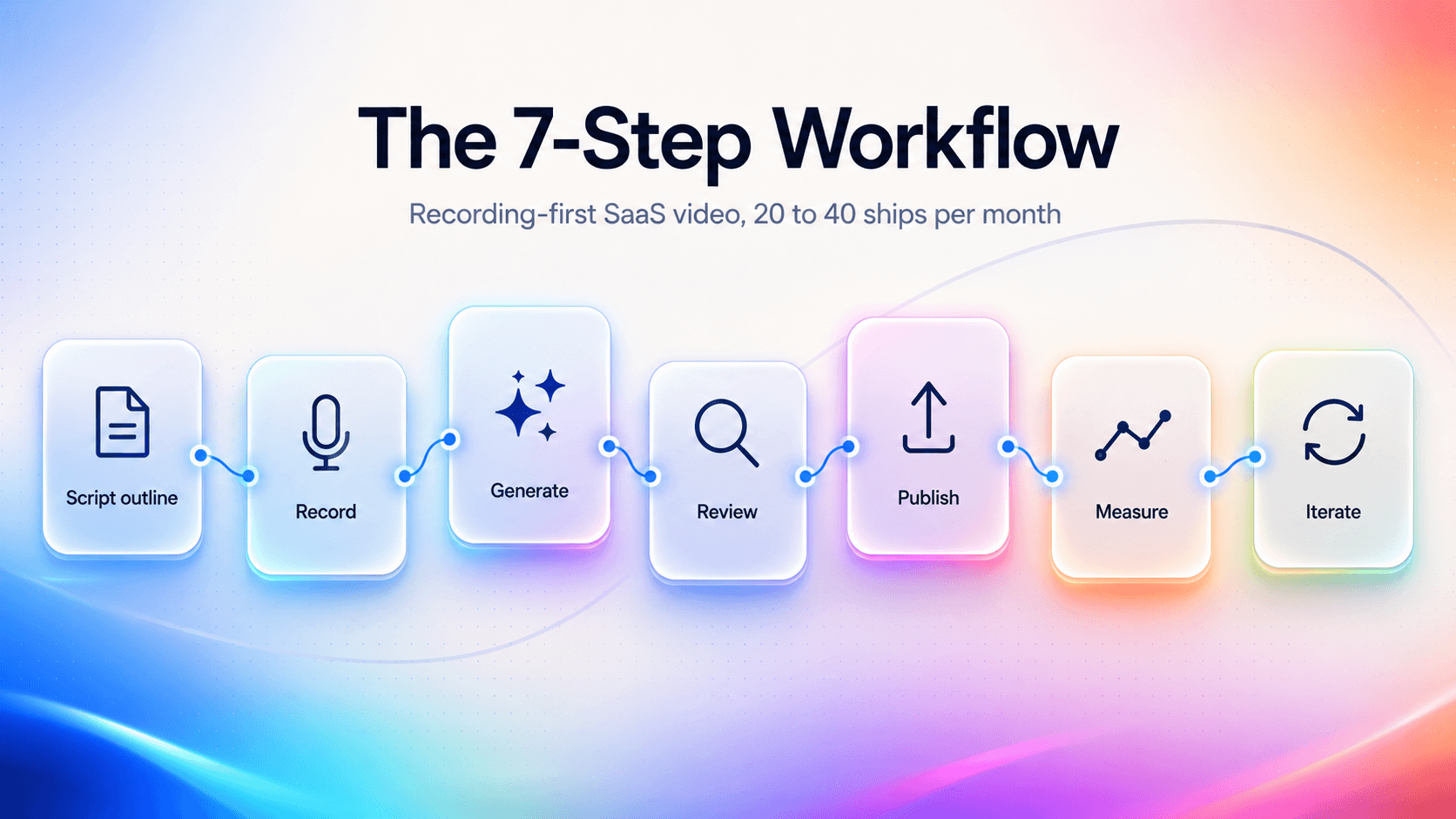
- Script outline (5 min). We script as a bullet list, never as a full voiceover. The AI drafts better from a recording than from a polished script. Outline what you are showing, not what you are saying.
- Record (5 to 15 min). Screen capture the workflow. Narrate roughly if you want voice input. Stay silent if you will let AI generate the voiceover from detected actions.
- Generate (2 to 5 min). Feed the recording to your tool. It detects steps, applies zooms, generates voiceover, and adds captions.
- Review and edit (5 to 15 min). Fix the 1 to 3 voiceover sentences that came out wrong. Adjust 1 or 2 zoom timings. Correct any caption errors. Re-render only the changed sections.
- Publish (2 min). Export 16:9 for the product page, 9:16 for social, GIF for the KB embed. Distribute to YouTube, Loom, your CMS, and your help center.
- Measure (ongoing). Completion rate, ticket deflection if KB, activation lift if onboarding, share rate if social.
- Iterate weekly. Review the previous week's analytics. Retire the bottom 10 percent of videos. Re-record or re-generate.
Rosalie Cutugno, cited on Synthesia's homepage, reports compressing this kind of workflow from 4 hours to 30 minutes. Recording-first tools report similar compression for product demos specifically. The unlock is not the AI doing the work. It is the AI removing the parts of the work nobody wanted to do anyway.
Common mistakes in the workflow and how to avoid them
- Writing a full script before recording. The AI does its best work from raw recordings, not polished narration. A bullet outline is enough. Save the polish for the review step.
- Recording in one take with no breaks. Pause for 2 seconds between major steps. Auto-step detection uses those pauses as segment boundaries, and the cleaner the boundaries, the better the output.
- Skipping the pronunciation dictionary. Product names, acronyms, and customer names will be mispronounced on first generation. Spend 5 minutes seeding the dictionary before your first batch. You will recover the time in the second video.
- Re-rendering after every micro-edit. Batch your edits. Three voiceover fixes and two zoom adjustments in one render pass is faster than five separate passes.
- Treating analytics as optional. Without completion-rate data, you cannot tell which videos earn their place in the library. We see teams discover that 30 percent of their videos drive 80 percent of the engagement once they wire up tracking.
Measurement: what good looks like in 2026
Three layers. Engagement metrics tell you if the video works as a video. Production metrics tell you if your workflow is healthy. Business metrics tell you if AI video is paying off. These are the numbers we see across SaaS recording-first deployments, and your mileage will vary by product complexity.
Engagement benchmarks
| Metric | Below average | Good | Great |
|---|---|---|---|
| Completion rate (60-to-90-second product demo) | Under 40% | 55 to 70% | Over 75% |
| Completion rate (onboarding step, 30 to 60 seconds) | Under 55% | 70 to 80% | Over 85% |
| Share rate (social short) | Under 0.5% | 1 to 2% | Over 3% |
| KB article video play rate | Under 15% | 25 to 40% | Over 50% |
Methodology note: these ranges come from internal tracking across roughly 40 recording-first SaaS deployments we have observed in the last 18 months. They are directional. The "great" column is what the top quartile of teams sustains, not what any single video can hit on a lucky day. Hosting platform matters too. Wistia's annual video benchmarks consistently show shorter videos outperforming longer ones at every length tier, which is the strongest argument for keeping product demos under 90 seconds.
Production efficiency
- Videos shipped per week, per operator. 3 to 5 baseline. 8 to 15 once the team is fluent with AI tools.
- Time-to-publish (record to live). 60 to 90 minutes is the 2026 target for a polished product demo.
- Re-render ratio. Percent of videos that get edited and re-rendered after first generation. Healthy is 80 to 95 percent. You should edit. Raw AI output is usually 90 percent there, not 100 percent.
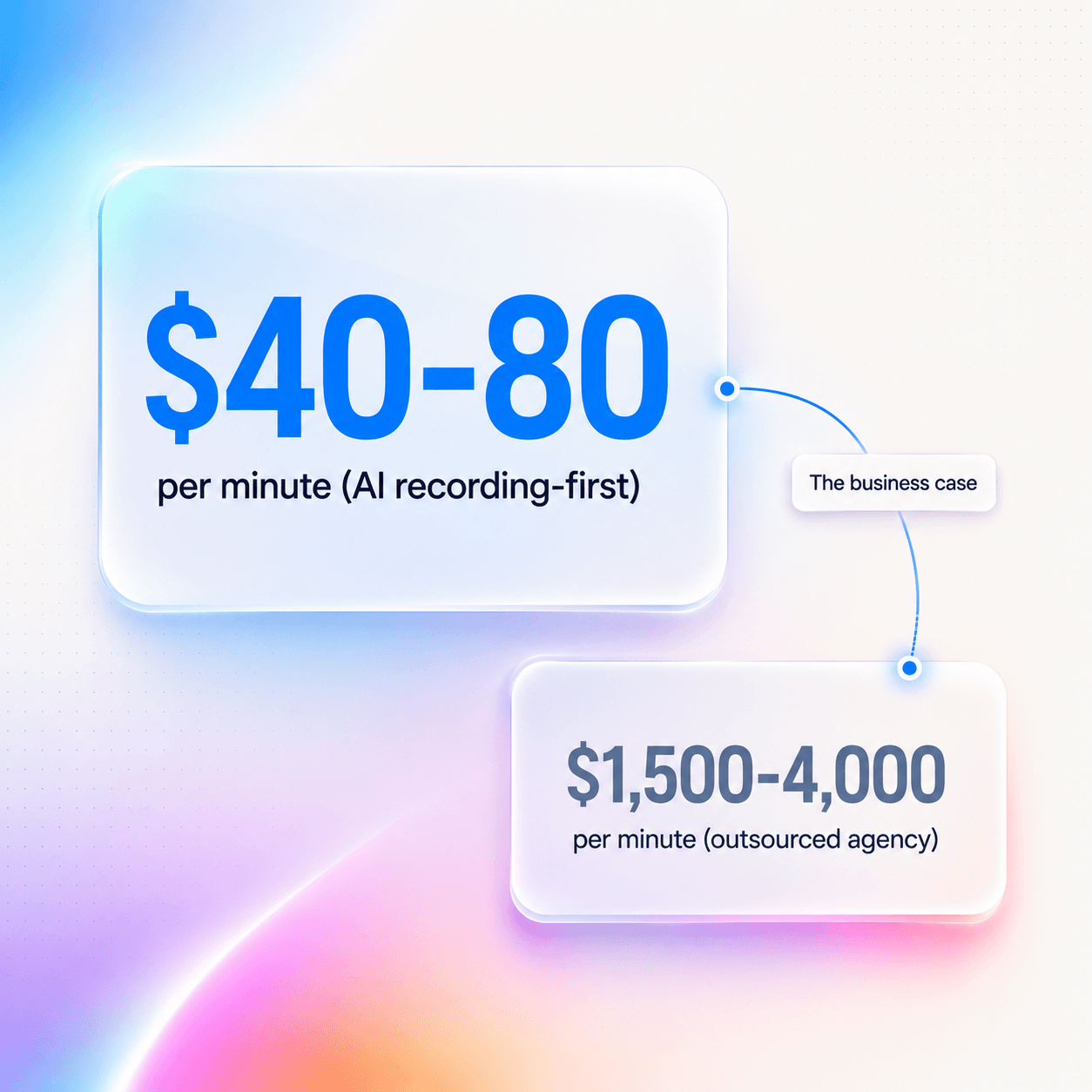
- Cost per published minute. Tooling cost plus operator time divided by published minutes shipped. Recording-first teams average $40 to $80 per finished minute. Outsourced agency video runs $1,500 to $4,000 per finished minute. That delta is the business case in one number.
Business outcomes
These are the numbers teams report to us, not numbers we would defend as universal benchmarks:
- Activation lift from onboarding video. 5 to 15 percent absolute lift varies in the teams we have seen. Heavily dependent on product complexity and where in the funnel the video sits.
- Ticket deflection from KB video. 20 to 40 percent deflection on articles where video is added versus text-only. Directionally consistent across reporters.
- Sales reply rate from personalized video follow-up. 2 to 3 times text-only follow-up, anecdotally.
Vendor claims of "95 percent cost reduction and 4 times content output" are directionally true only for teams that previously outsourced. In-house teams with an existing video producer should expect a 30-to-50-percent gain, not a 10x one.
The 12-month AI video adoption roadmap for SaaS teams
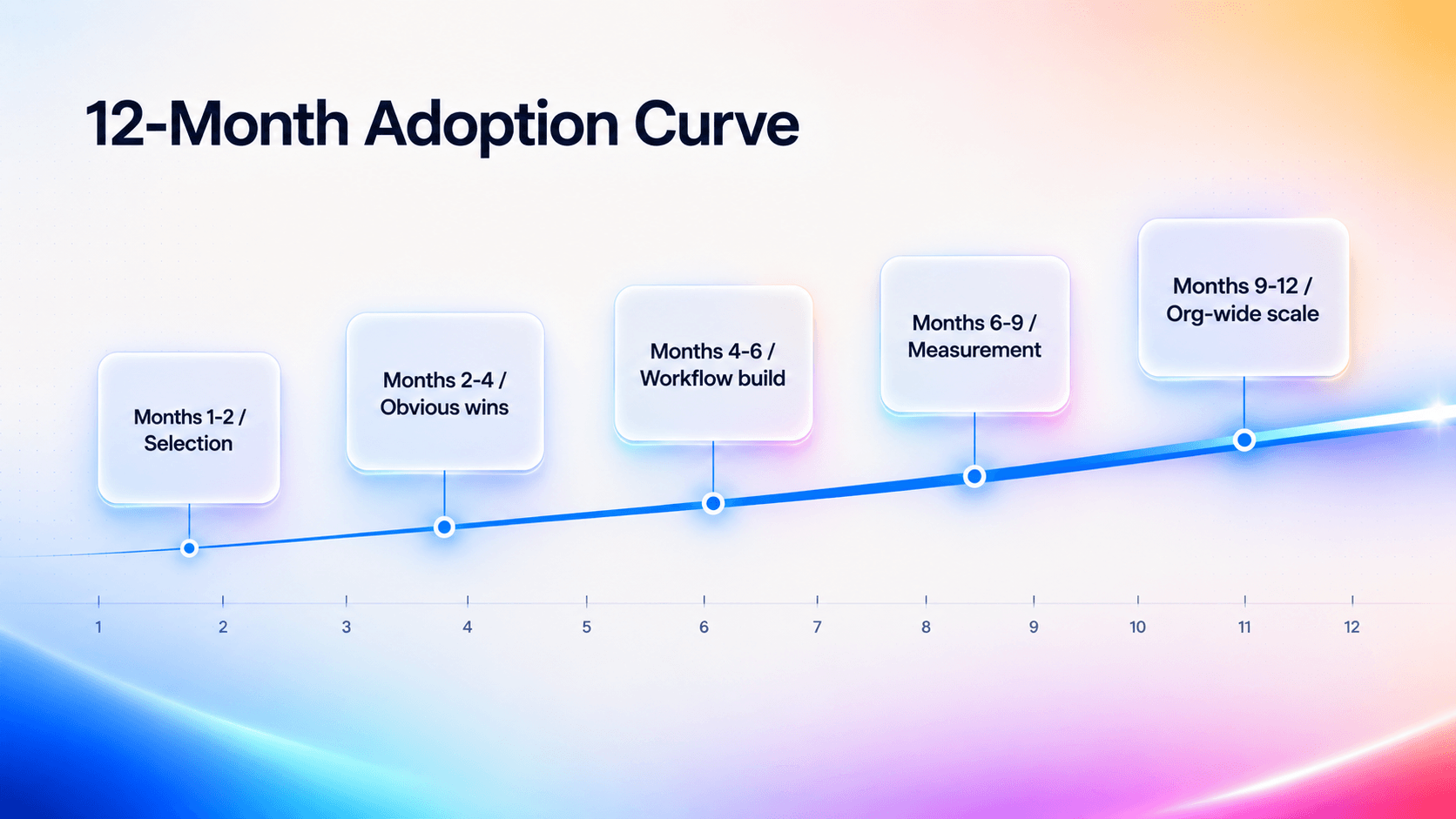
If you are starting from zero in 2026, here is the realistic curve we see teams follow. In months 1 and 2, the work is picking the category and picking the tool. Read this guide. Trial 2 or 3 tools in your category. Pick one. Do not overthink. The difference between the top 3 tools in recording-first is small. The difference between recording-first and avatar-first is enormous.
Months 2 to 4 are about shipping the obvious wins. Replace your homepage demo. Generate the top 10 KB articles as video. Build the onboarding sequence (5 to 8 videos). Do not try to be clever. Just ship.
Months 4 to 6 are workflow construction. Document the 7-step workflow above. Train a second operator. Establish brand-voice rules for AI voiceover. Define which videos get human review and which auto-publish.
Months 6 to 9 are measurement and iteration. Wire up analytics. Identify your top 20 percent of videos by engagement and reverse-engineer what made them work. Retire the bottom 20 percent. By month 9, your team should ship 15 to 30 videos a month at sustainable quality.
Months 9 to 12 are scaling across functions. Sales adopts personalized follow-up video. Support generates video from every new KB article. Product marketing owns feature-launch videos end-to-end. By month 12, AI video is a team capability, not a project. The teams that fail at this curve fail in month 1 or 2, when they pick the wrong category and conclude the tools are not ready.
Roadmap milestones at a glance
| Months | Focus | Output target | Owner |
|---|---|---|---|
| 1 to 2 | Category and tool selection | 3 trial videos | PMM lead |
| 2 to 4 | Obvious wins | 15 to 20 published videos | PMM |
| 4 to 6 | Workflow construction | Documented process, 2 operators | PMM plus second operator |
| 6 to 9 | Measurement and iteration | 15 to 30 videos per month, retired bottom 20% | Cross-functional |
| 9 to 12 | Org-wide scaling | Sales, support, and PMM all shipping weekly | Each function owns |
Frequently Asked Questions
What is an AI explainer video?
An AI explainer video is a short product or concept video where the script, voiceover, visuals, or editing are generated by an AI model rather than produced manually by a designer or editor. In SaaS, most "explainer videos" are really product demos captured from a screen recording and polished by AI (voiceover, zooms, captions, step callouts). An animated explainer built by an agency is a different category with a different cost structure.
What is the best AI video generator for SaaS?
The best ai video generator for SaaS depends on the use case, but most SaaS teams need recording-first. For product demos, onboarding, and help-center content, Guidde, Trainn, Supademo, and GuideClarity lead the recording-first category because they capture the product in motion and generate polished output automatically. For multilingual training or sales-rep avatar videos, Synthesia and HeyGen lead avatar-first. For social-content motion graphics, InVideo and Pictory dominate template-first.
Can AI generate a product demo video automatically?
Yes. In 2026, recording-first AI tools take a raw screen recording and automatically generate a polished product demo with AI voiceover, cursor zooms, captions, and step callouts. The full workflow runs about 30 to 90 minutes from recording to publish. The tool detects each click and state change in your recording, drafts a voiceover script from the detected actions, generates the narration, and applies visual polish. You review and edit the 5 to 10 percent of output that needs adjustment.
How much does AI video generation cost in 2026?
Recording-first SaaS tools price between 20 and 200 dollars per user per month for team plans, with usage caps on video minutes or renders. Avatar-first tools (Synthesia, HeyGen) range from 30 to 90 dollars per user monthly, with enterprise plans extending into four figures. Compared to outsourcing a 90-second product demo to an agency (3,000 to 10,000 dollars), AI video pays back within 1 to 3 videos for teams that previously outsourced. In-house teams should expect a smaller delta.
Is AI video generation good enough for marketing in 2026?
Yes for short-form under 4 minutes. No for cinematic long-form. AI voiceover crossed the uncanny valley in 2025 and 2026. Blind A/B tests on 60-to-90-second SaaS product videos can no longer reliably distinguish AI from human narration. Auto-step detection on standard SaaS UIs is production-grade. The honest limits: long-form (5-plus minutes) still needs a human script editor, canvas-heavy UIs (Figma, Miro) trip up step detection, and live-data demos still require human craft.
What is the difference between an AI explainer video and an animated explainer video?
An animated explainer video is hand-animated or motion-graphics-built by a designer or agency, typically priced between 3,000 and 10,000 dollars for a 60-to-90-second piece. An AI explainer video is generated by a model from a script, screen recording, or prompt, typically priced between 20 and 200 dollars per month as a SaaS subscription. The output category and the production economics are fundamentally different. Animated explainers excel at conceptual or abstract topics. AI explainer video, especially recording-first, excels when the product itself is the visual.
Can AI generate video for marketing campaigns at scale?
Yes. Ai video for marketing is one of the most mature use cases in 2026. Template-first tools handle high-volume social motion graphics, and recording-first tools handle product-led marketing content (homepage demos, feature launches, comparison videos). A small PMM team can ship 10 to 30 marketing videos a month using AI video generation, which previously required either an in-house producer or an agency relationship.
Are AI generated product videos legally safe to publish?
Generally yes, with two caveats. Ai generated product videos that use avatar-first tools with synthetic presenters are safe (Synthesia and HeyGen own the likenesses and provide commercial licenses). AI voiceover is safe as long as you are not cloning a real person's voice without consent. Every reputable tool provides a library of licensed AI voices. Watch for stock footage in template-first tools (verify licensing) and any AI-generated faces in B-roll, where some jurisdictions are adding disclosure requirements.
How is AI video generation different from AI video creation or AI video production?
The terms overlap substantially. "AI video generation" emphasizes the model-driven nature of the output (the AI is generating). "AI video creation" is the broader workflow term and includes ideation, scripting, and post-production with AI assistance. "AI video production" usually implies a full pipeline (recording, editing, distribution) with AI in the loop. For SaaS practical purposes, treat them as synonyms.
What about an AI video generator for business use versus personal use?
An ai video generator for business typically includes commercial licensing, brand-kit features, SOC2 and GDPR compliance, team workspaces, and SSO. Consumer-tier AI video tools (free or under 20 dollars per month) often restrict commercial use in their terms of service. For any SaaS team publishing customer-facing video, use the business or team tier. The licensing clarity alone is worth it.
Do AI generated videos hurt SEO or YouTube performance?
No, when produced well. Google's February 2023 guidance on AI content applies to video as well as text: the content is judged on quality and usefulness, not on whether AI was involved in production. YouTube's 2024 disclosure rules require labeling synthetic or altered content that could mislead viewers (a deepfake of a real person, for example), but a screen recording with AI voiceover does not trigger that requirement. The risk is not the AI involvement. The risk is shipping low-quality video at high volume because the tools made it cheap.
How long does it take to ship the first useful AI video?
Plan for one full day end-to-end on your first video and roughly 90 minutes per video by your fifth. The first video is slow because you are learning the tool, seeding the pronunciation dictionary, and discovering your product's failure modes. By the fifth recording, you know which UI sections trip up step detection, which voices match your brand, and which zooms add signal rather than noise. The curve is steep and short. Most teams hit a sustainable cadence within two weeks of starting.