
SaaS Demo Software in 2026 Splits into 3 categories. Each Solves a Different Problem.
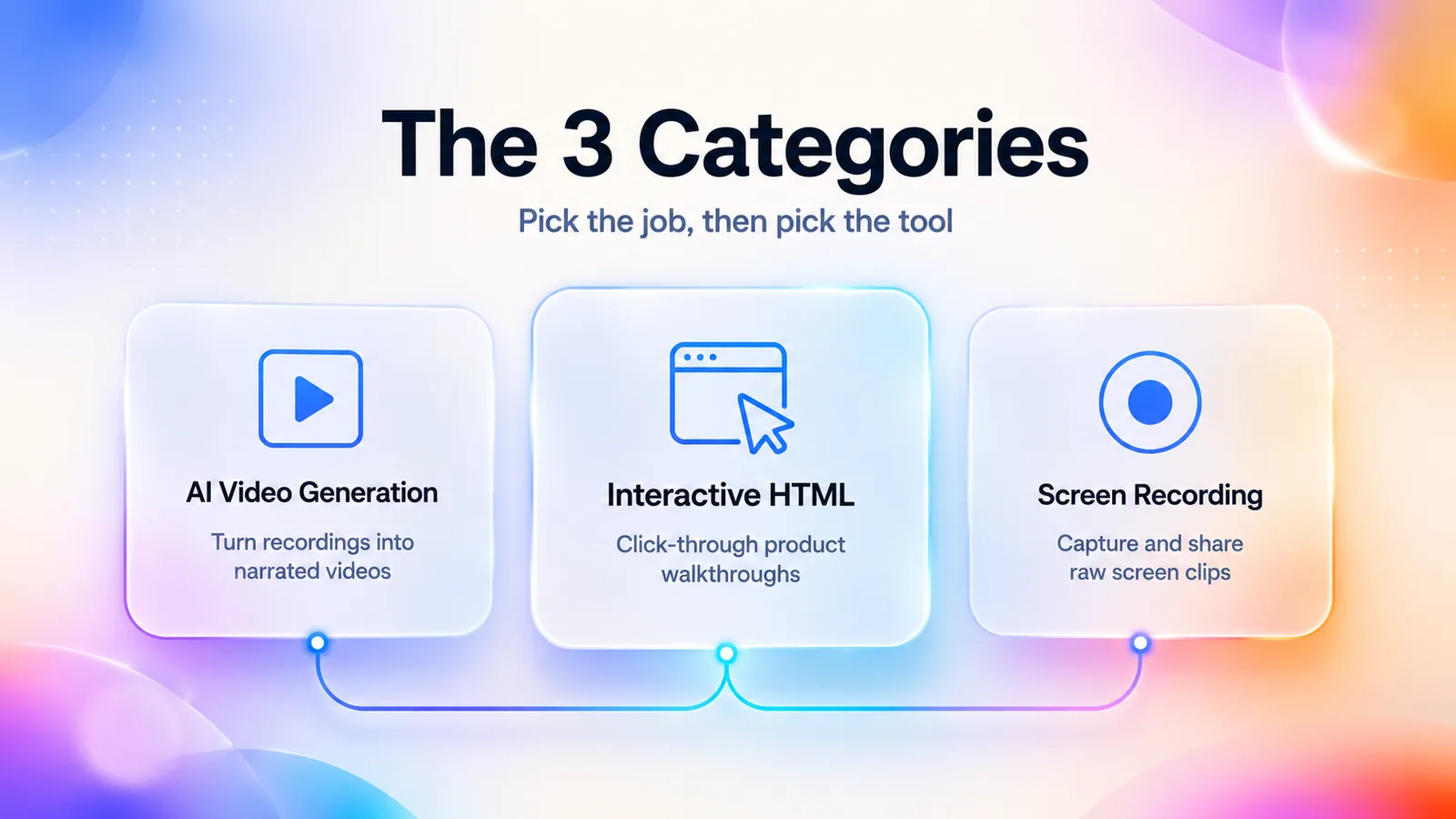
AI video generation
Turns a recording or doc into a narrated video in minutes.
Interactive HTML demos
Buyers click through a guided product replica at their own pace.
Screen recording
Captures live walkthroughs to share fast, with light editing.
Key Takeaways
- Pick the category before the tool. SaaS demo software splits into AI video generation, interactive HTML demos, and screen recording. Getting the category right matters more than getting the tool right.
- Every top-ranking 2026 roundup is published by a vendor that puts itself at #1. Third-party objectivity is the moat for honest buyer guides. This one ranks GuideClarity inside its category, not above all others.
- Maintenance is the tax that decides ROI. For more than 20 published demos through 3+ UI updates a year, AI video and interactive HTML pay back screen-recording stacks within 12 months. The worked example in this guide shows about a $4,000 per year time-cost delta at typical Series B volume.
- Five criteria decide renewal: editability, production speed, scalability, localization, and input flexibility. Branded templates and generic "AI features" do not.
- Most Series A+ teams need two tools in two categories. AI video plus interactive HTML. One tool that claims to do everything is the most common buyer mistake.
- 72% of B2B buyers expect a self-serve, digital-first experience (Gartner). Demo budget is shifting out of live-call headcount, not adding to it.
- The 4-week trial gauntlet beats the vendor sales demo. Week 4's maintenance test (force a fake UI change, time the fix) is the most predictive signal.
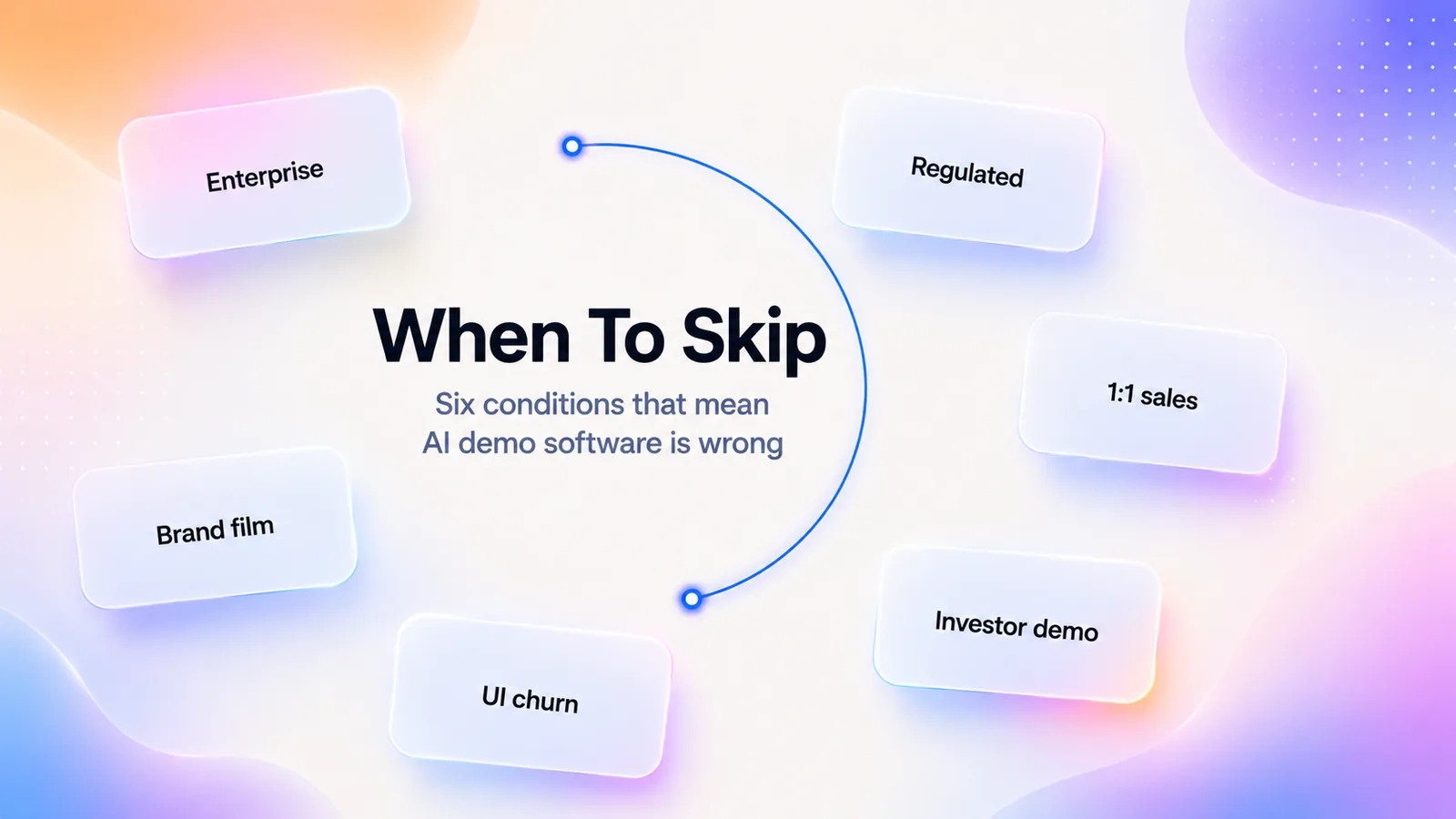
- Avoid AI demo tools entirely when the demo is highly personalized one-to-one. Or in a regulated industry with content-compliance review. Or built on a UI still in weekly churn. The category is powerful, not universal.
Who This Guide Is For (And Who It Isn't)
This is written for SaaS PMM, product education, customer success, and revenue teams picking tools to produce product demos at scale. The kind that ship on landing pages, in sales sequences, in onboarding flows, and inside help centers.
It is not written for these audiences:
- Filmmakers picking video editors.
- Course creators looking at Loom alternatives for lecture capture.
- Gaming streamers.
- Marketing teams making consumer brand films.
Those audiences need different tools and different criteria. If that is you, this guide will waste your time.
Three signals tell you this guide is aimed at you:
- You publish demos in multiple channels (landing page, help center, sales sequence, in-app onboarding) and you need them all to stay consistent.
- Your product has shipped at least one major UI refactor in the last 12 months. So you have lived experience of how brittle a recorded demo library can be.
- Someone on your team has asked "should we hire a video editor instead?" and you want a clearer answer than "it depends."
The patterns in this guide come from buyer-side evaluations across PLG, sales-led, and hybrid SaaS motions. Skip any section that does not fit your motion.
What Is SaaS Demo Software in 2026?
SaaS demo software is a category of purpose-built tools. They produce, edit, and host product demonstrations for software companies. It replaces the slow, fragile, designer-dependent workflow. That old workflow records walkthroughs in Loom, edits them in Premiere, and re-records every time the UI changes.
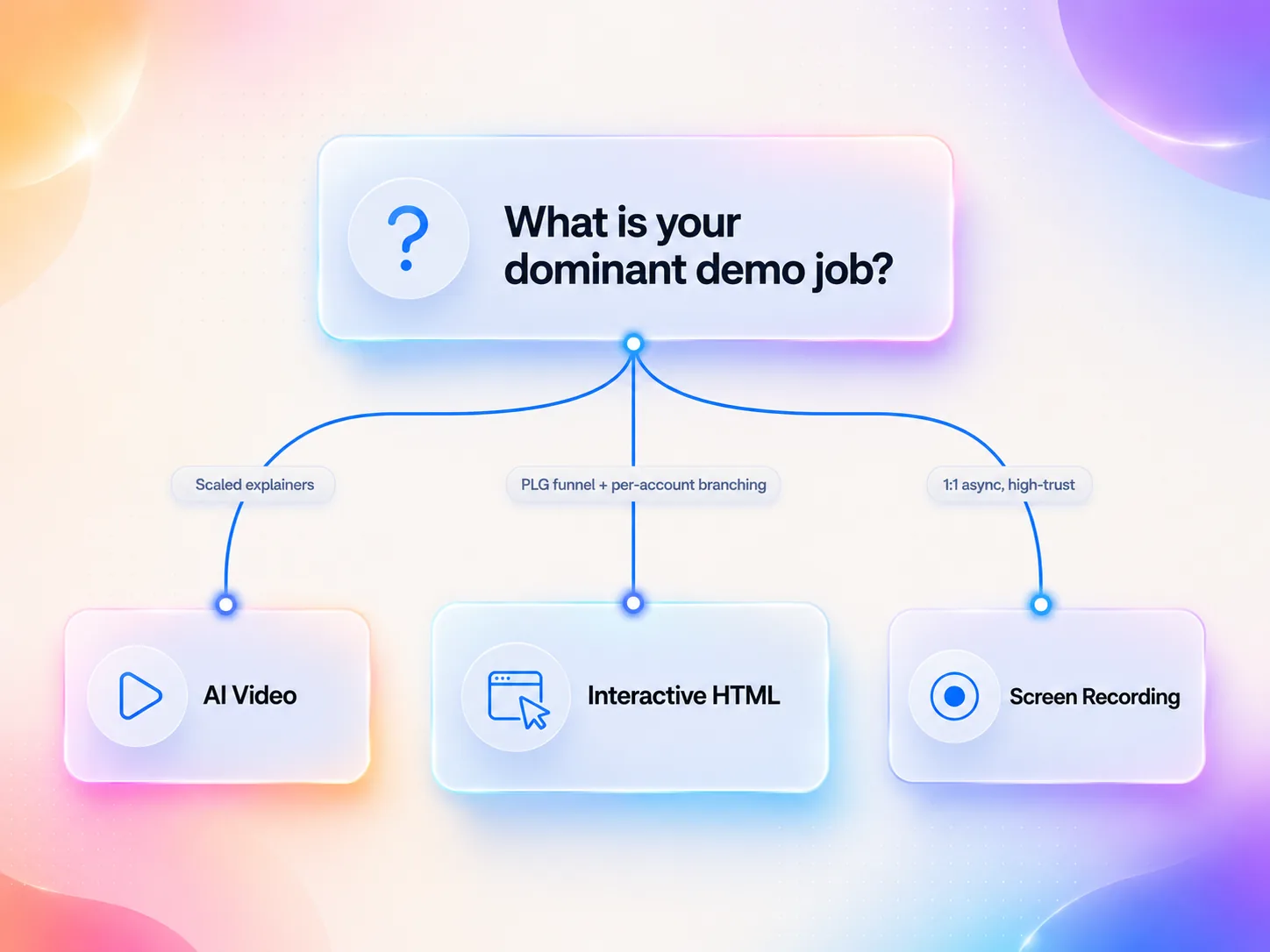
Each category solves a different job. AI video covers scaled narrated explainers. Interactive HTML covers self-serve product tours and PLG funnels. Screen recording covers fast async communication and bespoke sales follow-ups. The "best tool" question is meaningless without first naming the category. Get the category wrong and you will spend $50K a year on a tool that solves the wrong problem at the wrong scale.
A worked example makes the split concrete. Picture a Series A vertical SaaS company that launched a new QuickBooks integration. The same outcome (buyers understand and adopt the integration) has to be delivered three ways:
- The 90-second narrated explainer on the integration's landing page is an AI-video job. The script will be revised when QuickBooks ships its next API version.
- The clickable "try the connector" demo on the pricing page is an interactive-HTML job. The team wants to see which step prospects drop out of.
- The Loom that customer success records for the three pilot accounts who hit a setup snag is a screen-recording job. The content is specific to those accounts and disposable after the week.
One outcome, three jobs, three categories. Doing all three with the same tool is where most teams overspend.
Adjacent categories get confused with saas demo software, and they shouldn't:
- Digital adoption platforms (Pendo, WalkMe, Appcues) are in-app guidance layers, not external demo producers.
- Knowledge base tools (Scribe, Tango) generate step-by-step screenshot docs, not videos.
- Video hosting platforms (Wistia, Vidyard) host and analyze video but do not produce it.
A real demo stack often touches all three adjacencies. But they are not substitutes.
The State of the Demo-Video Market in 2026
The category is no longer niche. Wyzowl's State of Video Marketing 2025 reports that 93% of businesses use video as a marketing tool. 89% of marketers planned to use video in 2025. Both numbers were up year-over-year. Gartner's B2B Buying Journey research finds that 72% of B2B buyers prefer a self-serve, digital-first experience. That is the structural force pulling SaaS budgets out of live-demo sales calls. It pushes them into pre-recorded and interactive formats. The implication for buyer planning: budget is shifting out of live-demo headcount and into pre-recorded tooling, not adding to it.
The infrastructure markets around demo software are growing fast too. Grand View Research sizes the sales enablement software market at $2.67B in 2022. It is growing at a 19.8% CAGR through 2030. The adjacent video conferencing market sat at $9.07B in 2022 with an 11.6% CAGR through 2030. Demo software is the layer in between. It is the category seeing the most product velocity in 2026.
What the Macro Numbers Mean for Your Shortlist
Three implications follow from those benchmarks.
- Every shortlist should now include at least one interactive-HTML tool. The 72% self-serve preference is the buyer signal that linear-video-only stacks underserve.
- Localization is no longer a "nice to have" enterprise feature. If Wyzowl is right that 89% of marketers use video, your competitors already publish in 5+ languages. Treat 30-language voiceover as a baseline criterion.
- The rise of AI script-assist has compressed the production-cost gap between vendors. The vendor differences that matter in 2026 are not "can we generate video." They are "what does it cost to keep the video accurate six months from now." That cost is the maintenance problem, which we return to later.
A nuance worth naming. Wyzowl's data is a self-reported marketer survey. Gartner's is a B2B buyer survey. Both have directional value. Neither is an audit. Treat them as confirmation of a trend, not as precise effect sizes for your category.
The 3 Categories of SaaS Demo Software (And Which One You Need)
This is the section every other roundup skips. I have read about 30 ranking pages for this query in the last six months. Most are written by a vendor that sits at #1. Vendors hate the category framing. It forces a buyer to ask "do I even need your category?" Often the honest answer is no.
Category 1: AI Video Generation
The job is to turn a screen recording, document, or script into a narrated, edited video at scale. The team uploads a raw recording (or a help-doc URL). The tool produces auto-zoomed cuts, AI voiceover, captions, and a publishable file in minutes. This is the category for:
- Customer education teams maintaining 50+ help videos.
- Product marketing teams shipping multiple feature explainers per month.
- Any team localizing at scale (one source recording becomes 12 language outputs).
The tools competing here are:
- GuideClarity
- Guidde
- Trupeer
- Synthesia
- HeyGen
- Descript (as a hybrid)
The tradeoff: you trade fine-grained creative control for speed and scalability. If your demo is "the CMO walking through a quarterly roadmap with brand-specific jokes," AI video is not the answer. If your demo is "show new users how the integrations page works, and update it whenever we ship," AI video is the only sustainable answer.
When this category is the wrong call: brand films, ad creative with on-screen talent, or any video where the voiceover itself is the product. That includes interviews, podcasts, and founder narratives. AI voice has closed the gap on neutral explainer narration. It still falls short on emotional cadence and brand timbre. If you would describe the video as "creative" rather than "explanatory," look at Descript or a human production studio instead.
Category 2: Interactive HTML Demos
The job is to let buyers click through a guided replica of your product. No call booking, no install. The tool captures screenshots or DOM snapshots. You add hotspots, tooltips, and branching logic. The result embeds on a landing page or in an email. This category powers:
- Product-led-growth funnels.
- "See it before you sign up" pre-trial education.
- Outbound sales sequences that need an asynchronous replacement for the call.
It is also the only category that gives you analytics on which steps a buyer skipped.
The tools competing here are:
- Supademo
- Arcade
- Storylane
- Walnut
- Navattic
The tradeoff: you gain interactivity and trackable engagement. In exchange, you maintain a clickable replica when the UI ships weekly. Arcade reports an average 23% conversion rate across 25,000+ published interactive demos in their own internal data. That is their customers on their platform. The number says nothing about maintenance burden. Walnut reports customers seeing up to 34% faster sales cycles with demo automation in their published case data. Useful directionally. Not industry benchmarks.
When this category is the wrong call: your product's value lives in a workflow that crosses multiple windows, tabs, or third-party tools (e.g., an iPaaS or a deep observability platform). The clickable replica becomes a maze. It hides the value rather than revealing it. Interactive demos shine on single-surface workflows. They struggle on cross-surface ones.
Category 3: Traditional Screen Recording
The job is to capture a live walkthrough fast and share it. Light editing (trim, captions, maybe a watermark). No production overhead. This is the right category for async communication, bespoke sales follow-ups, one-off bug reports, and customer support replies. It is also right for:
- Pre-seed and seed-stage teams that do not yet need to scale demo production.
- CS teams sending 1:1 walkthroughs.
- Engineering capturing bug repros.
The tools here are:
- Loom
- Screen Studio
- Camtasia
- Descript as a hybrid
The tradeoff: you get simplicity and price. You also get zero scalability. Vidyard's 2024 Video in Business Benchmark Report found the average demo video converts at 3.21% across 2.1M analyzed videos. Fine for a screen-recorded sales follow-up. Painful when you pay for traffic to a landing page that hosts it.
When this category is the wrong call: the moment "this demo will be watched more than 50 times" becomes true, the economics of un-edited screen recording collapse. The same 5-minute Loom that worked for 5 prospects becomes a brand liability when 5,000 prospects see it on a landing page. Promote any high-traffic recording to a properly produced asset.
Decision Framework: Which Category Do You Actually Need?
| If your dominant job is... | Pick this category | Why |
|---|---|---|
| Producing more than 5 demo videos a month that must stay current as UI ships | AI video generation | Re-recording manually is the scaling bottleneck |
| Self-serve PLG funnel where buyers research before booking a call | Interactive HTML | Buyers want to click, not watch passively |
| One-to-one sales follow-ups, bug repros, async team comms | Screen recording | No production overhead needed |
| Help center plus onboarding, multi-language | AI video generation | Localization at scale is impossible manually |
| Outbound sequences that need to look like a live demo | Interactive HTML or AI video (hybrid) | Track engagement per viewer |
| Enterprise sales with hyper-personalized deals | Interactive HTML | Custom branching per account |
| Investor or board updates (one-off, high-trust) | Screen recording with light editing | Authenticity outranks polish here |
| Conference walkthrough or recorded keynote | Hybrid (screen recording plus AI captions and clips) | Source needs human voice, distribution needs cut-downs |
The honest answer for most Series A+ SaaS teams is two categories, two tools. An AI video generator for scaled explainers. Plus an interactive demo tool for the PLG funnel. Series B+ teams often add screen recording at the rep level for free-form async comms. Picking one tool to do all three jobs is the most common buyer mistake in this category. It is also the most expensive.
The 5 Evaluation Criteria That Actually Matter in 2026
Most demo-software comparisons list 15+ "features" without ranking them. These are the five I default to in every buyer-side evaluation I run. Ordered by how strongly each one predicts whether you will renew next year.
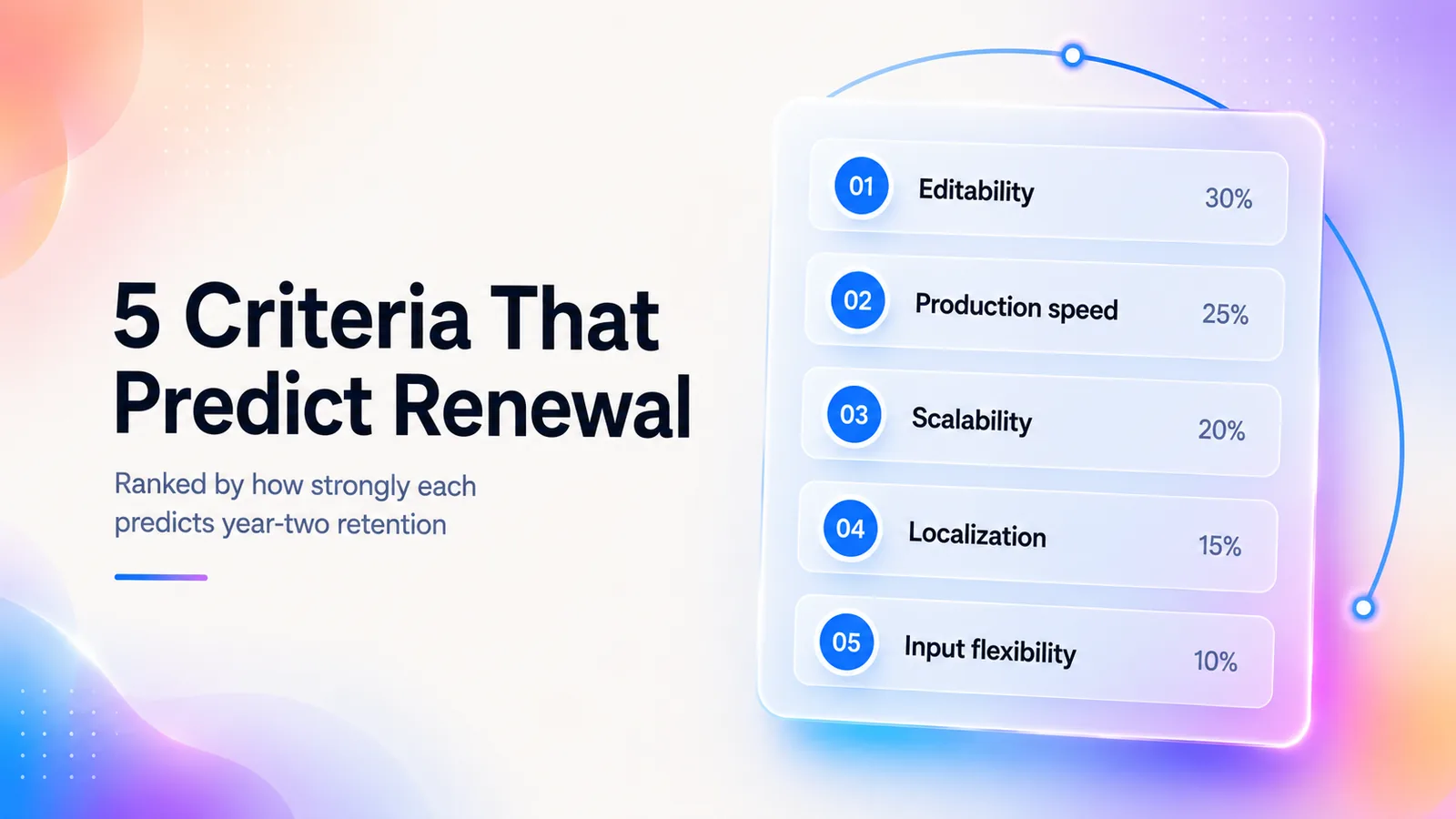
The first is editability. It is the silent killer of demo libraries. Can you update a demo when the UI changes, without re-recording? As one practitioner put it on r/screenrecorders: "Most screen recorders capture the video, but then you still have to edit, add captions, and explain every step manually." If your product ships weekly, a tool that needs full re-recording on every change is a tool you will abandon in six months. The tools that handle this well are AI video platforms with re-render workflows (re-record one step, regenerate the video). Interactive demos that let you swap individual screenshots also work.
The second is production speed, measured in minutes from "start" to "shareable URL." In my testing of the AI-video category, the bar to clear is about 10 minutes for a 90-second demo with voiceover and captions. For interactive demos, 30 minutes from capture to embed-ready is where the leading tools land. If the tool needs a video editor or designer in the loop, it is not solving the production-speed problem. It is shifting cost.
The third is scalability. Different tools have different scaling cliffs. Loom is fine for one demo. It is terrible for a 200-video help library. Synthesia scales beautifully to 500 demos in 12 languages. It is overkill for a Series A team making four explainers a quarter. Match the tool to the volume you will be at in 12 months, not today.
The fourth is localization. A 2026 buyer should expect AI-translated voiceover, AI-generated multi-language captions, and locale-specific text overlays as mid-tier features. Not premium upcharges. If a vendor still gates localization behind an enterprise plan, that is a signal they have not shipped 2026 features yet.
The fifth is input flexibility. The best tools in 2026 accept many starting inputs:
- A raw screen recording.
- A help-doc URL.
- A Notion page.
- A script paste.
- A CRM-personalized template.
As another practitioner asked on r/seo_saas: "I need something that lets me create interactive demos people can click through, and also lets me export the demo as a video file when needed." Hybrid input and output is no longer exotic. It is the 2026 buyer expectation.
How to Score the 5 Criteria During a Trial
Naming the criteria is easy. Testing them in a 14-day trial without burning a quarter of your week is harder. The scorecard below is what we hand to PMM teams running concurrent trials. Score each criterion 1 to 5 against the same test demo, then weight as shown.
| Criterion | Weight | How to test in 14 days | Score 5 looks like | Score 1 looks like |
|---|---|---|---|---|
| Editability | 30% | Record a 60-second demo, then "ship a UI change" (swap a screen) and time the fix. | Under 5 minutes, no re-record needed | Full re-record required |
| Production speed | 20% | Stopwatch from "open tool" to "shareable URL" on a fresh demo. | Under 10 minutes end to end | Over 60 minutes or designer required |
| Scalability | 20% | Project your 12-month demo volume and price the tool at that volume. | Linear or sub-linear cost growth | Steep tier jumps at low volume |
| Localization | 15% | Translate the test demo into 3 languages and check voice quality. | 30+ languages on mid-tier plan | Locked behind enterprise sales |
| Input flexibility | 15% | Try 3 inputs: a recording, a help-doc URL, and a typed script. | All 3 produce usable output | Only one input format supported |
Two criteria I deprioritize on purpose:
- Branded templates. Every tool has them. They are not differentiating.
- "AI features" as a checkbox. Every tool now claims AI. What matters is whether the AI shortens production time in your specific workflow.
A third anti-criterion worth flagging: avatar quality. It is the demo of every vendor sales call. It is the deciding factor on roughly zero renewals.
A Common Mistake: Weighting Templates Over Editability
The most predictable mis-trial in this category is letting the first 30 minutes of polish win the decision. Vendors put their best templates on the landing page and their best avatars in the demo. Both produce a great first impression and zero renewal pressure. The criterion that decides renewal is editability. It is the only one you live with daily after week one. If the trial feels great but you cannot answer "what happens when the settings page moves" in under 30 seconds, you are buying a polish problem, not a workflow.
The 10 SaaS Demo Tools, Ranked by Category
How we ranked these. The 10 tools were picked from the three-category framework above to represent the leading options in each. We checked pricing and features from each vendor's public pages in May 2026. No vendor paid for placement. GuideClarity is included transparently in the AI-video category where it competes. It is not ranked across categories where it does not.
GuideClarity sits in the AI-video-generation category alongside Guidde, Synthesia, and HeyGen. We do not put it at #1 across all 10. Every other ranking page for this keyword does. That is why this guide exists. If GuideClarity is the wrong tool for your job, this section will tell you so.
Pricing accurate as of May 2026 from vendor public pages. Verify before purchase.
1. GuideClarity (The Product Demo Video Maker for High-Volume SaaS Teams)
- Best for: SaaS teams shipping multiple product explainers per month who need recording-to-narrated-video in under 10 minutes.
- Pricing: Starter from $39 per month. Team from $99 per seat per month. Enterprise custom.
- Key features: AI voiceover in 30+ languages. Auto-zoom on cursor focus. Doc-to-video imports. Single-step re-record (regenerate one step without redoing the whole video).
- Pros: Fastest time-to-publish in the category. The re-render workflow solves the maintenance problem cleanly. Multi-input across recording, doc URL, and script.
- Cons: Less granular than Descript for editing-heavy creators. Interactive features are roadmap, not shipped.
- Pick this if: you maintain a video library of 20+ assets and your UI changes monthly. Skip if you publish fewer than 5 demos a quarter.
2. Guidde
- Best for: Help center video at scale. Teams documenting workflows where AI voiceover is required.
- Pricing: Free tier with up to 25 videos. Pro $29 per creator per month, or $19 billed annually. Business $59 per creator per month, or $39 billed annually, for up to 5 creators. Enterprise custom.
- Key features: Chrome capture. AI step-narration. Branded video templates.
- Pros: Strong free tier. Well-suited to documentation-style content.
- Cons: Less control over voiceover pacing than premium AI tools. UI editing is limited.
- Pick this if: your dominant job is documentation video at low cost. Skip if you need marketing-grade polish. See our Guidde alternatives comparison for the trade-offs, or read our Guidde vs Clueso comparison.
3. Synthesia
- Best for: Avatar-led explainer videos at enterprise scale. Multi-language training content.
- Pricing: Personal $29 per month. Creator from $89 per month. Enterprise custom.
- Key features: 230+ AI avatars. 140+ languages. No real recording required.
- Pros: Avatar quality is best-in-class. Localization is 2026-grade.
- Cons: Overkill and overpriced for screen-walkthrough demos. Avatar-only workflow does not suit product UI demos.
- Pick this if: you run internal L&D or compliance training across 10+ countries. Skip if the asset is a screen-recording demo.
4. HeyGen
- Best for: Marketing teams making spokesperson-style explainers, ad creative, and video ads.
- Pricing: Free. Creator $29 per month and Pro $49 per month billed monthly. Business $149 per month plus $20 per extra seat. Enterprise custom.
- Key features: AI avatars. Video translation. Instant avatar (your own face).
- Pros: Excellent for face-on-camera content without filming.
- Cons: Not designed for screen-recording-based SaaS demos. See the HeyGen alternatives comparison for tools that put the product on screen.
- Pick this if: your distribution channel is paid social and your creative is "talking head." Skip for product walkthroughs.
5. Supademo
- Best for: PLG funnels needing interactive product tours embedded on landing pages.
- Pricing: Free tier. Scale $38 per creator per month billed yearly, or $50 monthly. Business $199 and Growth $350 per month. Enterprise custom.
- Key features: AI voiceover layer over screenshot demos. Branching logic. Viewer analytics.
- Pros: Hybrid interactive plus AI voice. Strong analytics out of the box.
- Cons: Less polished branching UX than Storylane for complex flows.
- Pick this if: you want one tool for landing-page tours that can also export to video. Skip for enterprise rep-personalized demos. We compare its rivals on our Supademo alternatives page, or read our Supademo vs Arcade comparison.
6. Arcade
- Best for: Self-serve product education and PLG-driven onboarding.
- Pricing: Free tier. Growth $50 per seat per month, or $42.50 per seat on yearly billing. Enterprise custom. AI videos use credits.
- Key features: Browser-extension capture. Hotspots. Branching. In-app embeds.
- Pros: Reports 23% average conversion across 25k+ published demos in their own data. Excellent capture UX.
- Cons: Maintenance burden when UI ships weekly. Per-seat pricing scales fast.
- Pick this if: your funnel is heavily PLG and you want polished tours fast. Skip if you have 20+ seats. Per-seat economics get punishing. We compare cheaper options on our Arcade alternatives page, or see how it stacks up in our Storylane vs Arcade comparison.
7. Storylane
- Best for: Sales-led enterprise demos with hyper-personalized branching.
- Pricing: Free plan. Starter $40 per month, Growth $500 per month, Premium $1200 per month (all billed yearly). Enterprise custom.
- Key features: Screenshot and video demos on every plan, HTML demos from Growth. Personalization tokens. Hubs as sales rooms.
- Pros: Best-in-class for sales-led interactive demos. CRM integration is deep.
- Cons: Expensive jump from Starter to Growth. Salesforce and SSO wait for Premium.
- Pick this if: your ACV is north of $25K and reps personalize per account. Skip for PLG-only motions. See our Storylane vs Walnut comparison.
8. Walnut
- Best for: Enterprise sales orgs needing demo libraries at rep scale.
- Pricing: Ignite $575 per month, Accelerate $1,550 per month (both billed annually). Scale custom. No free plan shown.
- Key features: Full sandbox replica capture. StoryCaptureAI. Rep-personalization at scale.
- Pros: Most mature enterprise platform. Their customer data reports up to 34% faster sales cycles.
- Cons: Every plan starts with a sales call and a high entry price. Overkill for orgs with fewer than 50 reps.
- Pick this if: you have a 50+ AE org and a demo-engineering function. Skip below that scale. Our Storylane vs Walnut comparison covers the trade-off.
9. Loom
- Best for: One-to-one async communication, sales follow-ups, bug repros, and small teams pre-Series A.
- Pricing:Free (5-minute clips). Business $12.50 per seat per month. Enterprise custom.
- Key features: Browser and desktop capture. Viewer engagement insights. Light editing.
- Pros: Best-in-class capture UX. Lowest friction in the entire category.
- Cons: Zero scalability for production demos. Editing is minimal.
- Pick this if: the dominant job is "send a 90-second video to one person today." Skip for landing-page assets.
10. Descript
- Best for: Teams comfortable in editing-first workflows. Content creators producing demo, podcast, and tutorial hybrids.
- Pricing: Free. Hobbyist $19 per month. Creator $35 per month. Business $50 per seat per month.
- Key features: Transcript-based editing. AI voice clone (Overdub). Screen recording.
- Pros: The transcript-as-editor model is best-in-class.
- Cons: Editing-first means slower time-to-publish than generation-first AI tools.
- Pick this if: you have one person who edits all video and they live in transcripts. Skip if production speed is your top constraint.
Also worth knowing about:
- Camtasia: traditional editor. Still strong for long-form tutorials. We compare its rivals on our Camtasia alternatives page.
- Screen Studio: macOS-only. Polished captures.
- Scribe and Tango: screenshot-based documentation tools. Not demo video. Useful when the format fits. See our Scribe alternatives comparison.
- Trupeer: a newer entrant in the AI-video category worth watching. See our Trupeer alternatives comparison.
The 10-Tool Comparison Matrix
We pulled G2 ratings during research but found Spring 2026 reports still mid-update. We would rather omit a column than mislead you on stale scores. Cross-check on G2 before shortlisting.
| Tool | Category | Starting price | Best for | Editability | Localization | G2 audience |
|---|---|---|---|---|---|---|
| GuideClarity | AI video | $39 per month | Multi-format demos at scale | Step re-record | 30+ languages | SMB to Mid-market |
| Guidde | AI video | Free, $19 per month annual | Help center video | Limited UI edit | Multi-language | SMB |
| Synthesia | AI video | $29 per month | Avatar explainers | Script re-render | 140+ languages | Mid-market to Enterprise |
| HeyGen | AI video | Free, $29 per month | Spokesperson video | Script re-render | 175+ languages | SMB to Mid-market |
| Supademo | Interactive | Free, $38 per creator per month | PLG tours | Screenshot swap | AI voice translation | SMB to Mid-market |
| Arcade | Interactive | Free, $50 per seat per month | Self-serve PLG | Screenshot swap | Partial | SMB to Mid-market |
| Storylane | Interactive | Free, $40 per month | Sales-led enterprise | HTML re-capture | Yes | Mid-market to Enterprise |
| Walnut | Interactive | $575 per month, billed annually | Enterprise rep scale | Sandbox refresh | Yes | Enterprise only |
| Loom | Recording | Free, $12.50 per month | One-to-one async | Re-record only | Captions only | All |
| Descript | Recording / hybrid | Free, $19 per month | Editing-first creators | Transcript edit | Multi-language | SMB |
Reading the matrix: two columns predict renewal most strongly. Editability. And starting price relative to your team size. The categories are not interchangeable. Cross-category comparison on price alone is misleading. A $40 per month interactive tool is not "more expensive" than a $12 per month screen recorder. It is doing a different job for a different audience.
The Biggest Hidden Cost: Demo Maintenance
The pricing page is a distraction. The real cost of demo software in 2026 is maintenance. What happens after your product ships its next UI update.
Every tool's maintenance burden differs. Almost no buyer thinks about this during the trial. This is the most expensive blind spot in the buying process.
| Category | What breaks when UI changes | Fix cost | Typical fix time per asset |
|---|---|---|---|
| Screen recording (Loom, Camtasia) | The entire video is outdated | Re-record plus re-edit, end to end | 30 to 90 minutes |
| AI video generation (GuideClarity, Guidde) | Specific steps are outdated | Re-record affected steps and regenerate | 5 to 15 minutes |
| Interactive HTML (Supademo, Arcade) | Specific screenshots or DOM nodes broken | Swap individual nodes; partial recapture | 5 to 20 minutes |
| Avatar-only (Synthesia, HeyGen) | Script needs updating | Edit script and regenerate (cheapest) | 3 to 10 minutes |
Take a SaaS company shipping a meaningful UI change weekly across 50 active demos. The maintenance math gets ugly fast. A screen-recording-only stack means about 50 full re-recordings per release cycle. An AI-video stack means re-recording only the changed steps. An interactive-demo stack means swapping screenshots. But only if the underlying capture tool supports node-level updates. Many do not.
A Worked Maintenance-Math Example
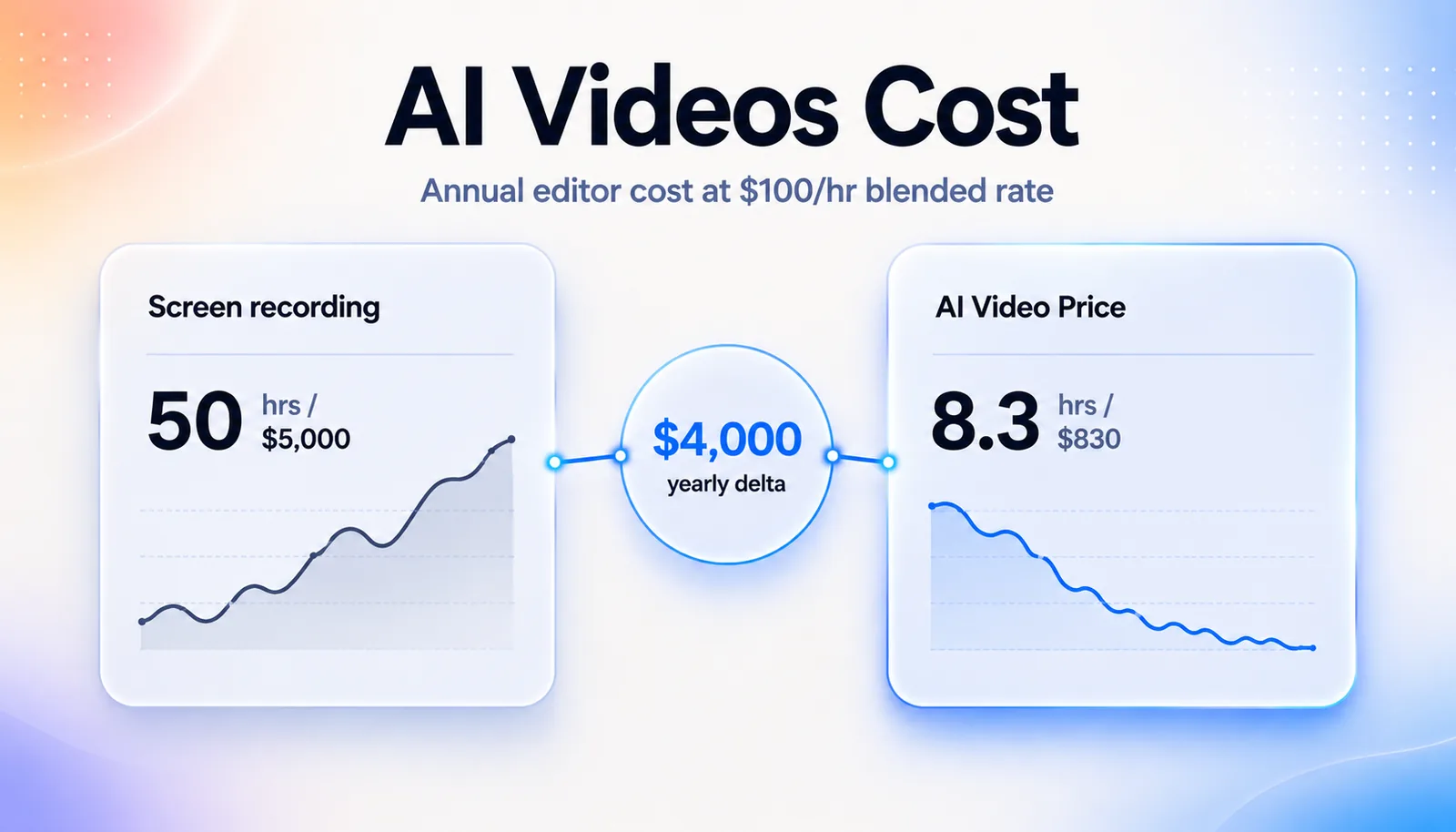
Take a Series B SaaS company with 50 published demos and 4 meaningful UI updates per year. Assume each UI update affects about 25% of demos (a conservative estimate). That is 50 demo-update events per year. Multiply by per-asset fix time from the table above:
- Screen recording stack: 50 events x 60 minutes = 3,000 minutes = 50 hours of editor time per year. About $5,000 at a $100/hour blended rate.
- AI video stack: 50 events x 10 minutes = 500 minutes = 8.3 hours per year. About $830 at the same rate.
- Interactive HTML stack: similar to AI video. Often less if the tool supports DOM-level swaps.
That is a ~$4,000 per year delta on maintenance alone. The tool's sticker price is almost always smaller than the maintenance-time difference at any production volume above a dozen assets. Build the maintenance math into your buying case. The "expensive" AI-video tool usually shows up as the cheaper option over a 24-month horizon.
Production cost is a one-time hit. Maintenance is the recurring tax. Pick the tool that minimizes the tax, not the one that wins the trial.
A rough rule. I will flag it as a rule-of-thumb based on the maintenance math above, not a published ROI study. If your team will maintain more than 20 published demos through three or more major UI updates per year, the AI-video and interactive-HTML categories pay for themselves within 12 months versus screen recording. Below 20 demos, or with a stable UI, screen recording is fine.
The Maintenance Question to Ask Every Vendor
One sentence to drop into every demo call: "Walk me through what happens when our settings page UI changes and 12 of our demos reference it. Show me the actual workflow." Vendors who handle this gracefully will narrate a 30-second click path. Vendors who do not will pivot to "well, our customers usually..." That pivot is the answer.
When NOT to Use AI Demo Video Tools
The honest section. Most roundups skip it because they are selling AI tools. I have talked teams out of buying this category more times than I have talked them into it.
Skip AI video generation when:
- Your demo is a complex enterprise feature flow with custom branching per persona that the buyer must self-navigate. Interactive HTML wins this job, not video.
- You are in a regulated industry (healthcare, financial services, defense) where AI voiceover and AI-generated content trigger compliance review. Record with a human, or use captioned screen recording.
- You are producing ultra-personalized one-to-one sales demos ("I made this for Sarah at Acme"). Loom or screen recording wins on authenticity and speed of personalization.
- You need CMO-level brand voice and creative direction. AI voiceover, even best-in-class, does not match a trained narrator for hero brand films.
- Your UI changes daily in early-stage development. Every demo will be stale before it ships. Wait until the UI stabilizes.
- Your distribution is investor-facing or board-facing. The signal of "we recorded this ourselves" outweighs the polish of AI generation.
If two or more of these apply, you are either in the wrong category or too early for any demo-software investment beyond Loom.
Compliance and AI-Content Review: What to Expect in 2026
For teams in healthcare, finance, insurance, and government, AI-generated content has moved from "experimental" to "review required." A practical pattern works well. Keep the screen capture human-recorded. Generate captions and translations with AI. These are lower-risk in legal review. Disclose AI assistance in the video footer. Treat avatar-led narration as the highest-risk vector. Treat AI captioning as the lowest. If your legal team has not yet written an AI-content policy, that conversation should happen before tool selection, not after.
The "Best by SaaS Stage" Pick List
The mistake I see most often is jumping to enterprise tooling too early (Walnut at Series A is overkill). Or sticking with Loom too long (Loom at Series B with 100 published demos is a maintenance disaster). Match the stack to the volume, not to the round you closed.
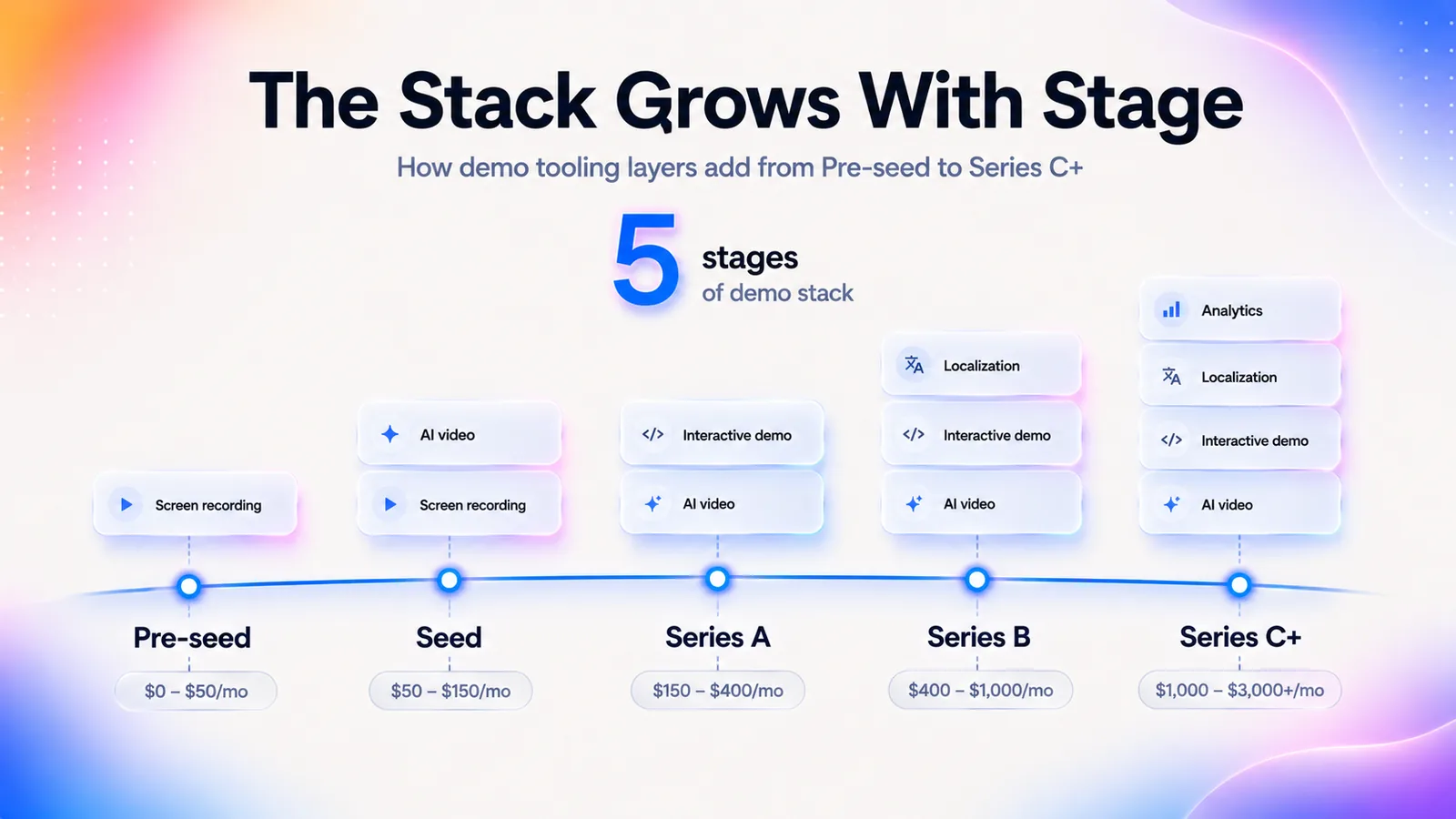
| Stage | Recommended stack | Approx. monthly cost | Why |
|---|---|---|---|
| Pre-seed / indie | Loom or Screen Studio | $0 to $25 | One demo at a time. Budget matters more than scale |
| Seed | Loom plus GuideClarity Starter | $50 to $80 | Add an AI video tool the moment you have more than 5 demos to maintain |
| Series A | GuideClarity (AI video) plus Supademo (interactive) | $150 to $300 | Two categories cover the PLG funnel and the explainer library |
| Series B | GuideClarity plus Supademo or Arcade plus Loom (rep-level) | $400 to $900 | Three categories: library, PLG, and one-to-one async |
| Series C+ / Enterprise | Synthesia or GuideClarity Enterprise plus Storylane or Walnut plus Loom | $2,500 to $8,000+ | Localization at scale, enterprise sales-led interactive, plus one-to-one |
Two stage-transition triggers to watch for:
- When a single human becomes the bottleneck for video production (around 8 to 12 demos per quarter). That is the signal to add an AI-video tool, regardless of stage.
- When a PLG funnel starts generating more than 200 free-trial signups per month with low activation. That is the signal to add an interactive-demo tool to pre-trial education.
The 4-Week Trial Gauntlet (How to Actually Pick a Tool)
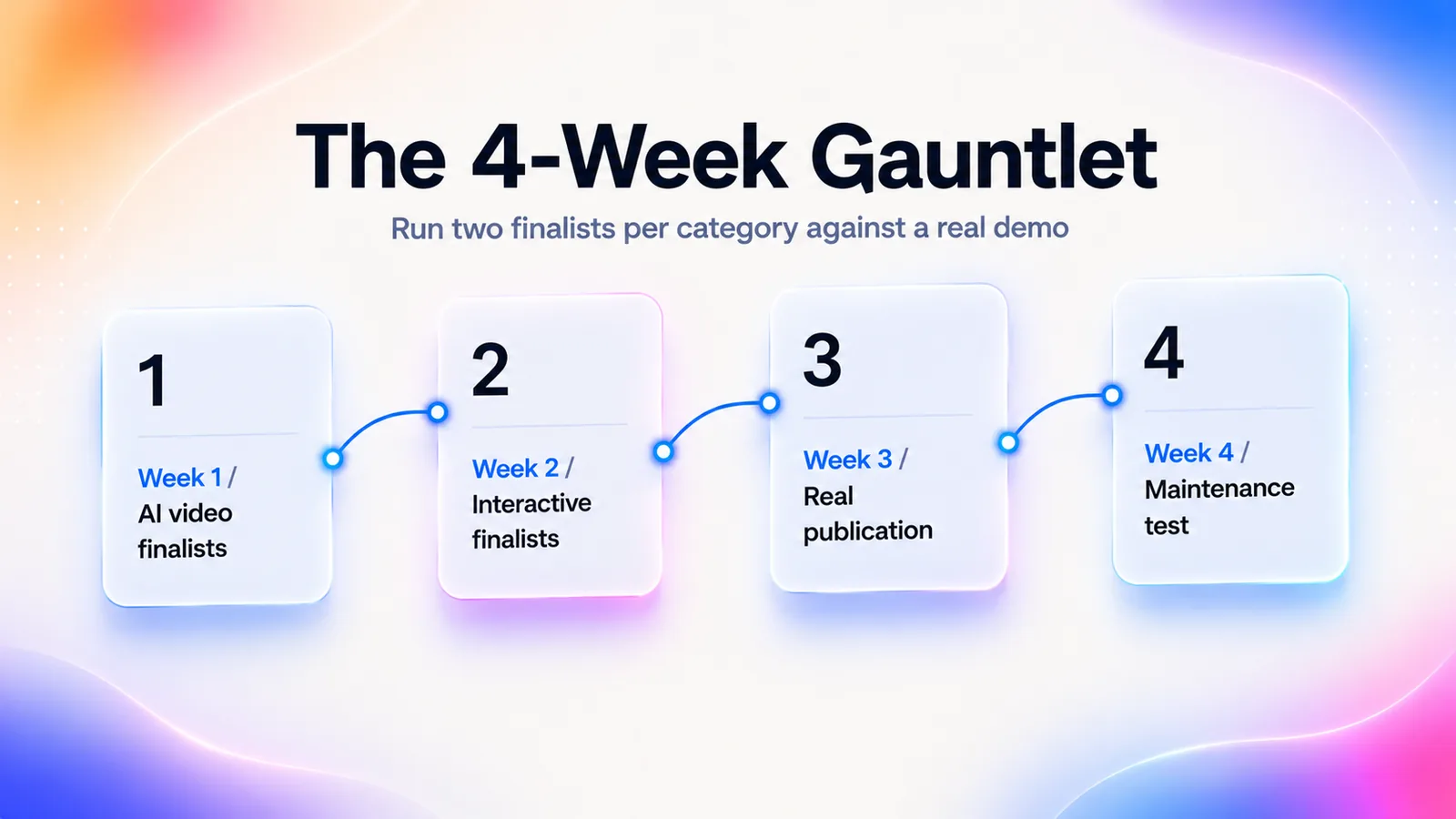
Vendor sales demos are designed to make every tool look good. The only way to surface the real differences is to run the same workload through two finalists in each category. In parallel. Against a real demo your team will publish. The 4-week gauntlet below is the compressed version of the evaluation we hand to PMM and product education teams.
| Week | Focus | What you do | What you measure |
|---|---|---|---|
| Week 1 | AI video finalists | Produce the same 90-second product demo in two AI-video tools using the same source recording. | Time-to-publish, voiceover quality, caption accuracy, output file flexibility. |
| Week 2 | Interactive finalists | Capture the same flow in two interactive tools. Embed both on a staging landing page. | Capture-to-embed time, analytics granularity, branching support. |
| Week 3 | Real publication | Ship one demo from each finalist into a live channel (sequence, landing page, or help article). | Real viewer engagement: completion rate, click-through, replay. |
| Week 4 | Maintenance test | Force a fake UI change (swap one screen). Time the fix across all four tools. | Minutes to update, who can do it (designer? PMM? rep?), output parity. |
The week-4 maintenance test is the most predictive signal in the evaluation. Two tools that look identical in weeks 1 to 3 often diverge by an order of magnitude on maintenance speed. Buyers who skip this test almost always regret the choice within 90 days.
The Integrations Checklist Before You Sign
- CRM: Salesforce, HubSpot. Required for personalized interactive demos.
- SEP: Salesloft, Outreach. Required for outbound video embedding.
- Analytics: Segment or direct webhook. Required for engagement events into your warehouse.
- SSO: Okta, Azure AD, Google Workspace. Required at Series B and above.
- Doc import: Notion, Confluence, Google Docs. Required if doc-to-video is in your workflow.
- Storage and export: S3, Drive, Vimeo, YouTube. Required if your video hosting is owned, not vendor-locked.
Any vendor missing two or more of these in 2026 is a signal of slower roadmap velocity, not a feature gap alone.
Frequently Asked Questions
What is the best SaaS demo video software?
There is no single best tool. Three categories solve three different jobs.
- AI video generation (GuideClarity, Guidde, Synthesia, HeyGen) makes narrated explainers at scale.
- Interactive HTML demos (Supademo, Arcade, Storylane, Walnut) power self-serve PLG funnels.
- Screen recording (Loom, Descript) handles one-to-one async.
Most Series A+ SaaS teams need two tools across two categories.
What should a product demo video include?
A strong SaaS product demo video has four parts in order:
- A 5-second hook that names the outcome.
- 15 seconds of problem framing for the target buyer.
- 45 to 60 seconds of product walkthrough focused on one outcome the buyer cares about.
- A 5-second call to action.
Resist the urge to feature-tour. One outcome per video, not five.
How do I make a product demo video with AI?
The 2026 workflow has three steps:
- Capture a raw screen recording or paste a help-doc URL into an AI demo tool like GuideClarity or Guidde.
- Let the tool generate the AI voiceover, auto-zoomed cuts, and captions.
- Publish to a hosted URL or export.
Total time is under 10 minutes for a 90-second demo. Skip AI when the demo is one-to-one personalized or your industry needs content-compliance review.
How do you make a good product demo video?
Three rules separate a good SaaS demo from a bad one:
- Lead with the outcome the buyer wants, not a feature tour.
- Script before you record so the narration stays tight.
- Instrument analytics on every published demo so you know which sections viewers skip.
The best demo videos answer one question well, not five questions partially. For the full production process, see our step-by-step guide on how to make a SaaS product demo video.
What's the difference between video demo and interactive demo software?
Video demo software produces a linear file buyers watch passively. It fits explainers, help-center content, and sales sequences. Interactive demo software produces a clickable HTML replica buyers self-navigate. It fits PLG funnels and pre-trial education. Video wins on production speed and explanation depth. Interactive wins on viewer engagement and per-step analytics.
What are the essential features to look for in an AI product demo video maker for SaaS?
Five features decide renewal:
- Editability: can you fix one step without re-recording the whole video.
- Production speed: under 10 minutes from capture to publish.
- Scalability to your 12-month volume.
- Localization with AI voiceover in 30 or more languages.
- Input flexibility across recordings, docs, scripts, and CRM data.
Branded templates and generic AI features do not differentiate.
What's the cheapest SaaS demo tool?
Loom's free tier with 5-minute clips is the cheapest entry. Paid options start at these tiers:
- Loom Business: $12.50 per seat per month.
- Guidde Pro: $19 per creator per month billed annually.
- Descript Hobbyist: $19 per month.
- HeyGen Creator: $29 per month billed monthly.
Do not optimize on starting price. The real cost is maintenance over 12 months. That usually favors AI video or interactive HTML over screen recording.
How long should product demo videos be?
Match length to channel:
- PLG funnel embeds: 60 to 90 seconds.
- Sales sequence touchpoints: under 2 minutes.
- Help-center explainers: 2 to 4 minutes.
- Onboarding: chunk into 60 to 90 second steps rather than one long video.
Vidyard's 2024 benchmark across 2.1M videos shows completion rates drop sharply after the 2-minute mark.
Do I need both AI video and interactive demo tools?
Most Series A+ SaaS teams do. The two categories solve different jobs and do not substitute for each other. AI video covers narrated explainers, help center, and localization. Interactive HTML covers PLG funnel touchpoints and self-serve product tours. Stacking both runs $150 to $400 per month combined at SMB scale. That is cheaper than either category trying to solve the other's job.
What's the ROI of AI demo software vs traditional screen recording?
The variable is maintenance. If you produce 5 demos a year, ROI is roughly flat. If you maintain 20 or more demos through 3 or more UI updates a year, AI video or interactive HTML pays back within 12 months versus full re-recording. Walnut reports customers see up to 34 percent faster sales cycles with demo automation. That is vendor-published data, not independently benchmarked.
Can interactive demos replace live sales calls?
Partially. Interactive demos replace the first live demo call for self-serve buyers. They reduce the number of qualified-but-still-researching prospects who otherwise book. They do not replace late-funnel calls with high-ACV buyers who want custom branching and a real human. Gartner research shows 72 percent of B2B buyers prefer self-serve experiences. That is the segment interactive demos serve well.
How should I run a 4-week trial across multiple demo tools?
Pick two tools per category and budget one week each:
- Week 1: capture the same source demo in both AI-video tools.
- Week 2: do the same for two interactive tools.
- Week 3: ship one demo from each finalist into a live channel (landing page, sequence, or help center).
- Week 4: review analytics, internal feedback, and the time-to-update test.
The time-to-update test is the most predictive trial activity.
What integrations should a SaaS demo tool have?
Table-stakes integrations in 2026:
- Salesforce or HubSpot for CRM-driven personalization.
- Salesloft or Outreach for sequence embedding.
- Segment or a reverse-ETL pipe for engagement events back to your warehouse.
- Notion, Confluence, or Google Docs for doc-to-video import.
- SSO via Okta or Azure AD is required at Series B and above.
If a tool lacks CRM and SEP integration in 2026, treat that as a leading indicator the vendor is behind on roadmap.