
SaaS onboarding video is a short scoped clip, typically 30 to 90 seconds, embedded inside a product or onboarding email that moves a new user through one specific activation step. The 2026 winning pattern is a library of micro videos, one per funnel step, scored on completion rate and activation lift, and regenerated when the underlying UI ships.
This guide is for PMs, CS leads, and customer-education owners building SaaS user onboarding video. If you came looking for new-hire orientation content, you want a different guide on employee onboarding video.
What a SaaS onboarding video actually is in 2026
The 2022 pattern: one five-minute welcome reel that played on first login. That approach is being deprecated fast.
The 2026 pattern: a library of short onboarding videos, one per activation moment. Each clip fires on a specific user action and is scored on activation lift, not view count.
What flipped the math is AI tooling. Platforms like Videate, Synthesia, Clueso, and NarrateAI now generate role-conditioned video segments from a single script — which makes a per-funnel-step library economically defensible for the first time. For the full tool breakdown, see our companion guide on AI explainer videos for SaaS.
The terminology in this space is still loose, so it is worth being explicit. Here is how the adjacent video categories actually differ in placement, length, and the metric they move.
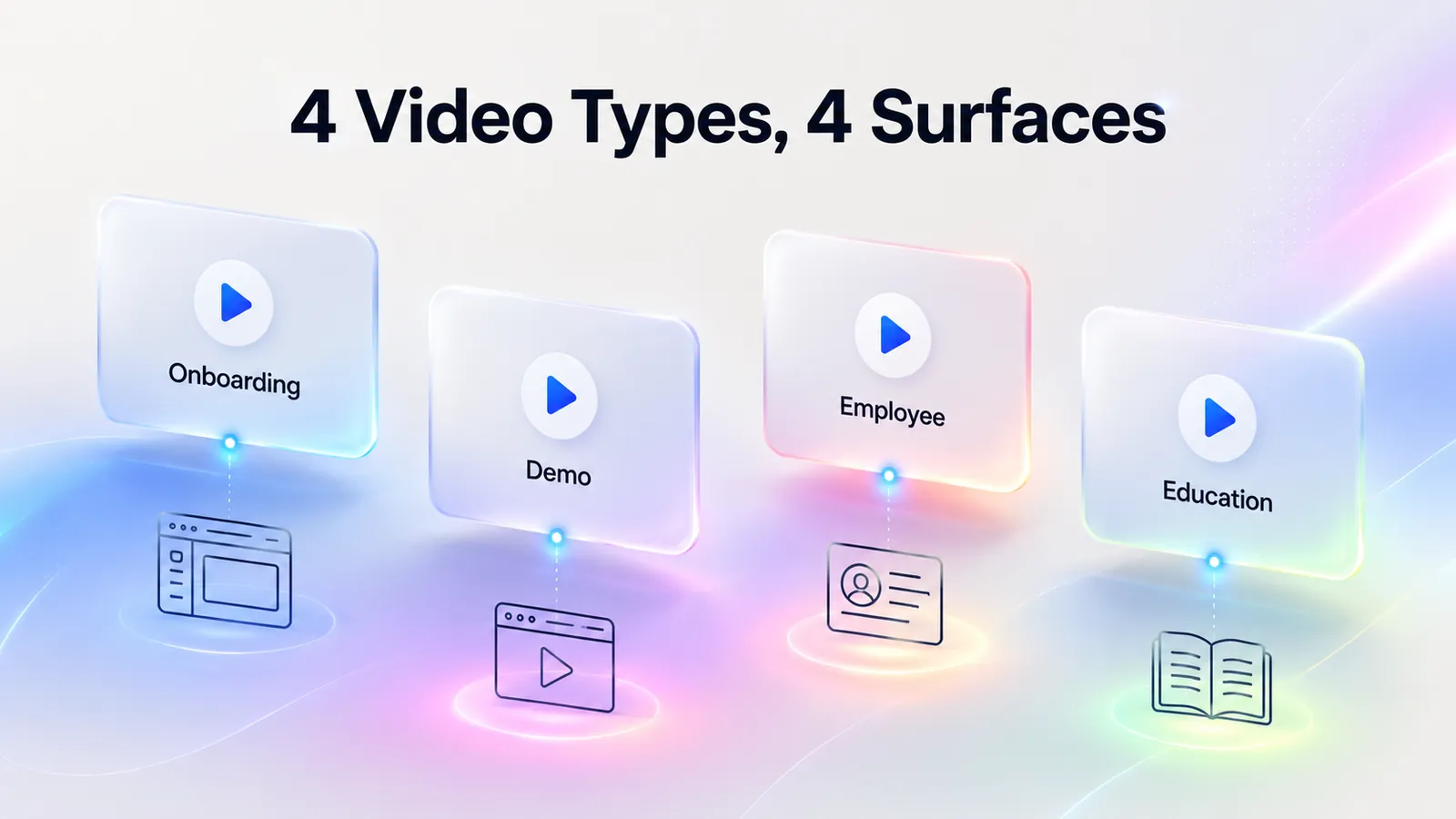
| Video type | Lives where | Audience | Typical length | Metric it moves |
|---|---|---|---|---|
| SaaS onboarding video | Inside the product or onboarding email | Signed-up users | 30 to 90 seconds | Activation rate |
| Product demo video | Marketing site, sales decks | Prospects | 90 seconds to 3 minutes | Sign-up rate |
| Employee onboarding video | HR portal, LMS | New hires | 2 to 5 minutes | Time-to-productivity |
| Customer education course | Help center, academy | Active users learning advanced features | 3 to 10 minutes | Multi-feature adoption |
If a single video is trying to serve more than one of these rows, it is doing none of them well. The rest of this playbook assumes you are building the first row.
Why video onboarding beats text for SaaS users
Three reasons video onboarding beats text for SaaS users — and none of them is the recycled "8-second attention span" stat you will find on most SERP pages.
1. Users prefer video when learning a new product. Wyzowl's State of Video Marketing 2024 found that 73% of people prefer a short video over text to learn about a product, and 74% have already watched one to figure out how to use a website or app. TechSmith's Video Viewer Study pushes the number even higher: 83% prefer video over text or audio when learning something new (TechSmith). Ship a text-only walkthrough and you are fighting your users' stated preference.
2. Video compresses time-to-value. Activation is a clock problem — the longer a user takes to reach first value, the lower the odds they come back. A 60-second video showing the exact click path replaces a 400-word help doc the user has to read, parse, and translate into UI actions. The translation step is where they drop.
Both Gainsight and Appcues back this up. Gainsight's customer success guidance treats first-value time as the leading driver of long-term retention and CLTV. Appcues' 2024 PLG benchmarks show activated users retain at two to three times the rate of non-activated users in the same cohort (Appcues, 2024).
3. Video lifts cross-feature retention. First-feature activation is necessary but not sufficient. Users who touch only one feature churn faster than users who reach two or three. Short feature deep-dive videos (covered in the five-moments framework below) are how mature SaaS teams pull users from single-feature usage into multi-feature usage — the threshold where retention curves flatten.
One honest caveat: There is no clean public benchmark for SaaS onboarding video completion rate. Vidyard publishes general video-engagement numbers, but the SaaS onboarding cohort is not broken out. Treat any vendor claim of "X% completion rate for onboarding video" with skepticism unless they expose methodology. Your own funnel is the only number that matters — the KPI framework later in this guide shows you what to measure.
When video is the wrong choice. Three cases where text or an interactive walkthrough beats video:
- Compliance-heavy flows (KYC, security setup) where the user must read and confirm exact language.
- Highly variable workflows where every account looks different and a single recorded path would mislead.
- Power-user shortcuts and keyboard cheatsheets, which users want to scan and bookmark, not sit through.
The rule is not "always use video." It is: use video for the activation moments where translating text into clicks is the dominant drop-off cause.
The five moments in a SaaS user journey that need an onboarding video
Stop thinking about one onboarding video. Start thinking about five SaaS onboarding videos, each scoped to one specific moment in the activation funnel.
This is the framework most guides skip — and the one every downstream decision in this playbook hangs from.
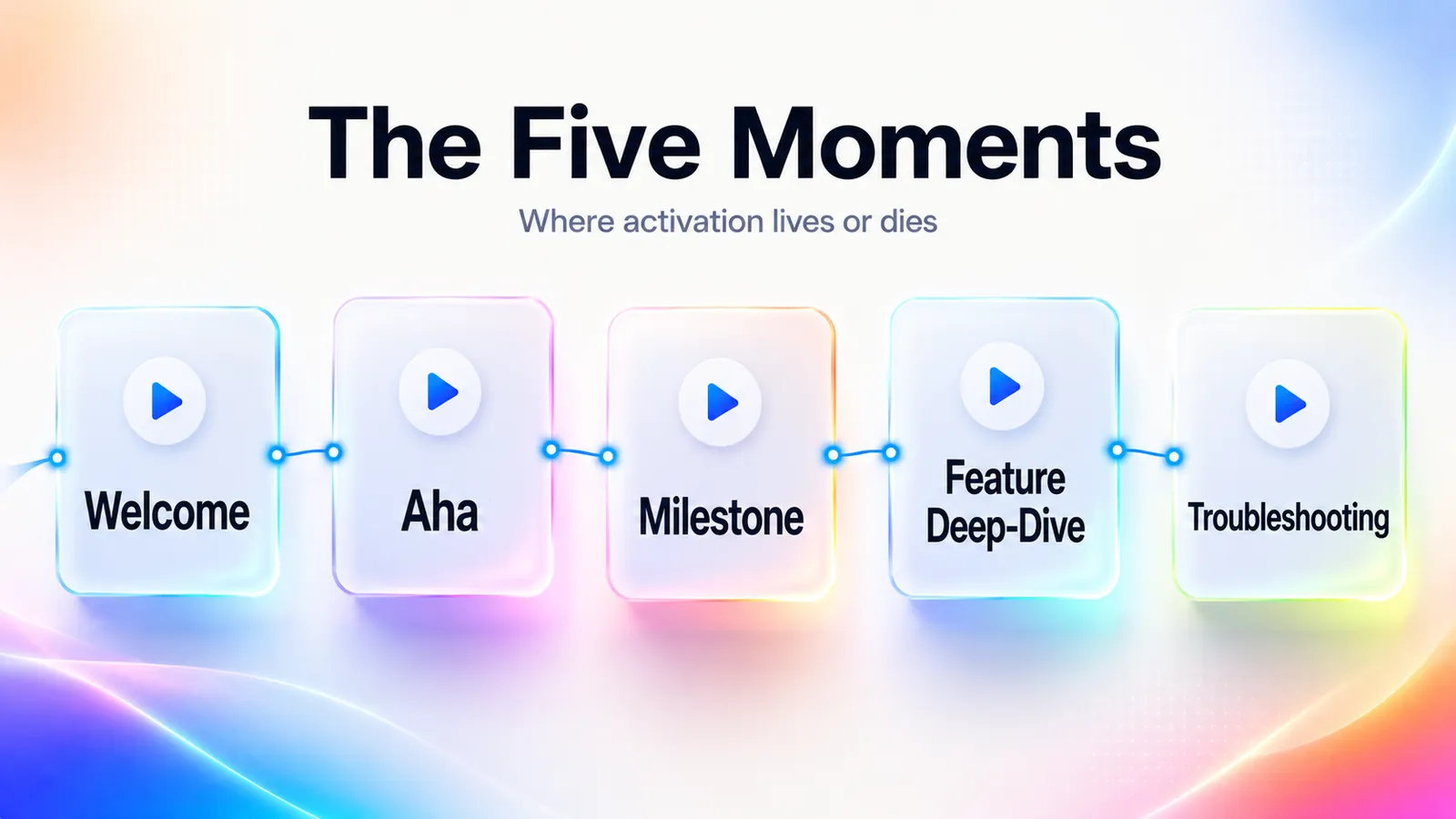
| Moment | When it fires | Video length | Primary KPI |
|---|---|---|---|
| 1. Welcome | Pre-login email and first login | 30 to 60 seconds | Sign-up to first-login conversion |
| 2. Aha | First-value action (first project, first invite, first integration) | 45 to 90 seconds | Activation rate (percent who reach first value) |
| 3. Milestone | Workflow completion (first dashboard saved, first report shared) | 60 to 90 seconds | Day-7 retention |
| 4. Feature deep-dive | Triggered by feature discovery, not on signup | 60 to 120 seconds | Multi-feature adoption rate |
| 5. Troubleshooting | In-app help, error states, common dead-ends | 30 to 60 seconds | Ticket deflection rate |
One caveat before the breakdowns: some products with thin activation funnels will collapse moments two and three into a single video. That is fine. The framework is a checklist of moments to consider, not a quota of videos to ship.
1. Welcome moment (pre-login and first login)
The welcome video answers one question: "What does this product do for me, the person who just signed up?" It does not tour the UI. It does not introduce the team. It shows the outcome the user signed up for, framed as a 30 to 60 second story. Linear's post-signup flow is the canonical example, a short, dense clip that demonstrates the issue-tracking outcome rather than the feature catalog. Place it in two surfaces: the welcome email (for users who close the tab) and the first screen of first-login (for users who come back).
Worked example. Imagine a project-management tool with a 38% sign-up to first-login conversion. The welcome video should not tour boards, calendars, and timelines. It should show one team going from a chaotic backlog at 0:05 to a clean weekly plan at 0:50, with a single line of voiceover. The metric to watch the week after launch is sign-up to first-login. If that climbs from 38% to 50%, the welcome video is doing its job. If it does not move, the bottleneck was never the welcome video, it was the email subject line or the verification step. Diagnose first.
Where most teams get this wrong: they record a founder waving at the camera and explaining the company mission. That is a brand video. It belongs on the About page, not in the activation funnel.
2. Aha moment (first-value achievement)
The aha video fires at the first-value action, when the user is one click from the dopamine hit but hesitating. Notion does this well. When a new user is about to create their first page, a short in-context video shows what is possible with blocks. The trigger is behavioral, not time-based. Critically, the aha video must not play if the user has already completed the action. Context-aware triggering is the difference between "helpful" and "patronizing."
The exception. If your product has no clear single first-value moment (a broad horizontal platform like an iPaaS or a multi-product suite), the aha video pattern breaks. In those cases, run role-conditioned aha videos instead, one per primary use case at signup. ClickUp's approach in the next section is the canonical implementation.
3. Milestone videos (workflow completion)
Milestones are the second and third value events, not the first. A user who saves a first dashboard, invites a first teammate, or ships a first project has crossed a retention threshold. The milestone video congratulates and points forward: "Now that you have shipped your first project, here is how teams use the next workflow." Stripe uses this pattern in its developer onboarding. Once you have sent your first test charge, the next video shows webhook configuration.
4. Feature deep-dives (advanced use)
Feature deep-dives are the longest videos (up to two minutes) and the only ones that should live primarily in the help center rather than in-app. Trigger them on feature discovery. A user hovers over a feature they have not used, and a "Show me how" link surfaces the video. Figma's approach is instructive: every advanced feature (Auto Layout, Variables, Dev Mode) has a dedicated short video, accessible from a single search-driven help surface.
5. Troubleshooting and support (in-app help)
The least sexy and the highest-leverage. Troubleshooting videos sit at the dead-ends: error states, empty states, common confusion points. They are 30 to 60 seconds, scoped to one error or one question, and they deflect tickets. TechSmith's data on video for support is directional but real: video tutorials measurably reduce support volume and increase adoption. The trick is scoping. A troubleshooting video that covers three problems deflects no tickets because nobody can find it.
The fastest way to build the troubleshooting library: pull your top 20 support tickets by volume from Zendesk or Intercom, group them by topic, and produce a 45-second video for each topic that gets more than 50 tickets a quarter. That is your priority queue. Anything below the threshold is not worth the production cost.
Seven SaaS onboarding video examples, grouped by pattern
For each SaaS onboarding video example below, four things matter: format, length, placement, and the one detail that makes it work.
Spot-check each product's flow before you copy it — SaaS onboarding surfaces refresh quarterly.
| Product | Pattern | Length | Placement | What makes it work |
|---|---|---|---|---|
| Notion | Outcome-first welcome | ~45s | In-app, pre-first-page | Previews the exact UI the user is about to touch |
| Linear | Outcome-first welcome | ~60s | Email and first-login | No voiceover, motion sells the speed of the product |
| Miro | Outcome-first welcome | ~60s | First-login | Shows a team, not a single user, because collaboration is the value |
| Stripe | Milestone chain | 4 x ~60s | In-app, behind each milestone | One task per video, terminal + browser side by side |
| Loom | Pre-action meta clip | ~30s | Before first recording | Removes on-camera anxiety by demonstrating the form |
| Figma | Search-driven library | 90 to 120s each | Help center + "Show me how" in-app links | One feature per video, searchable, no scope creep |
| ClickUp | Role-branched | ~60s per role | Post-signup role selector | Narrows surface area to the 20% of features that matter per role |
Outcome-first welcomes: Notion, Linear, and Miro. Notion's first-page video runs about 45 seconds, is triggered in-app when a new user is about to create their first page, and uses screen recording with subtle motion graphics overlaying block types. It works because the video previews the exact UI the user is about to touch, so the cognitive transfer cost is near zero. Linear's post-signup outcome reel runs about 60 seconds, lives in the welcome email and the first-login screen, and is dense and cinematic with no voiceover, only UI motion plus on-screen text. Linear sells speed, and the video is itself fast. Form matches function. Miro takes the same outcome-first move and applies it to a harder problem: collaborative whiteboarding is hard to grok from screenshots, so its 60-second first-login video shows a team using the product rather than a single user clicking buttons.
Milestone-chained sequences: Stripe and Loom. Stripe runs multiple 60-second clips chained behind milestones: first test charge, then webhook setup, then going live, then first production charge. Each clip uses a terminal and browser side by side with voiceover. It works because developers do not watch one video. They watch one video, complete one task, then trigger the next. Stripe is the canonical milestone-chain implementation in B2B SaaS. Loom uses a tighter version of the same idea: a 30-second meta clip (a Loom showing how to record a Loom) fires before a user's first recording. It works because it removes on-camera anxiety by demonstrating that the host is just talking over a screen, not performing.
Search-driven libraries and role branching: Figma and ClickUp. Figma's feature deep-dive library runs 90 to 120 seconds per video, lives in the help center and behind in-app "Show me how" links, and uses screen recording with hover annotations. It works because each video is searchable and scoped: one feature per video, no scope creep, so users actually find them. ClickUp goes further with role branching: at signup, users select a role (PM, engineer, marketer), and the onboarding flow branches into role-conditioned UI walkthroughs that surface a different feature subset for each. PMs see goals and dashboards. Engineers see Sprint, Git integrations, and bug forms. Marketers see calendars, forms, and proofing. ClickUp's surface area is enormous, and role-conditioning narrows the funnel to the 20% of features that matter to this user.
The pattern across all seven: short, scoped to one task or outcome, triggered contextually, and produced in a format that matches what the product itself feels like. None of them are five-minute welcome reels.
The 5-step playbook for producing onboarding videos at scale
This is the operator playbook for producing SaaS onboarding videos at scale — how to go from a blank funnel map to a shipped, in-app video library.
If you are a PM, CS lead, or customer-education owner building this from zero, follow these five steps in order: map the activation funnel, pick one video per funnel step, write a 60 to 90 second script, choose a production path, and place each video where users actually are.
Map the activation funnel first
Before producing a single video, write down your activation funnel. Concretely: sign-up, first-login, first-value action, second-value action, invite-teammate, habit-loop event. For each step, write the drop-off rate. The funnel map is the artifact that drives every downstream decision. If you do not know which step bleeds users, you cannot know which video to make first.
Most SaaS teams already have this in a product analytics tool (Amplitude, Mixpanel, Heap, PostHog). If you do not, do not start with video. Start with instrumentation. A video without a funnel is decoration.
A worked funnel for a B2B analytics tool, with the kind of numbers you might actually see:
- Sign-up to first-login: 62% (drop-off 38%)
- First-login to first-data-connection: 41%
- First-data-connection to first-dashboard: 73%
- First-dashboard to first-share: 28%
- First-share to day-7 active: 56%
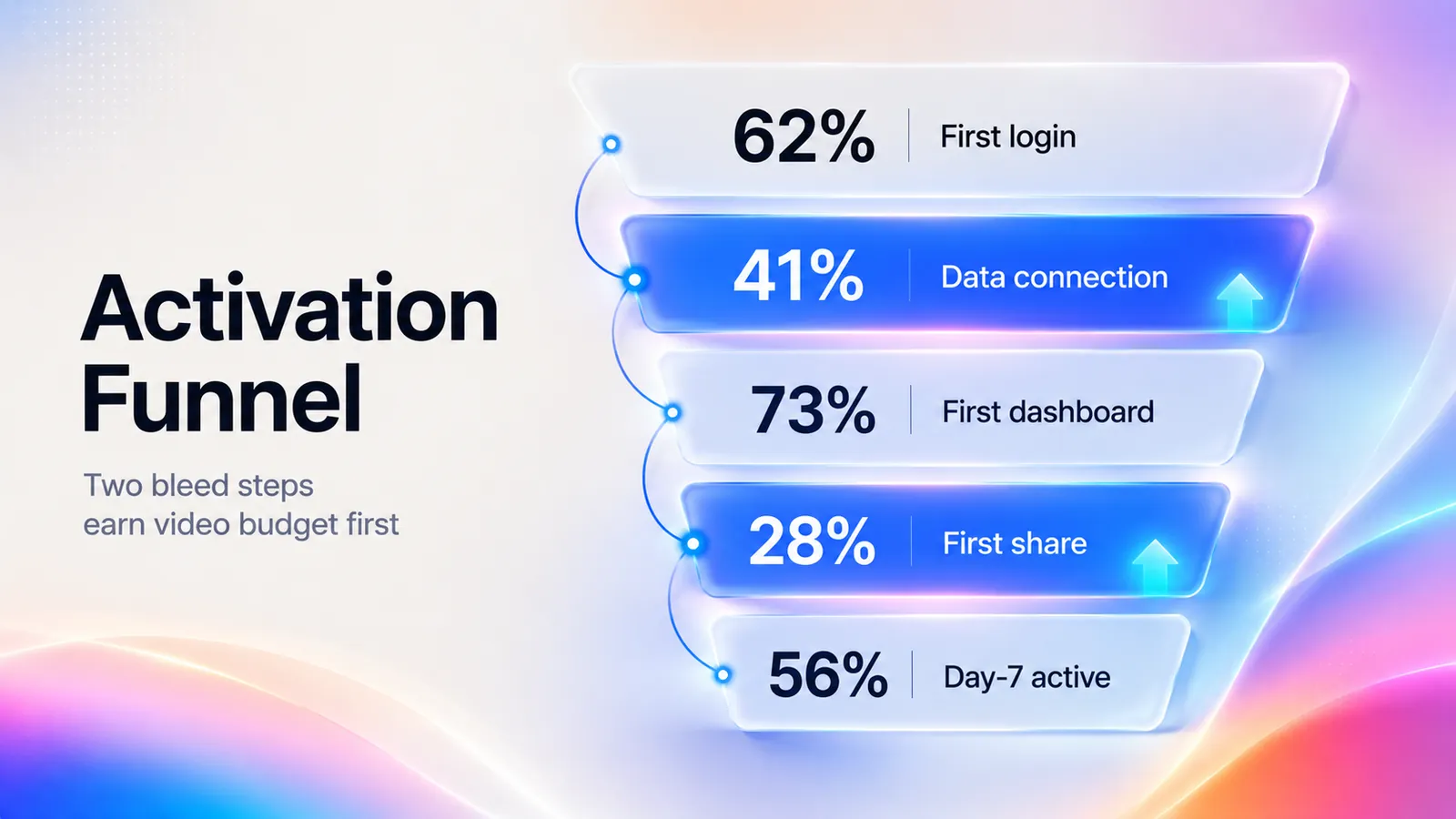
The biggest bleed is step 2 (data connection) and step 4 (sharing). Those are the two video slots that earn production budget first. The other steps are not video problems, they are activation problems with different root causes (email deliverability for step 1, dashboard breadth for step 3). This is the diagnostic the funnel map gives you, and it is the reason this step is non-negotiable.
Pick one video per funnel step
The single most common mistake in SaaS onboarding video is scope creep at the script stage. A PM decides one video should "introduce the product and show how to create a project and explain billing and tour the settings." That video is six minutes long, has a 20% completion rate, and moves no metric.
One video per funnel step. If you have five activation steps, you have five videos. Each does one job. If a video is doing two jobs, split it into two. Resist the urge to bundle.
The test I use to catch scope creep at the script stage: write the one-sentence promise of the video at the top of the doc. If you cannot say it in fifteen words, the scope is wrong. "By the end of this video, you will have sent your first test charge in Stripe." That passes. "Learn how Stripe works and set up your account and understand pricing" fails.
Write the 60 to 90 second script
The right default for a SaaS onboarding video script is 60 to 90 seconds — the same range Vidyard's production guidance recommends for explainer and onboarding video.
Why that window. Under 60 seconds, you cannot establish context before asking the user to act. Over 90 seconds, completion rates fall off a cliff.
A working 60 to 90 second onboarding script has four beats:
- The promise (5 to 10 seconds). State the outcome the user will have at the end.
- The action (30 to 60 seconds). Show the exact click path. No tangents.
- The proof (10 to 15 seconds). Show the user the visible result so they recognize success when they see it in their own account.
- The next step (5 to 10 seconds). Tell them what to do immediately after the video ends.
A worked 70-second script for the "first dashboard" milestone of a hypothetical analytics tool:
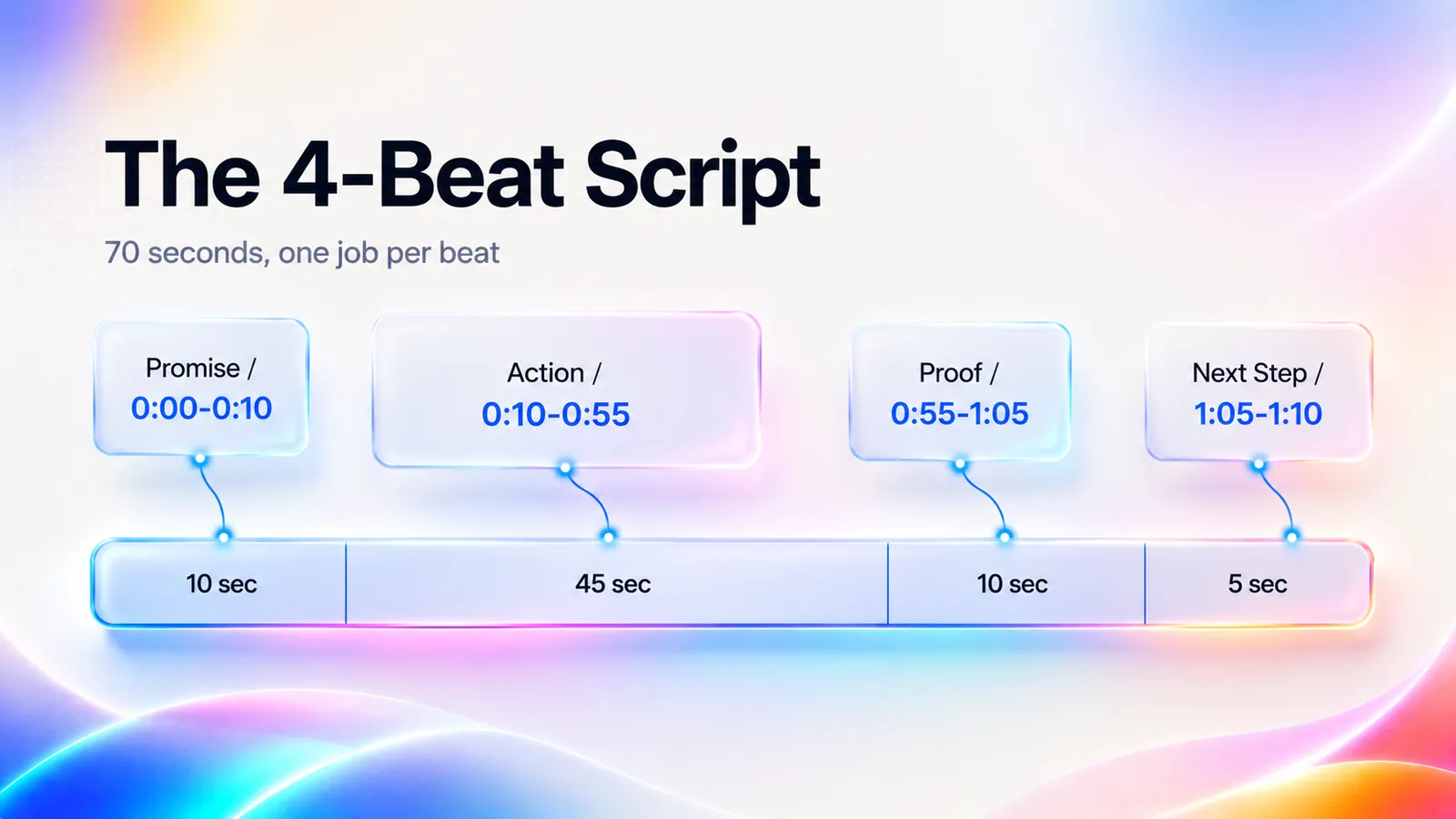
- 0:00 to 0:08 (promise). "In the next minute, you will build your first dashboard and share it with your team."
- 0:08 to 0:55 (action). Cursor clicks New Dashboard. Drags two charts in. Names it. No tangents into theming, no mention of advanced filters.
- 0:55 to 1:05 (proof). "Here is what your team will see when you share." Cut to the recipient's view.
- 1:05 to 1:10 (next step). "Click Share in the top right to invite your first teammate."
Note what is absent. No company intro. No mission statement. No tour of the left-hand nav. The script work overlaps heavily with marketing demos — for the underlying frameworks (hook patterns, narration style, the avatar-versus-voiceover decision), see our step-by-step guide on making a SaaS product demo video.
Record, generate, or both: pick a production path
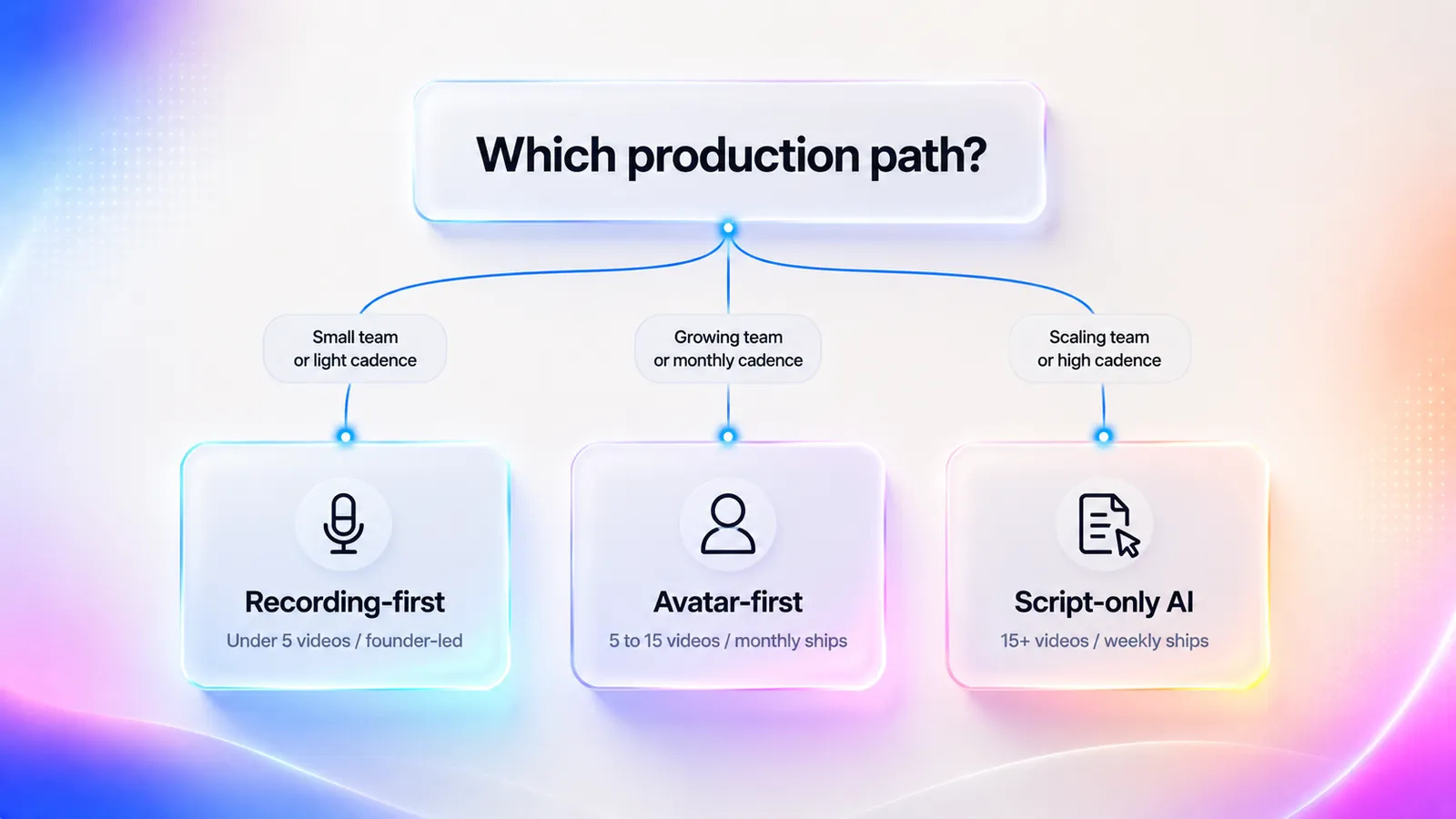
There are now three production paths in 2026, not two. Pick by team size and update cadence.
| Path | Best for | Tooling | Per-video production cost | Update cost | When to avoid |
|---|---|---|---|---|---|
| Recording-first | High-touch CS teams, one-time founder-led recordings | Loom, Descript, Riverside | 4 to 8 hours | High. Re-record on UI change. | Weekly product ships, libraries above 10 videos |
| Avatar-first | Mid-stage teams with frequent product changes | Synthesia, HeyGen, Colossyan | 1 to 2 hours | Low. Regenerate from script. | Founder-led welcome video where presence carries signal |
| Script-only (fully AI-generated) | Teams with weekly product ships and 20+ videos | Videate, Clueso, NarrateAI | 15 to 60 minutes | Very low. Auto-sync to product. | Early-stage products where UI changes too fast for the dependency map to track |
The big 2026 shift is the third row: script-only AI video generation. Videate's published case with Reputation reports a 93% drop in production time (12 to 15 hours down to 1 hour per video) and a 98% faster update cycle (4 hours down to 5 minutes) after moving from manual recording to script-driven AI.
The caveat. Those numbers are vendor-reported and order-of-magnitude only — but they match what I see across SaaS teams producing onboarding video at scale.
The quick rule, based on what I see across SaaS teams:
- Recording-first — use it at founder-led stages or for the welcome video specifically, where founder presence carries signal value.
- Avatar-first — switch to it once you have more than 5 onboarding videos and any meaningful product update cadence.
- Script-only AI — the right call at roughly 15 videos and weekly product ships, where the maintenance math on manual re-recording stops working.
For a full vendor-by-vendor comparison across all three production paths, see our SaaS demo software buyer's guide.
A back-of-envelope to make the math concrete. A team with 15 onboarding videos and a monthly ship cadence that touches 30% of the library, on recording-first, faces roughly 4.5 video updates a month at 4 hours each, or 18 hours a month of pure maintenance. On script-only with a Videate-style update cycle, the same maintenance is closer to 23 minutes a month. The breakeven against the tool's annual cost typically lands inside the first quarter for any library above ten videos.
Practitioner signal confirms the demand for non-recording options. A representative thread on r/CustomerSuccess asks: "what do ya'll use, to make onboarding videos for customers? i really don't want to record myself talking, what options do i have?" It is the most common question CS leads ask, and the answer in 2026 is increasingly avatar-first or script-only.
Place each video where users actually are
Each video needs a placement plan, not just a destination. Three primary surfaces, each with a different job:
- In-app (highest leverage). Embedded in the UI where the action happens. Triggered behaviorally (user hovers, clicks, or reaches an empty state). Highest completion rate, highest activation lift. Welcome, aha, milestone, and troubleshooting videos all belong here as primary.
- Help center (highest searchability). Every video also lives in the help center, indexed by feature. For deep dives and the canonical troubleshooting library, this is the primary placement.
- Onboarding email (highest reach). Welcome and milestone videos go into the email sequence for users who close the tab. Email video usually links out rather than auto-playing.
The mistake teams make is treating one placement as the answer. Each video has a primary placement plus one or two secondary surfaces, scoped to where the user actually is when the moment fires.
Tactical detail most teams miss: in-app video should default to muted with captions on. Most users open the product in a browser tab next to a meeting or a Slack window. Auto-playing audio is the fastest way to make a user close the modal and never reopen it. Captions are non-negotiable. They also satisfy WCAG 2.1 accessibility requirements, which matters for any product selling into enterprise or public-sector accounts.
The metrics nobody else covers: how to measure if onboarding videos work
This is the largest gap in the SERP. Every competitor page lists "videos are great" stats. Almost none give you the KPI framework to score your videos. Here it is.
The mistake I see most often is celebrating a completion-rate number without a holdout. The watched-versus-did-not-watch comparison is what separates a video that actually moves activation from a video that is simply watched by users who would have activated anyway. Track view counts if you want, but do not let them stand in for impact.
Four KPIs to instrument per video:
- Completion rate. Percentage of viewers who watch to the end. Target 60% or higher for a 60 to 90 second video. Below 40% means the video is too long, too poorly scoped, or wrongly placed. Wistia's annual State of Video reporting consistently shows that short-form video (under one minute) lands in the 60 to 80% completion range, which is the sanity-check benchmark to use for SaaS onboarding.
- Drop-off points. Where in the timeline viewers leave. Modern video platforms expose per-second drop-off heatmaps. Use them. A cliff at 0:15 means the hook is broken. A cliff at 0:45 means the middle drags.
- Activation lift (cohort comparison). The single number that matters. Take two cohorts (users who watched the video and users who did not) and compare their activation rate. A video that does not move activation by at least 5 percentage points is not earning its place.
- Ticket deflection. Compare support ticket volume for the topic the video covers before and after launch. TechSmith treats this as the dominant ROI driver for support-adjacent video, and on troubleshooting clips specifically, ticket deflection is the KPI that justifies the production cost.
The score-card view, mapped to the five moments, looks like this:
| Moment | Completion target | Activation-lift target | Secondary KPI |
|---|---|---|---|
| Welcome | 65%+ | +5 to +10 pp sign-up to first-login | Email click-through rate |
| Aha | 60%+ | +8 to +15 pp activation rate | Time-to-first-value (minutes) |
| Milestone | 55%+ | +5 pp day-7 retention | Invite acceptance rate |
| Feature deep-dive | 40%+ | +5 pp feature adoption | Help-center search-to-watch rate |
| Troubleshooting | 50%+ | n/a (use deflection) | Tickets per 1,000 sessions on tagged topic |
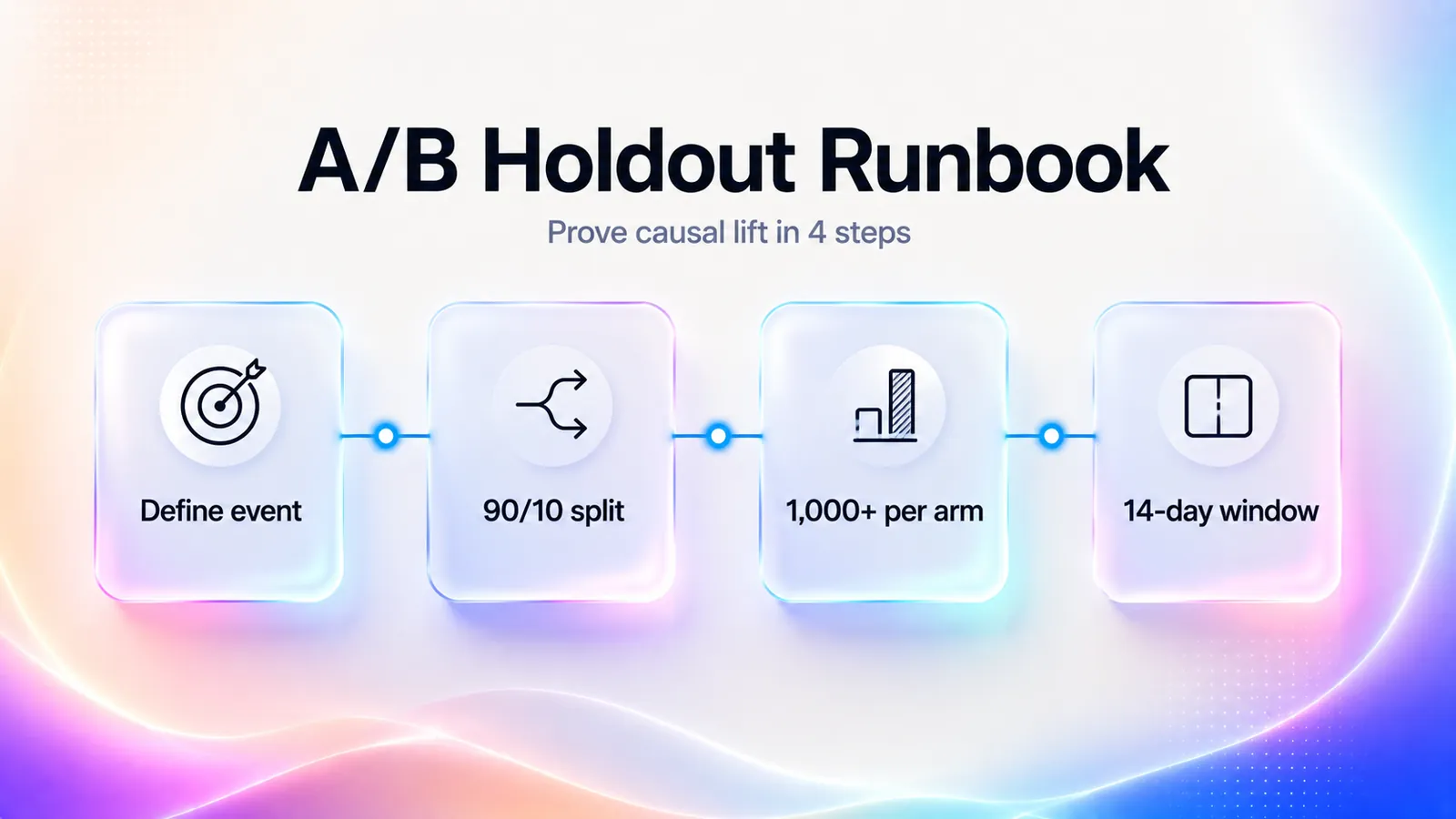
Cohort comparison is the methodology that matters. Watching video and activating are correlated. Users who watch onboarding video are also users who engage more in general. The only way to prove causal lift is to compare cohorts, ideally with an A/B holdout where a random subset does not see the video, and measure activation rate rather than view count.
Concretely, the setup in a tool like Amplitude or PostHog has four steps. Define a single activation event (for example, dashboard_shared). Randomize new users into two groups at sign-up using a feature flag (90% see the video, 10% holdout). Run the test until each arm has at least 1,000 users, which is the minimum to detect a 5 percentage-point lift at 80% power. Compare activation rate between the two cohorts inside a 14-day window. Do not stop the test early because the lift looks good in week one. Sample bias on the early arrivals is the most common way teams talk themselves into a result that does not replicate.
The honest limitation: if your product has fewer than 200 new signups a week, a clean A/B holdout will take too long to be useful. In that case, use a pre-post comparison instead, holding everything else constant, and treat the result as directional rather than causal. Imperfect measurement beats no measurement.
Maintaining onboarding videos as the product changes
Onboarding videos rot. Faster than docs, faster than screenshots, faster than anything except in-product strings. This is the section most teams skip until they have 30 stale videos teaching the wrong UI, at which point the maintenance debt is bigger than the original production work.
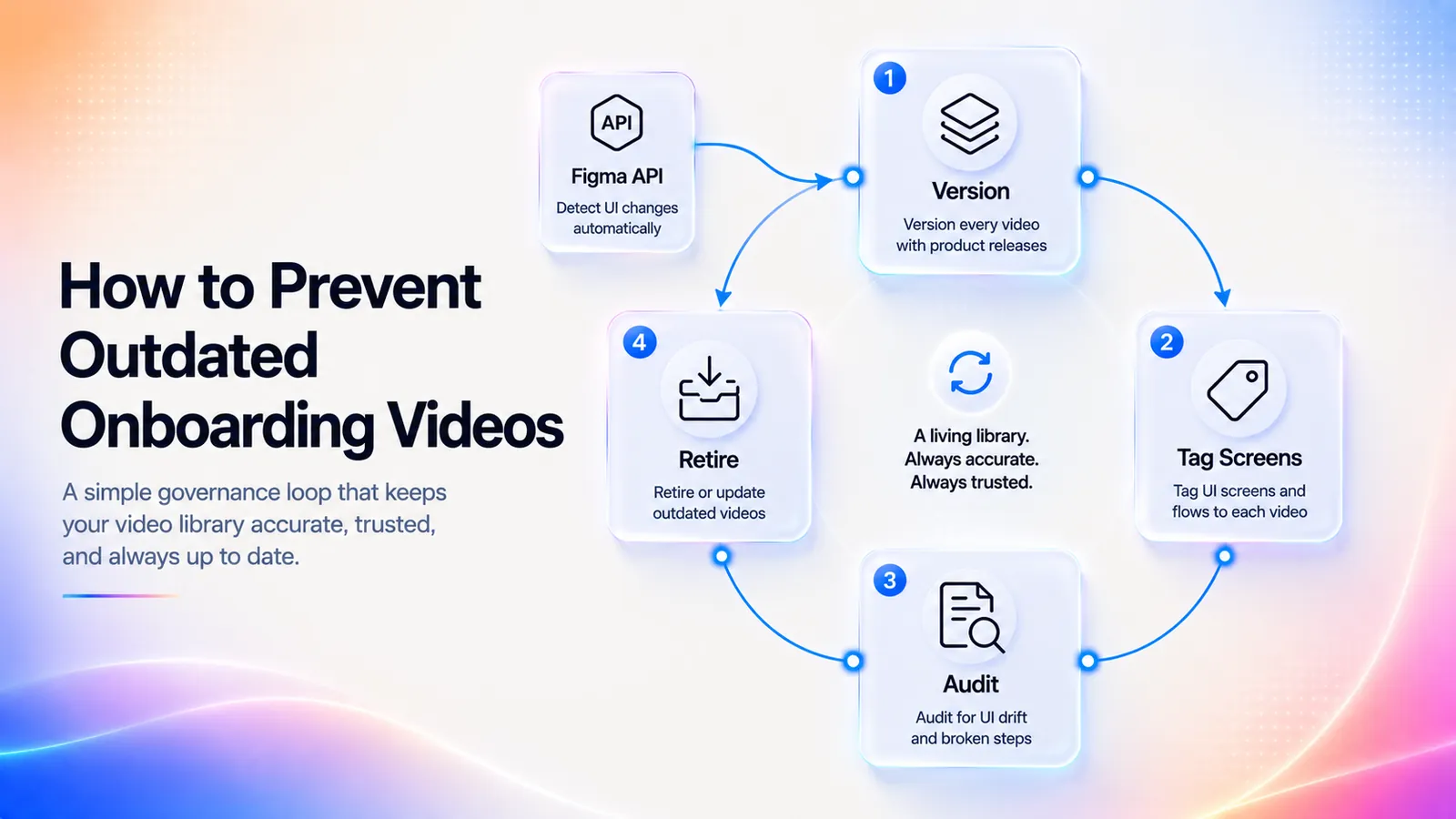
The governance pattern that works for 2026 SaaS teams:
- Version every video. Each video carries a version number tied to a product release date. When the underlying UI changes, the video version increments.
- Tag every video with the screens it depends on. Maintain a dependency map of video to screens. When a designer ships a redesign of a tagged screen, the map flags every affected video.
- Set a maintenance cadence. Audit the full library quarterly at a minimum. For teams shipping weekly, add a trigger: any release that touches a tagged screen flags the affected videos for re-review.
- Pick a production path that supports the cadence. If you are shipping weekly and you have 20+ videos, manual re-recording is mathematically unsustainable. This is where script-only AI generation earns its keep. The Videate Reputation case (4 hours to 5 minutes per update) is the order-of-magnitude shift that makes governance viable at scale.
- Retire ruthlessly. A video that no longer matches the UI is worse than no video. It teaches users the wrong thing. If you cannot update it in the current sprint, take it down.
A minimal dependency-map row looks like this, kept in the same Notion or Airtable database the team uses for the funnel map:
| Video ID | Moment | Screens depended on | Current version | Last UI change | Status |
|---|---|---|---|---|---|
| OBV-002 | Aha (first dashboard) | /dashboards/new, /charts/picker | v3.1 | 2026-04-12 | Up to date |
| OBV-007 | Troubleshooting (failed connection) | /integrations/error | v1.4 | 2026-05-02 | Flagged for re-review |
The flag-for-re-review column is the one that earns its keep. Hook it to the design tool. Figma's API exposes file-change events, and routing those into the dependency map turns "did anyone touch a tagged screen?" from a Slack question into a deterministic flag.
The teams that get this wrong end up with a help center full of videos showing UI from two years ago. The teams that get it right treat the video library like the docs library: a maintained, versioned, instrumented artifact.
The exception. Very early-stage products (pre-product-market-fit) should not build the dependency map at all. The UI changes so often that the overhead is greater than the benefit. The right move at that stage is recording-first welcome video only, accepting that you will re-record every quarter, and waiting until the activation funnel stabilizes before investing in a real library.
Frequently Asked Questions
Key takeaways
- A SaaS onboarding video is task-scoped, not a welcome reel. Think 30 to 90 seconds, embedded in the activation funnel, distinct from HR employee onboarding video.
- Ship a library, not a hero video. The 2026 winning pattern is one micro-video per activation moment, triggered by user actions.
- Map five moments and stop there. Welcome, aha, milestone, feature deep-dive, troubleshooting. Some products will collapse aha and milestone into one. That is fine.
- Default to 60 to 90 second scripts with four beats. Promise, action, proof, next step. Longer videos see steep completion drop-offs.
- Pick production path by team size and ship cadence. Recording-first for founder-led stages, avatar-first for mid-stage teams, script-only AI for weekly-ship teams with 15+ videos.
- Measure activation lift via cohort comparison, not view count. Completion rate, drop-off heatmap, activation lift with holdout, and ticket deflection are the only four KPIs that justify production cost.
- Governance is the unsexy half. Version every video, tag screen dependencies, audit quarterly, retire ruthlessly. Stale videos teach users the wrong thing.
What is an onboarding video?
For SaaS, an onboarding video is a short (30 to 90 second) task-scoped clip embedded inside a product or onboarding email that moves a new user through one specific activation step. The 2026 best practice is a library of micro-videos covering welcome, first-value, milestone, feature deep-dive, and troubleshooting moments, rather than a single welcome reel. It is distinct from employee onboarding video, which is an HR use case for new-hire orientation.
How long should an onboarding video be?
For SaaS user onboarding, 60 to 90 seconds is the right default per Vidyard's production guidance. Welcome and troubleshooting videos can be as short as 30 seconds. Feature deep-dives can extend to two minutes when the surface area warrants. Above 90 seconds, completion rates fall steeply. Google's current AI Overview cites a 2 to 5 minute range, but that guidance is for HR employee onboarding, not SaaS. Use 60 to 90 seconds.
What should be included in an onboarding video?
A working 60 to 90 second onboarding video has four beats. The promise (5 to 10 seconds), which states the outcome the user will reach. The action (30 to 60 seconds), which shows the exact click path with no tangents. The proof (10 to 15 seconds), which shows the visible result so the user recognizes success in their own account. The next step (5 to 10 seconds), which tells them what to do immediately after the video ends.
How do you make a SaaS onboarding video?
Five moves, in order. Map the activation funnel and identify drop-off steps in your product analytics. Pick one video per funnel step (no bundling). Write a 60 to 90 second script with the four-beat structure (promise, action, proof, next step). Pick a production path: recording-first for founder-led stages, avatar-first for mid-stage teams, or script-only AI generation for teams with 15+ videos. Place each video in-app primarily, with help center and email as secondary surfaces.
What metrics should I track to measure onboarding video effectiveness?
Track four KPIs per video. Completion rate (target 60% or higher for a 60 to 90 second video). Drop-off heatmap (find the second where viewers leave). Activation lift via cohort comparison (watched-versus-did-not-watch activation rate, ideally with a random holdout). Ticket deflection for support-adjacent videos. View count is not a KPI. Cohort comparison with a holdout is the only way to prove causal activation lift, because correlation alone overstates impact every time.
What is the difference between an onboarding video and a demo video?
A demo video lives on a marketing site and serves prospects deciding whether to sign up. It is typically 90 seconds to three minutes and emphasizes outcome and differentiation. An onboarding video lives inside the product and serves users who have already signed up, scoped to one activation step. Demo video sells. Onboarding video activates. Many SaaS teams confuse the two and ship onboarding videos that sound like demos, and activation lift is always worse when they do.
Where do onboarding videos belong: in-app, email, or help center?
All three, with primary and secondary surfaces per video. In-app is primary for welcome, aha, milestone, and troubleshooting because it wins on completion and activation lift. Help center is primary for feature deep-dives and the canonical troubleshooting library because it wins on searchability. Email is the secondary re-engagement surface for welcome and milestone videos. Each video has one primary surface plus one or two secondaries scoped to where the user is when the moment fires.
Can AI-generated onboarding videos replace recorded ones?
In 2026, yes, for most use cases. Avatar-first tools (Synthesia, HeyGen) and script-only platforms (Videate, Clueso, NarrateAI) now produce SaaS-onboarding-quality video at a fraction of the maintenance cost of manual recording. Videate publishes a Reputation case showing 93% production-time reductions and 4-hour-to-5-minute update cycles. Recording-first still wins for the founder-led welcome video, where presence carries signal value. For the other 90% of an onboarding video library, AI-generated is the right default.
Why are onboarding videos important for SaaS?
They compress time-to-value, which Gainsight treats as the leading driver of activation rate and long-term retention. Users also prefer the format: Wyzowl found that 73% of people prefer short video to learn about a product, and TechSmith puts the preference for video over text at 83%. A well-placed 60-second video replaces a 400-word help doc that users have to read, parse, and translate into UI actions, which is where most of them drop.
How often should onboarding videos be updated?
Tie the cadence to your product release cycle, not the calendar. For teams shipping weekly, audit any video whose tagged screens were touched in the release. For teams shipping monthly, a quarterly full-library audit is sufficient. A video that no longer matches the UI is worse than no video because it teaches users the wrong thing. Retire ruthlessly. Do not let stale videos linger because "they are better than nothing."
How do I run a clean A/B test on an onboarding video?
Define one activation event as the success metric. Use a feature flag to randomize new signups into a 90% video-on, 10% holdout split. Run the test until each arm has at least 1,000 users (the floor for detecting a 5 percentage-point lift at 80% power). Compare activation rate inside a 14-day window. Do not call the result early. If your weekly signup volume is below 200, use a pre-post comparison instead and treat the lift as directional rather than causal.
Should onboarding videos use captions and auto-play?
Captions yes, audio auto-play no. In-app video should default to muted with captions on, because most users open the product in a tab next to a meeting or a Slack window and will close any modal that starts talking. Captions also satisfy WCAG 2.1 accessibility requirements, which matters for any product selling into enterprise or public-sector accounts. Email-embedded video should link out to a player rather than attempt to auto-play inline, since most email clients block embedded video anyway.