
To learn how to make a product demo video, start with one audience and one outcome. Then show the real product reaching that outcome as fast as possible. The process runs plan, script, prepare, record, narrate, edit, publish and update. Most good demos run one to two minutes. AI tools now handle much of the recording, narration and editing, but the planning decisions still decide whether the demo works.
How to make a product demo video: the 10-step process
How to make a product demo video comes down to ten steps in a fixed order. Plan the audience, choose the workflow, write the script and prepare the product before recording anything. Then record, narrate, edit and publish. The last step, keeping the demo updated, is the one most teams forget. Each step below has its own section, so you can jump to the one you need.
- Define the audience and goal. Decide who watches and what they should do next.
- Choose what to show. Pick one workflow and cut everything else.
- Write the script. Hook, problem, value, demo, outcome and call to action.
- Prepare the product. Demo account, realistic data and a clean screen.
- Choose how to record. Manual, AI-assisted or an autonomous agent.
- Record the product. Short sections, steady pace, clean cursor.
- Add narration. Explain benefits and match the screen.
- Edit the demo. Cut dead time, add zooms and captions.
- Publish and distribute. Put a version wherever buyers decide.
- Keep the demo updated. Re-record when the interface changes.
What is a product demo video?
A product demo video is a short recording of the real product doing a real job, from the starting problem to a visible result. It shows the interface, the clicks and the outcome, usually with narration. It sits between an explainer, which explains why a problem matters, and a tutorial, which teaches every setting. A demo answers one question for a buyer or user. That question is "what does this look like when it works for me?"
The table separates the formats teams most often confuse.
| Format | What it shows | Viewer | Typical length |
|---|---|---|---|
| Product demo video | The real product solving one problem | Buyers and new users | 1 to 3 minutes |
| Explainer video | The problem and the idea, often animated | Cold audiences | 60 to 90 seconds |
| Tutorial | Every step of one task, in detail | Existing users | 2 to 10 minutes |
| Interactive demo | Clickable screens the viewer drives | Self-serve buyers | Viewer-paced |
| Product tour | A guided path inside the live app | Trial users | Viewer-paced |
When a demo video is the right format
A demo video is the right choice when the product's value is visible on screen and a viewer can understand it without trying it. It suits homepages, sales follow-ups, launch posts and help centers.
An interactive demo suits buyers who want to click around before talking to anyone. Navattic tracks about 5,000 B2B SaaS websites. It reports that 61% use a Book a Demo button and 18% offer an interactive demo (Navattic's 2026 interactive demo report). Many teams use both. A video sets the context, and the interactive demo lets the buyer explore.
What makes a good product demo video?
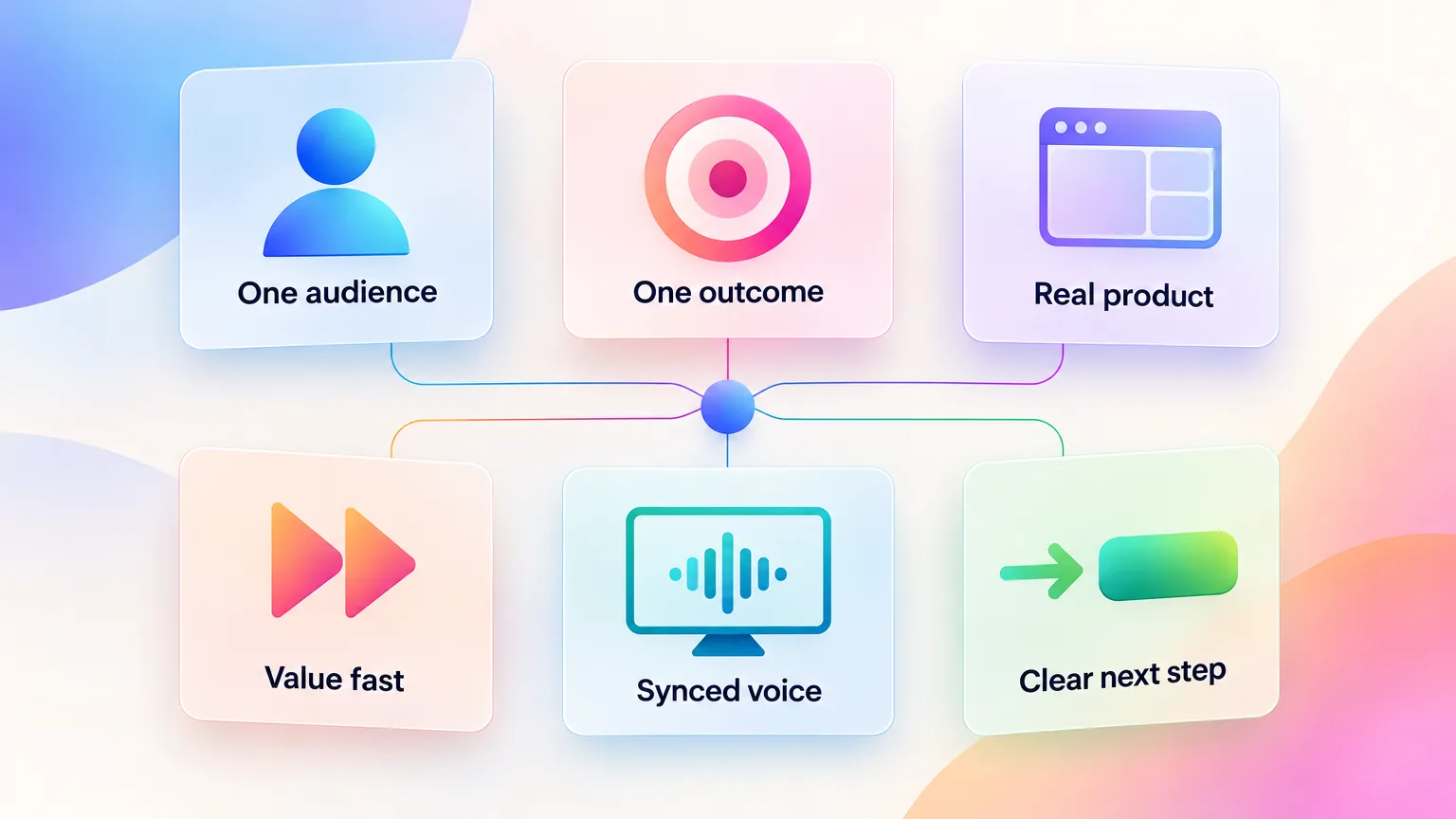
A good product demo video focuses on one audience and shows one outcome with the real product. It reaches value quickly, keeps narration matched to the screen, and ends with one clear next step. These six qualities matter more than production polish. A clean screen recording that hits all six beats a glossy video that tours every feature. The rest of this guide turns each quality into a step.
Focus on one audience
A demo for a CFO and a demo for an admin show different screens. Pick the one person most likely to watch, and cut anything that person does not care about.
Focus on a problem or outcome, not every feature
Viewers remember one result, not a feature list. Show the shortest path from the problem to the outcome, and leave the other features for other videos.
Show the real product
A real interface builds more trust than mockups or stock footage. ADVIDS studied 149 tech product videos and found that only 50.3% show the product producing a result (ADVIDS study of aha moments). The other half show screens without ever proving the outcome.
Get to value quickly
The same ADVIDS study found the product appears at a median of 12 seconds, but the first result arrives at a median of 34 seconds. Close that gap. Show the result early, then explain how it happened. For more benchmarks, see these product demo statistics from eight studies.
Keep narration aligned with the visual
The voice should describe what the viewer sees at that moment. When narration runs ahead of the screen, the viewer has to choose between listening and watching.
End with a clear next action
ADVIDS found that only 34.9% of 106 enterprise SaaS explainers end with a URL or an ask (ADVIDS enterprise SaaS explainer study). One clear call to action, such as a trial link or a booking link, gives the viewer somewhere to go.
Step 1: Define the audience and goal
The first step is deciding who will watch the demo and what that person should understand or do afterwards. Write both down in one sentence before opening a recorder. The audience sets which screens appear. The goal sets how the video ends. A demo without a written audience and goal usually turns into a feature tour, because nothing tells the team what to leave out.
Use one sentence in this shape. "After watching, a [role] at a [company type] understands [outcome] and [next action]." For example, "After watching, an ops manager at a 50-person agency understands how invoices get approved in one click and starts a trial."
Awareness, evaluation or onboarding
The same product needs different demos at different stages.
| Stage | Viewer's question | What the demo shows | Ends with |
|---|---|---|---|
| Awareness | Is this relevant to me? | The problem and one striking result | A visit to the site |
| Evaluation | Will this work for my case? | One full use case, start to finish | A trial or a booked call |
| Onboarding | How do I get my first result? | The first task inside the product | Doing the task now |
Onboarding demos belong inside the product journey. The SaaS onboarding video playbook covers that stage in depth.
One video or several use-case demos
One general demo works for a simple product with one main job. A product with several buyer types needs one short demo per use case. Three 90-second demos for three roles usually outperform one six-minute demo that tries to serve everyone. Each one can sit on the page or email where that role arrives.
Step 2: Choose what to show
Choosing what to show means picking one workflow and the few screens that prove it. Then cut every step that does not move the viewer toward the outcome. Start from the result and work backwards. List the screens the viewer must see to believe the result. Everything else, such as settings, menus and setup steps, can disappear from the demo even though users need it in real life.
Follow this order:
- Pick the workflow. Choose the use case your audience cares about most, from Step 1.
- List the screens. Write down every screen in that workflow.
- Mark the proof points. Circle the two or three screens where the value becomes visible.
- Cut the rest. Remove login screens, loading, configuration and anything the viewer can assume.
- Write the narrative. Turn the remaining screens into a short story, from problem to action to result.
A simple demo narrative has three beats. First, the viewer sees the problem in the product. Next, they see the action that solves it. Finally, they see the result and why it matters. If a screen does not fit one of those beats, it does not belong in this video.
Feature-heavy products tempt teams to show more. Resist it. A viewer who sees ten features remembers none of them, while a viewer who sees one result remembers the product.
Step 3: Write the product demo script
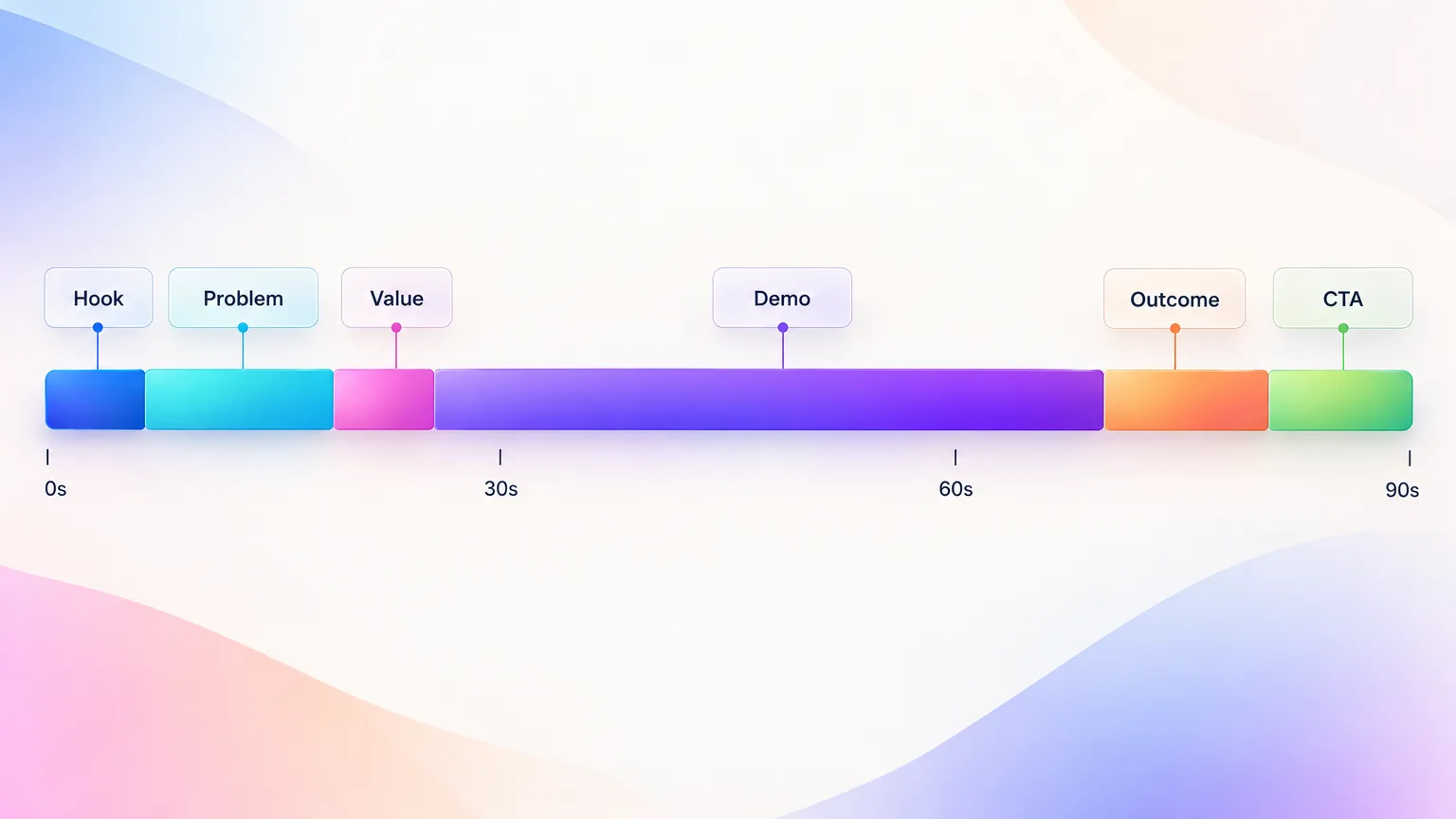
A product demo script is the plan for what the viewer hears and sees, second by second. It has six parts. These are the hook, the problem, the value proposition, the demonstration, the outcome and the call to action. A 90-second demo needs about 150 to 200 spoken words. ADVIDS found voiced enterprise explainers speak a median of 158 words in a median of 81 seconds. Writing the script first prevents rambling during recording.
Hook
Open with the result or the pain, in one sentence. "Approving 40 invoices used to take a morning. Here it takes two clicks."
Problem or context
Name the situation the viewer is in, in their words. Keep it to one or two sentences.
Value proposition
Say what changes when the product is used. One sentence, with one concrete outcome.
Product demonstration
Walk through the proof screens from Step 2. Describe the purpose of each action, not the click itself.
Outcome
Show the finished result on screen and say why it matters to this viewer.
CTA
Give one next step and say exactly where to go.
A reusable script framework
This template is a starting point written for this guide. Fill in each line, read it aloud and time it.
| Part | Time | What to write | Example line |
|---|---|---|---|
| Hook | 0 to 5 s | The result or the pain, one sentence | "Approving invoices used to take a morning." |
| Problem | 5 to 15 s | The viewer's situation, their words | "Every invoice needs three people to sign off." |
| Value | 15 to 20 s | What changes, one outcome | "Now approvals happen in one shared queue." |
| Demo | 20 to 70 s | Two or three proof screens, purpose of each | "Here the manager sees every invoice waiting." |
| Outcome | 70 to 80 s | The visible result and why it matters | "The whole batch is approved before lunch." |
| CTA | 80 to 90 s | One next step and where | "Start a free trial at the link below." |
Step 4: Prepare the product for recording
Preparing the product means setting up a clean demo account, realistic data and a repeatable starting state before anyone presses record. Most retakes come from preparation problems, such as a notification popping up, private data on screen or an empty dashboard. Thirty minutes of setup saves hours of editing. A repeatable starting state also makes the next update much faster.
Work through this list before recording:
- Demo account. Use a dedicated account, never a real customer's or your own working account.
- Realistic sample data. Fill the account with believable names, numbers and history. Empty states look broken, and "Test User 1" looks fake.
- Notifications and private data. Turn off desktop notifications, chat apps and email alerts. Check that no real customer names, emails or keys are visible.
- Browser state. Use a clean browser profile with no extra tabs, bookmarks bar or extensions in view.
- Screen resolution. Record at 1920 by 1080 and zoom the browser to 110 to 125% so text stays readable on small screens.
- Cursor and UI cleanliness. Close sidebars you do not need and use a normal-size cursor.
- Repeatable starting state. Save a snapshot or a script that resets the account, so every retake and every future update starts from the same place.
The repeatable state matters most for SaaS teams. The product will change, and the demo will need re-recording. A reset script turns a half-day re-shoot into a short session.
Step 5: Choose how to record it
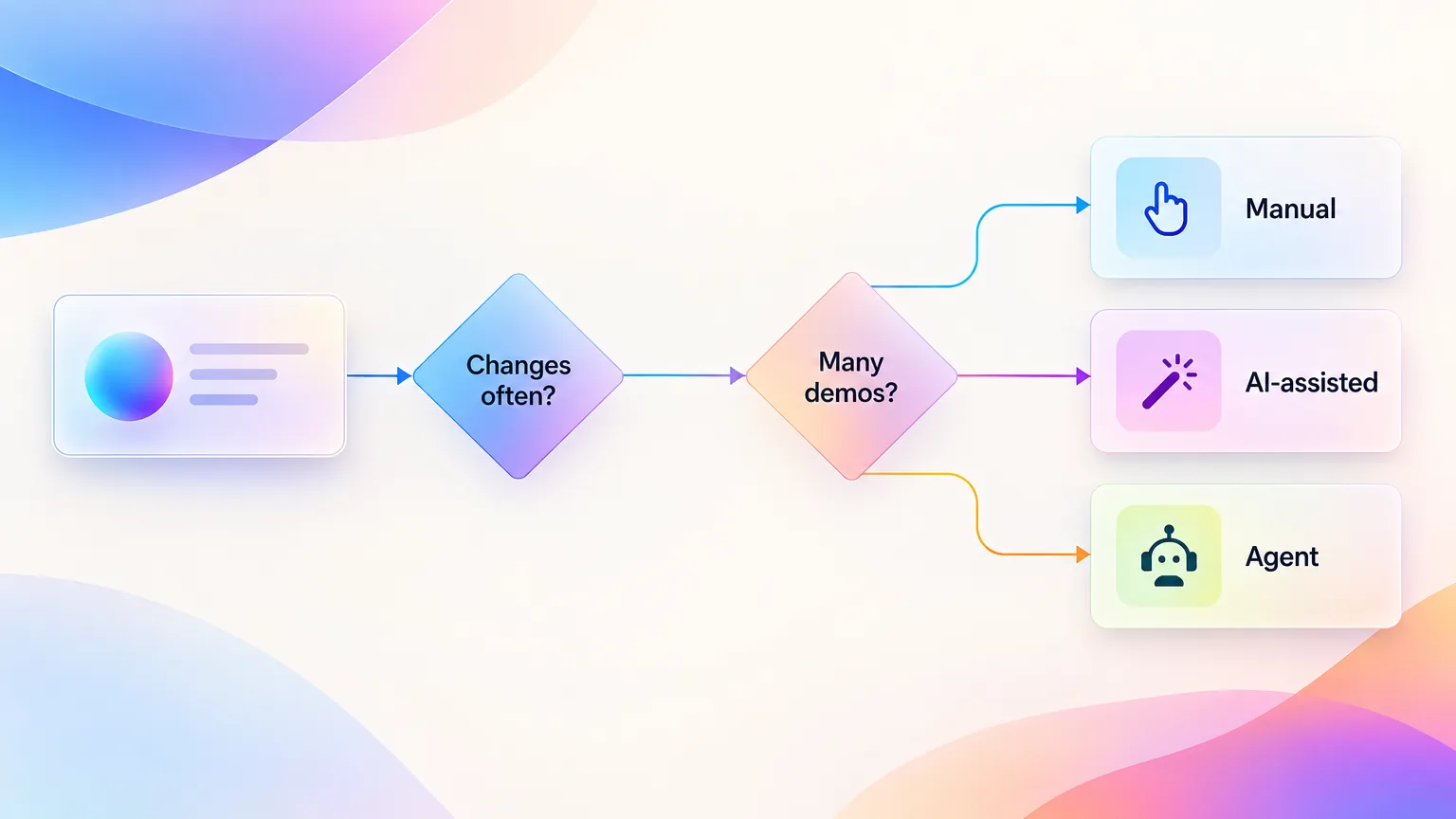
Teams record product demos in three ways. A person can record manually with a screen recorder. A person can record while AI tools handle editing and narration. Or an autonomous agent can operate the product and record it. Each fits a different team. The choice depends on how often the product changes, how much control the team wants, and how many demos it needs to produce.
Manual screen recording
A person records the screen with a tool such as Loom, Camtasia or Screen Studio. Manual recording gives full control and costs little. It is slow to repeat, and every product change means re-recording by hand. This comparison of automated recording and Loom shows where the two approaches differ.
AI-assisted recording and editing
A person still records, but AI tools clean up the result. They cut silences, add zooms, write captions and generate a voiceover. Tools in this group save editing time without changing how the footage is captured. The guide to AI explainer videos for SaaS covers this category.
Autonomous agent recording
An AI agent opens the product, navigates the interface and records the workflow itself, from a written request. GuideClarity, the platform behind this blog, works this way. The user describes what to show. The agent then navigates the product, records the right screens, and writes the script and voiceover. Agents work best for products with clear workflows. Complex judgement calls still need a person to review.
Which recording method fits which team
| Method | Best for | Strengths | Limits |
|---|---|---|---|
| Manual | One-off demos, founders, tight budgets | Full control, low cost | Slow, every update is a re-shoot |
| AI-assisted | Teams that record often | Faster editing, captions and voice | Footage still captured by hand |
| Autonomous agent | Frequent releases, many demos | Fastest production, repeatable | Needs review, less fine control |
For a full tool comparison, see SaaS demo software compared by category.
Step 6: Record the product
Recording the product means walking through the scripted workflow at a steady pace, with smooth cursor movement and pauses on every proof screen. Record in short sections rather than one long take. Short sections make retakes cheap and editing simple. Capture at full resolution with system sounds off, and keep the cursor still whenever the viewer should read something.
Use these habits while recording:
- Recording flow. Record one script section at a time and leave two seconds of stillness at the start and end of each.
- Cursor movement. Move the cursor in straight, unhurried lines. Never circle or wiggle it to point at something.
- Pacing. Slower than feels natural. Pause for one to two seconds after each click so the result registers.
- Zoom and focus. Plan where zooms will go during editing, and keep the important element near the center of the screen.
- Mistakes and retakes. Stop and redo the section rather than fixing a mistake on camera. Short sections make this painless.
- Capture quality. Record at 30 or 60 frames per second, at 1080p or higher, and check one test clip before the full session.
| Setting | Recommended value | Why |
|---|---|---|
| Resolution | 1920 by 1080 or higher | Leaves room to zoom in during editing |
| Frame rate | 30 fps, or 60 fps for fast UI motion | Smooth cursor and scrolling |
| Browser zoom | 110 to 125% | Readable text on phones |
| System sounds | Off | No stray clicks or alerts in the audio |
| Section length | One script part per take | Cheap retakes and simple edits |
Record narration separately from the screen when possible. Separate audio is easier to fix and re-time, and it lets the screen recording stay clean.
Step 7: Add voiceover and narration
Narration should explain why each action matters to the viewer, not describe the clicks they can already see. Write it to the benefit and keep it in sync with the screen. Choose a human or AI voice based on how often the demo changes. Good narration is short. ADVIDS found that 69.8% of 106 enterprise SaaS explainers use voiceover.
Benefit-led narration, not click narration
"Click the blue button" adds nothing. "One click sends the whole batch for approval" explains the value. Narrate the purpose and let the screen show the click.
Human or AI voice
| Voice | Choose it when | Watch out for |
|---|---|---|
| Human, the founder or an expert | Trust and personality matter, the demo rarely changes | Re-recording audio for every update |
| Professional voice actor | A flagship homepage demo | Cost and turnaround time |
| AI voice | Demos change often, or you need several languages | Flat delivery, mispronounced names |
A founder's voice carries extra credibility on outbound and early homepages, as the guide to founder-led video content explains.
Timing and pronunciation
Time each sentence to the action it describes, and leave a beat of silence after key results. Check how the voice pronounces your brand name, product terms and acronyms. AI voices usually let you add a phonetic spelling.
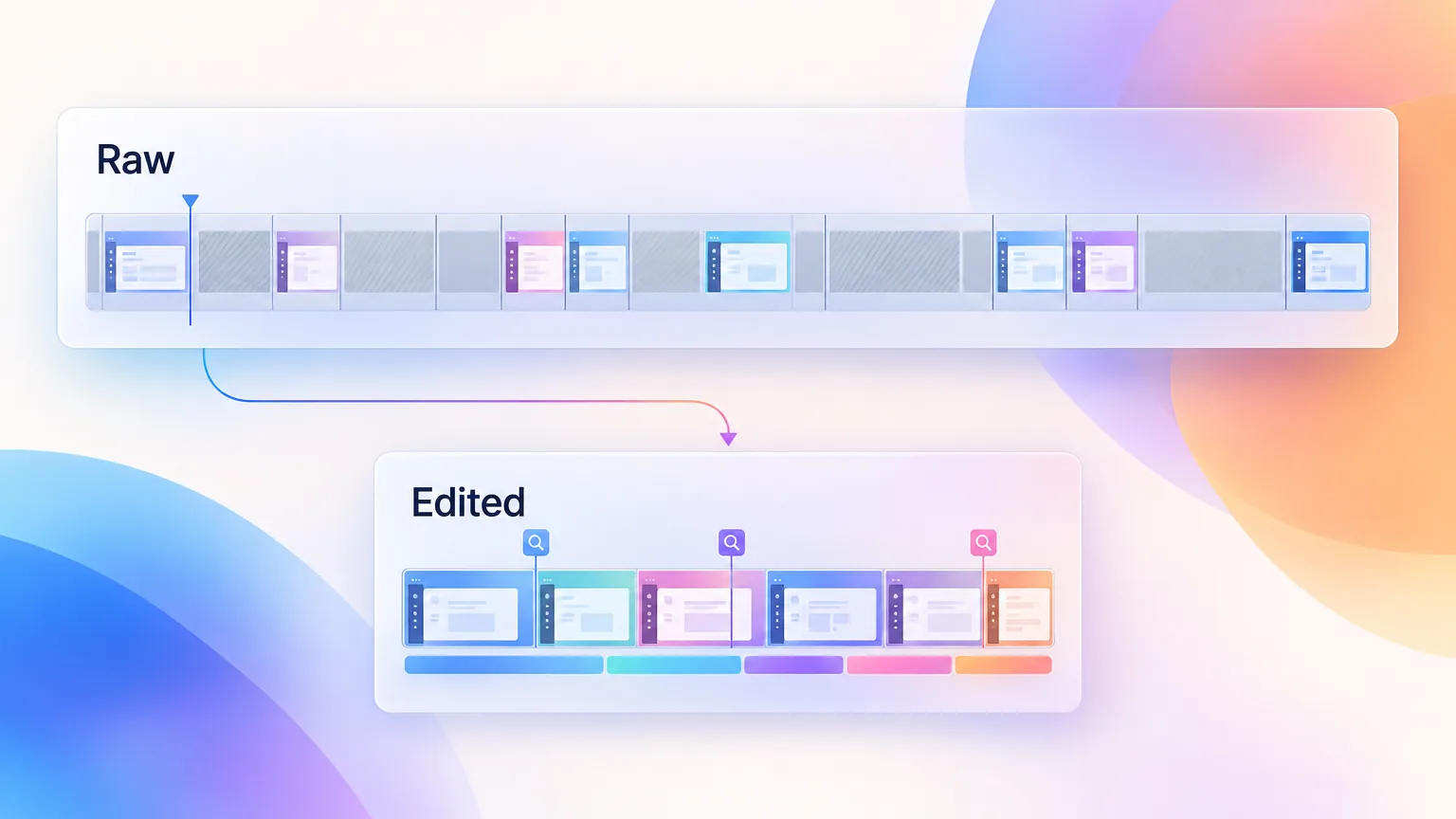
Step 8: Edit the demo
Editing turns raw footage into a tight demo by removing dead time, guiding attention with zooms and callouts, and adding captions and branding. Most of the work is cutting. Remove loading screens, pauses and repeated actions until every second earns its place. ADVIDS found the median enterprise SaaS explainer runs 1 minute 14 seconds, and 81.1% run two minutes or less.
Edit in this order:
- Remove dead time. Cut loading, typing pauses and any step the viewer can assume.
- Add zooms and callouts. Zoom into the element that matters at each proof point, and add a short label where needed.
- Add captions. Burn captions into any version that will autoplay without sound. ADVIDS found burned-in captions in only 10.4% of enterprise explainers, so captions are an easy edge.
- Apply branding. Add your logo, colors and an end card. Keep it light.
- Use simple transitions. Straight cuts or quick fades. Flashy transitions distract from the product.
- Add music only where it helps. Low background music suits social cuts. Skip it on detailed walkthroughs.
- Check UI readability. Watch the final cut on a phone. If the interface text is unreadable, zoom in or crop.
The finished demo should feel faster than the real product, without hiding how the product works. Never cut in a way that makes a slow step look instant.
Step 9: Publish and distribute
Publishing a product demo means placing it everywhere the target viewer makes a decision, and trimming a version for each place. One master recording can serve the homepage, landing pages, YouTube, sales emails, the help center and social media. Few teams do this well. WayaFrame studied 1,536 SaaS homepages and found only 3.7% feature a product demo video (WayaFrame's 2027 State of SaaS Video report).
| Channel | Version | Tip |
|---|---|---|
| Homepage | The full 60 to 90 second demo | Place it near the main call to action |
| Landing page | A use-case demo for that page's audience | Match the demo to the ad or campaign |
| YouTube | The full demo plus a longer walkthrough | Write a searchable title and add chapters |
| Sales | A short version reps send before or after calls | See personalized demo videos for sales |
| Help center | The onboarding version, step focused | Embed it next to the written steps |
| Social | 15 to 45 second vertical cuts with captions | Lead with the result in the first second |
| A thumbnail that links to the video | Use a play button on a still frame |
Not every channel needs a version on day one. A small team gets more from the homepage and sales versions first, because those reach buyers closest to a decision. Add social and YouTube versions once the core demo is proven.
The master recording is the raw material for all of these. The workflow for repurposing one recording across channels covers the full production side. For social reach, splitting one demo into many posts shows how to plan the cuts before recording.
Step 10: Keep the demo updated
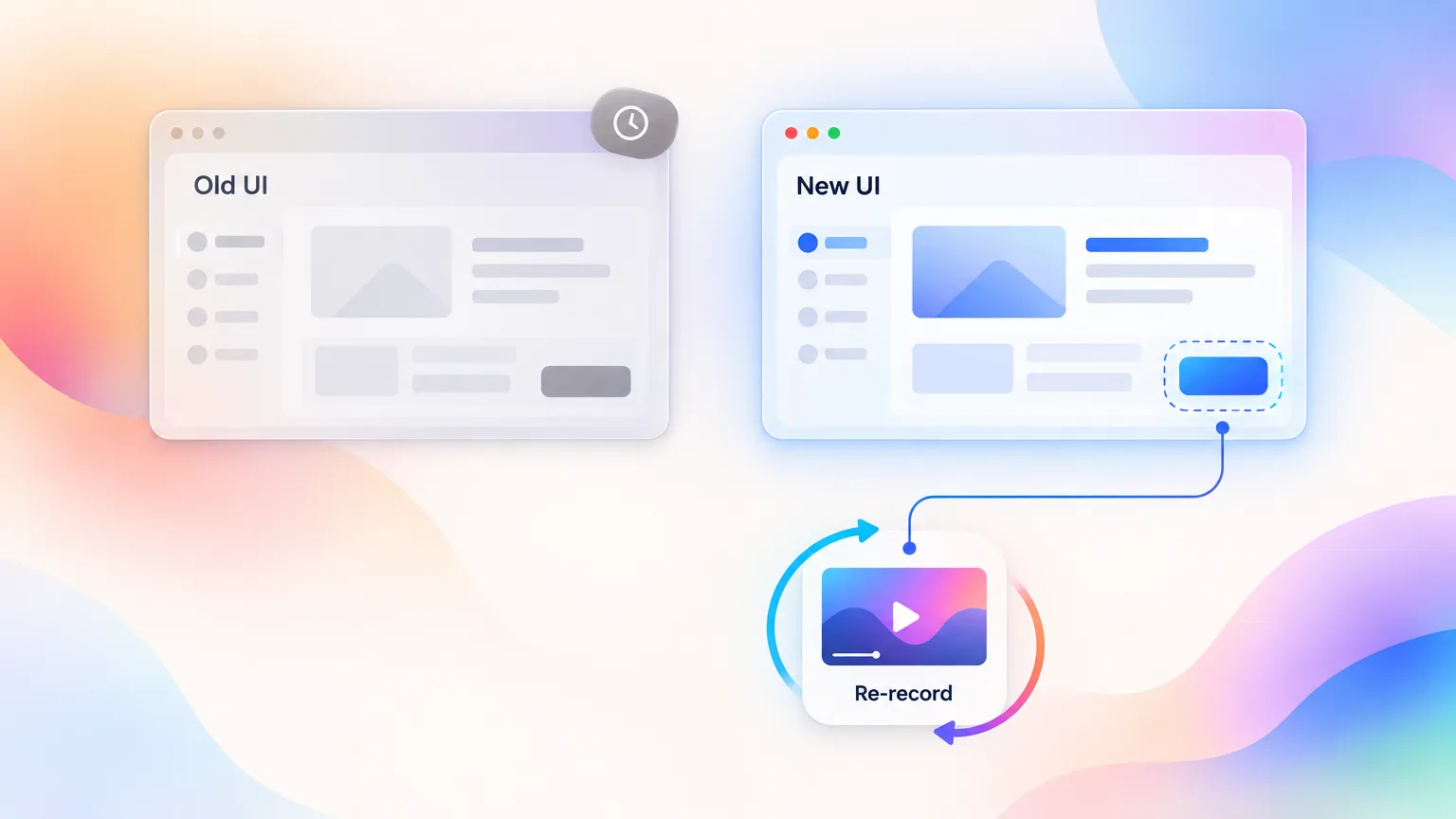
A product demo goes stale as soon as the interface changes, and SaaS interfaces change constantly. A demo that shows an old screen confuses new users and makes the product look neglected. Keeping demos current means tracking product changes, deciding which demos each change affects, and re-recording quickly. The repeatable starting state from Step 4 is what makes that fast.
Why SaaS demos become stale
Buttons move, labels change, menus get reorganized and new features replace old flows. Each change breaks every demo that shows it, often without anyone noticing.
Identify product changes
Keep a list of every demo and the screens it shows. Review the list with each release and mark the demos that touch changed screens. New features need their own demos, covered in the feature launch video checklist.
Manual re-recording
Reset the demo account, follow the original script and record only the sections that changed. Splice them into the existing edit. With a saved script and starting state, this takes an hour rather than a day.
Automated and autonomous re-recording
Agent-based tools can re-run a recorded workflow against the new interface and rebuild the demo. GuideClarity has this on its roadmap. Automatic re-recording after an interface change is coming, and it is not available yet. Until then, a saved script plus an agent that records from a written request already cuts most of the manual work.
Product demo example
A strong product demo follows the script framework closely and shows a visible result within the first 20 seconds. The example below is an illustrative breakdown written for this guide, not a real company's video. It describes a 90-second demo for an invoice-approval tool aimed at operations managers. Each line notes what the demo does and why it works.
| Time | What happens on screen | Why it works |
|---|---|---|
| 0 to 4 s | A pile of 40 pending invoices, then the same list fully approved | Shows the result before the process |
| 4 to 14 s | Narration names the problem of three sign-offs per invoice | Names the viewer's situation in their words |
| 14 to 20 s | One sentence states the outcome, approvals in one queue | Gives one clear value, not a feature list |
| 20 to 65 s | Three proof screens, with zooms on the queue, the rule and the approve button | Real UI, one workflow, zoom guides the eye |
| 65 to 80 s | The approved batch and a time-saved figure from the demo account | Ends on the outcome the buyer cares about |
| 80 to 90 s | End card with one trial link | One clear next step |
What it leaves out matters as much. There is no login, no settings screen, no tour of reports and no second use case. Those belong in other videos.
Product demo checklist
Use this checklist before publishing any product demo video. It covers the planning, recording and publishing decisions from the ten steps. A demo that passes every line is ready to ship. A demo that fails two or more usually needs another edit rather than another recording. Print it, or copy it into your team's review template.
- One audience and one goal are written down
- The demo shows one workflow from problem to result
- The first result appears within 20 seconds
- The script has a hook, problem, value, demo, outcome and CTA
- The demo account has realistic data and no private information
- No notifications, extra tabs or clutter appear on screen
- Narration explains benefits, not clicks
- Narration matches what is on screen at each moment
- Brand and product names are pronounced correctly
- Dead time and loading screens are cut
- Zooms or callouts highlight each proof point
- Captions are burned in for silent autoplay versions
- UI text is readable on a phone
- The video runs about one to two minutes
- It ends with one clear call to action
- A reset script and the original script are saved for updates
Create product demos automatically
Creating product demos automatically means letting software handle the recording, narration and editing steps, while the team keeps the planning decisions. Steps 1 to 3 still need a person, because only the team knows the audience, the goal and the story. Steps 5 to 8 are where automation saves the most time, and Step 10 is where it will save even more as re-recording becomes automatic.
GuideClarity is one implementation of this workflow. A team describes the demo it wants in plain words. The agent opens the product, navigates the interface, works out the workflow and records the right screens. It then writes the script, generates the voiceover, and adds captions, zooms, motion graphics and the brand style, as listed on the product features page. The team reviews the result, adjusts it and publishes.
Automation does not replace the decisions in this guide. A demo built on the wrong audience or a bloated workflow is still a weak demo, only faster. Use the checklist above on automated demos exactly as on manual ones.
Key Takeaways
- Learning how to make a product demo video starts with one audience, one goal and one workflow, written down before recording.
- Good demos show the real product reaching a result early. ADVIDS found the first result arrives at a median of 34 seconds, so beat that.
- A 90-second script needs about 150 to 200 words across six parts, from hook to call to action.
- Preparation, meaning a demo account, realistic data and a repeatable starting state, prevents most retakes and speeds up every update.
- Choose manual, AI-assisted or autonomous recording based on how often the product changes and how many demos you need.
- Cut dead time, burn in captions and check readability on a phone, since 81.1% of enterprise explainers run two minutes or less.
- Plan for updates from day one, because every interface change makes a demo stale.
Frequently Asked Questions
How long should a product demo video be?
Most product demo videos should run one to two minutes. ADVIDS found the median enterprise SaaS explainer runs 1 minute 14 seconds, and 81.1% run two minutes or less. Sales walkthroughs and tutorials can run longer, because the viewer has already chosen to watch. A homepage or social demo should stay short and show the result early.
What should a product demo script include?
A product demo script should include six parts. These are a hook, the problem, a value statement, the demonstration, the outcome and one call to action. A 90-second demo needs about 150 to 200 spoken words. Write the narration around benefits rather than clicks, and time each line to the screen it describes.
What is the difference between a product demo and an explainer video?
A product demo shows the real product solving one problem, with the actual interface on screen. An explainer video explains the problem and the idea, often with animation and little or no product footage. Explainers suit cold audiences who do not know the problem yet. Demos suit buyers and users who want to see how the product works.
Should I use an AI voice or my own voice?
Use your own voice or a professional voice when trust and personality matter and the demo rarely changes. Use an AI voice when the demo changes often or needs several languages, because updating AI narration takes minutes. Always check how the voice pronounces your brand and product names before publishing.
How do I make a product demo video without editing skills?
You can make a product demo video without editing skills by using tools that edit for you. AI-assisted recorders remove pauses, add zooms and generate captions automatically. Autonomous agents go further and record and narrate the demo from a written request. Good preparation and a tight script reduce the editing a demo needs in the first place.
How often should a product demo be updated?
Update a product demo whenever a release changes a screen it shows. Review your demos with every release, mark the ones that touch changed screens, and re-record those sections. Teams that ship weekly may update a demo several times a quarter. A saved script and a repeatable demo account make each update much faster.
Related Resources and Further Reading
- SaaS demo software compared by category, the best product demo software for each team type.
- AI explainer videos for SaaS, the AI product demo and video guide.
- Product demo statistics from eight studies, benchmarks for length, captions and calls to action.
- Feature launch video checklist, demos for new features and updates.