TL;DR
GuideClarity vs Loom comes down to who the video is for. GuideClarity is better when you need product demo videos and launch content for customers, because it builds them from your product with no editing. Loom is better for quick video messages inside a team, because you record once and share a link. The two also work well side by side.
- Pick GuideClarity if you want product demo videos and explainer videos generated from the live product, plus the docs, shorts and blog post.
- Pick Loom if you send quick updates, feedback and walkthroughs to teammates or customers and want a share link in seconds.
- Pick both if your team talks in Loom every day and launches features to customers every month.
GuideClarity vs Loom at a glance
The table compares GuideClarity and Loom on the points buyers check first. Starting price is the cheapest paid plan in US dollars, billed monthly. A tinted cell marks the side with the edge on that row. We read every price and limit on each vendor's own page on September 27, 2026.
| Criterion | GuideClarity | Loom |
|---|---|---|
| Best for | Product demo videos and launch content for customers | Quick video messages inside a team |
| Starting price | $59 a month, one plan price | $18 per user a month |
| Free plan | Yes, 3 video guide recordings | Yes, 25 videos of 5 minutes |
| How content is made | Generated from your product | You record, then share |
| Output | Demo video, explainer, shorts, docs, blog post | One recording with a share link |
| Platforms | Web app | Chrome extension, desktop app, mobile app |
| Languages | Not stated on the site | Transcriptions in 50+ languages |
| Team features | Pro for individuals, Business for teams | Comments, reactions, viewer insights |
| Biggest limitation | Built for SaaS product content only | Raw recordings, no launch assets |
How we compared GuideClarity and Loom
GuideClarity and Loom sit in different categories. GuideClarity generates marketing videos and content from a SaaS product. Loom records and shares video messages. So we compared them on the questions a SaaS team asks when it has both open. How the video gets made, what it costs, what comes out, who it serves, how it is edited, how teams work in it, and how safe it is.
- Own screenshots. Every homepage and pricing screenshot on this page is ours, taken on September 27, 2026 at 1440 pixels wide.
- Verified facts. Every price, limit and plan detail comes from the vendor's own page, and a script re-checked each one on September 27, 2026. The Sources section lists each page.
- An edge on every criterion. Each section ends with the side that wins it and the one fact that decides it. A tie is called when the answer depends on the team.
- No affiliate links. No vendor on this page pays us for a mention or a click.
GuideClarity publishes this page. It is one of the two tools compared, and its weaknesses are stated with the same directness as Loom's. Loom wins three of the seven criteria below.
What GuideClarity and Loom are
GuideClarity in brief
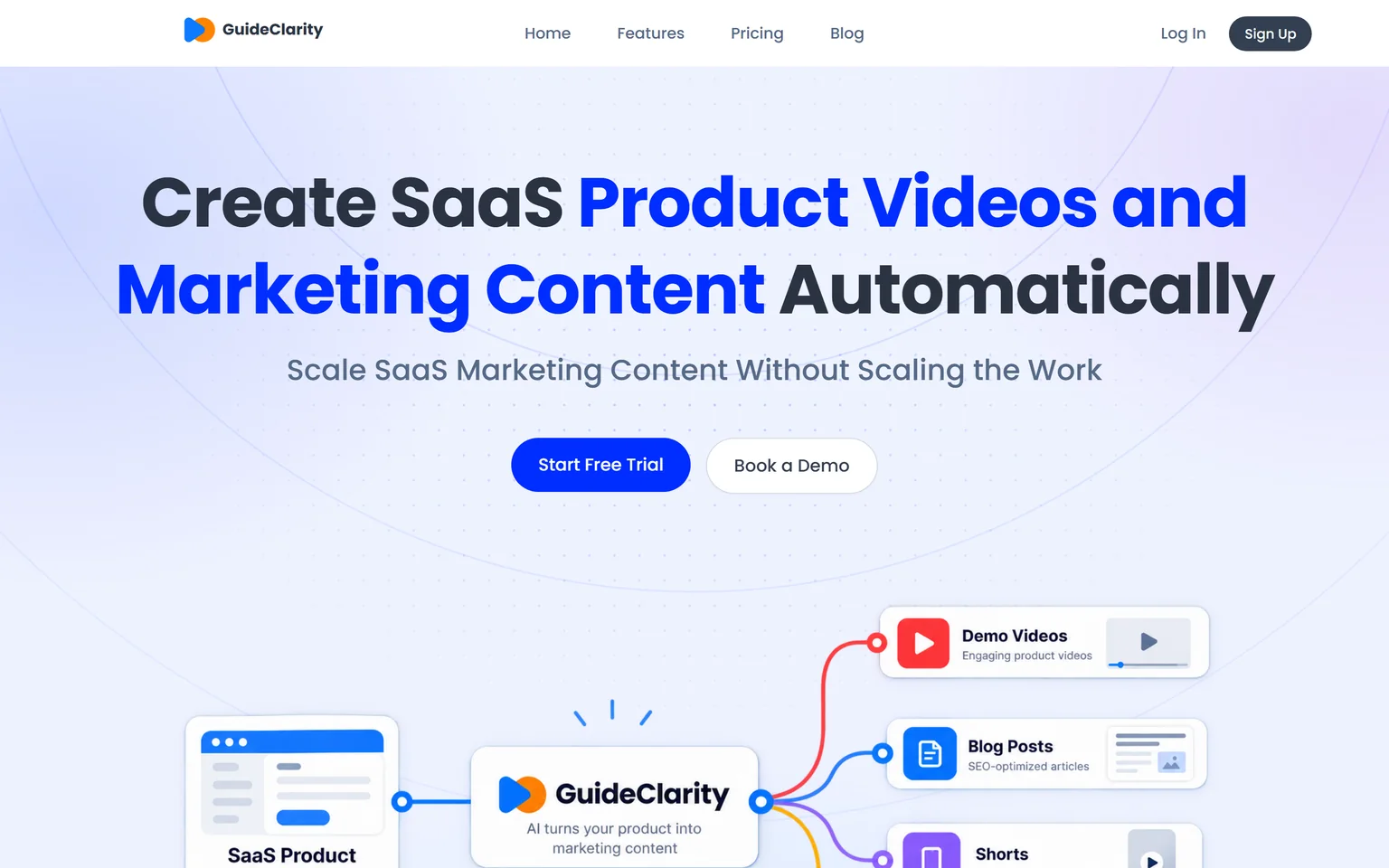
GuideClarity creates SaaS product videos and marketing content automatically. It turns a shipped feature into a demo video, an explainer video, shorts, docs, a blog post and social posts. It is best for SaaS teams that want marketing content without recording, scripting and editing for every channel. It fits founders, marketing teams and product marketers, from one founder to a large team.
Loom in brief
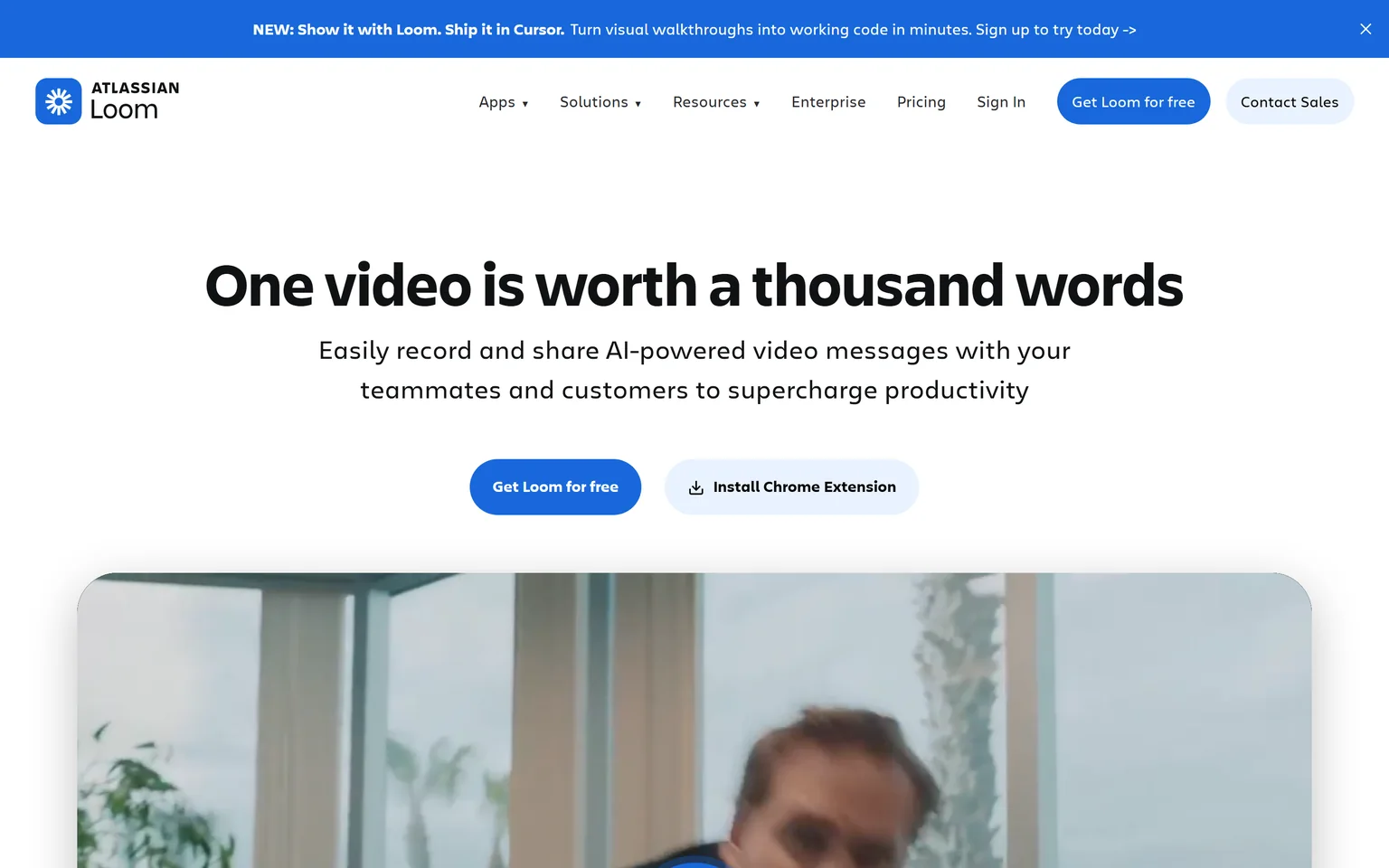
Loom lets you record and share AI-powered video messages with teammates and customers. You record your screen and camera, and a link is ready the moment you stop. Loom runs from a Chrome extension, desktop app or mobile app. Teams use it in place of meetings, long messages and quick demos.
GuideClarity vs Loom workflow
GuideClarity wins on workflow when the goal is a finished product video. With Loom, you are the camera operator, the presenter and the editor. With GuideClarity, the product does the talking. It explores your product, captures the key screens and works out what the feature does and who it is for. Then it builds the video and the other assets without a timeline.
How GuideClarity gets to a finished video
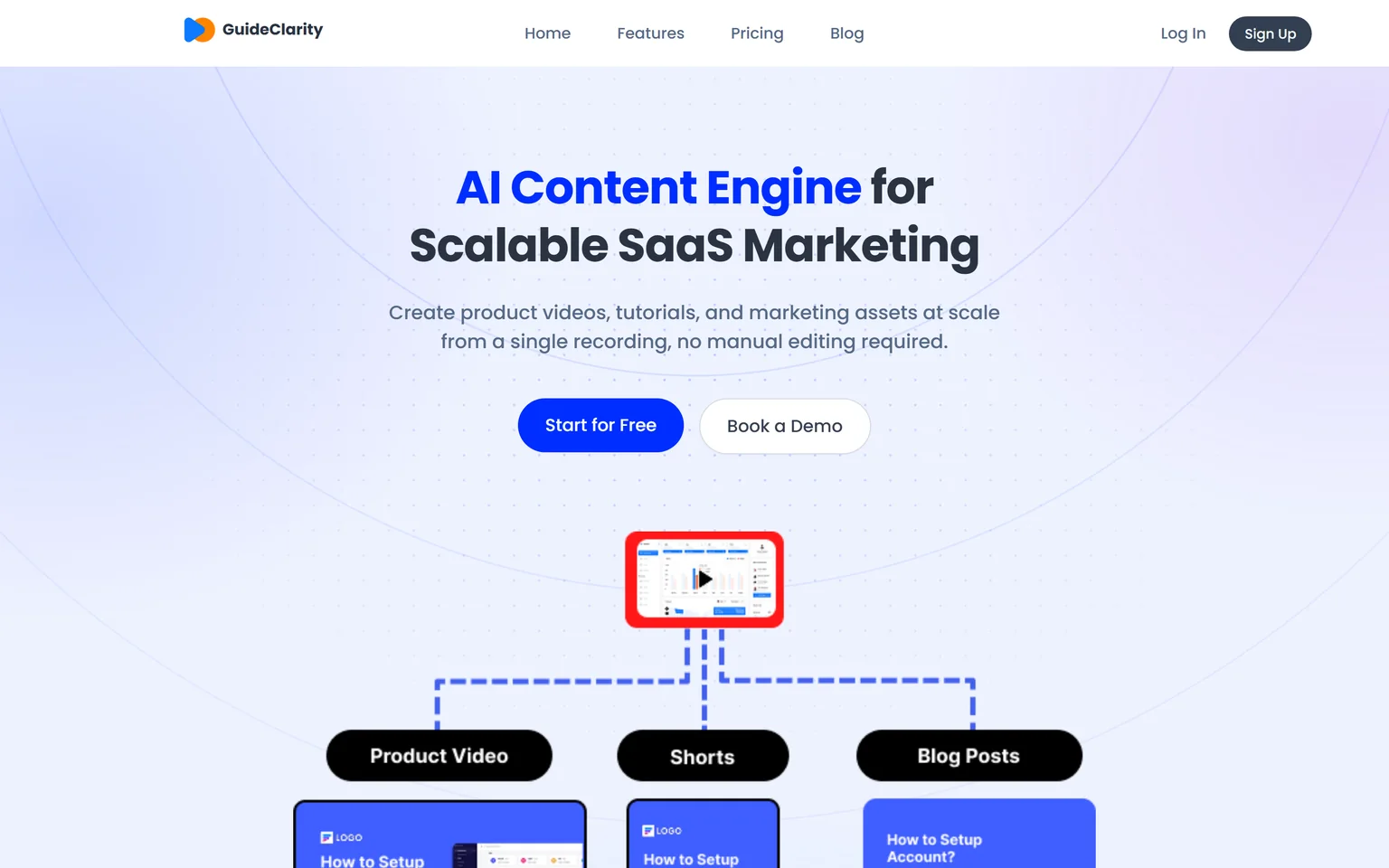
The homepage describes the flow after a release. You ship the feature, and GuideClarity takes it from there. The features page also describes a second path. GuideClarity can create product videos, tutorials and marketing assets at scale from a single recording, with no manual editing required. Either way, the team reviews the result and publishes. Nobody scripts the voiceover or drags clips around.
How Loom gets to a finished video
Loom is built for speed of sharing. You open the extension, pick a screen or a tab, and talk. Loom says you just hit record and Loom AI does the rest, with instant edits, enhancements and recaps. The result is your own take, with your voice and your mistakes, which is often exactly right for a teammate. For a customer-facing demo, you record again until it is clean, or edit it after.
Our guide on making a SaaS demo video that converts shows how much scripting and retaking a polished recorded demo takes.
Edge GuideClarity, because it builds the finished product video from the product, while Loom needs a person to record and retake it.
GuideClarity vs Loom pricing
Pricing is a tie, because the two charge for different things. Loom is cheaper for one person, since Starter is free with 25 videos per person and 5 minute screen recordings. Loom then charges per user. GuideClarity charges one plan price, and lists Pro for individuals and Business for teams. For a team that needs launch videos, GuideClarity replaces work that Loom does not do.
GuideClarity pricing
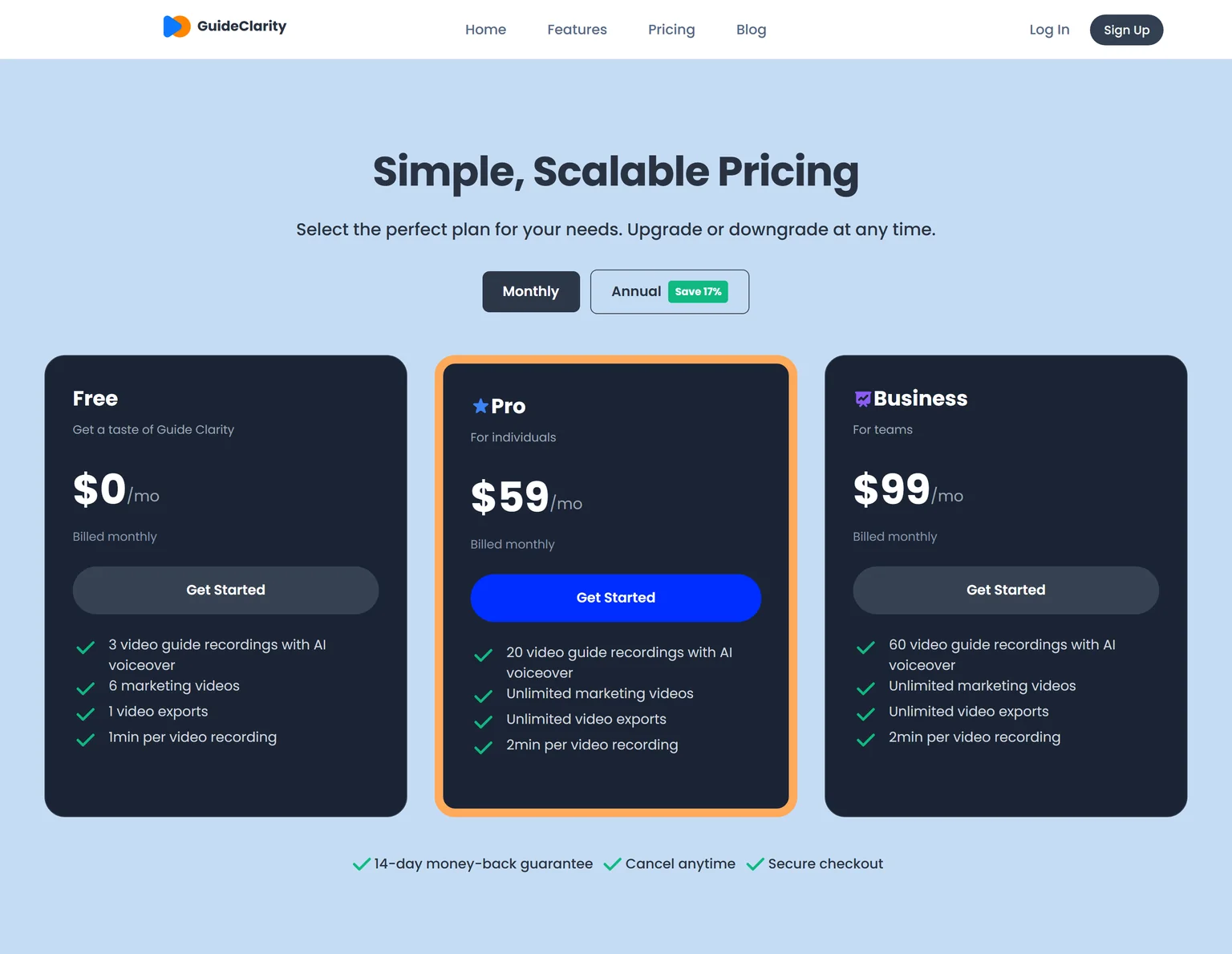
The free plan includes 3 video guide recordings with AI voiceover and 6 marketing videos. Pro costs $59 a month billed monthly and includes 20 video guide recordings, or $49 a month billed annually. Business costs $99 a month and includes 60 video guide recordings. Every paid plan carries a 14-day money-back guarantee.
Loom pricing
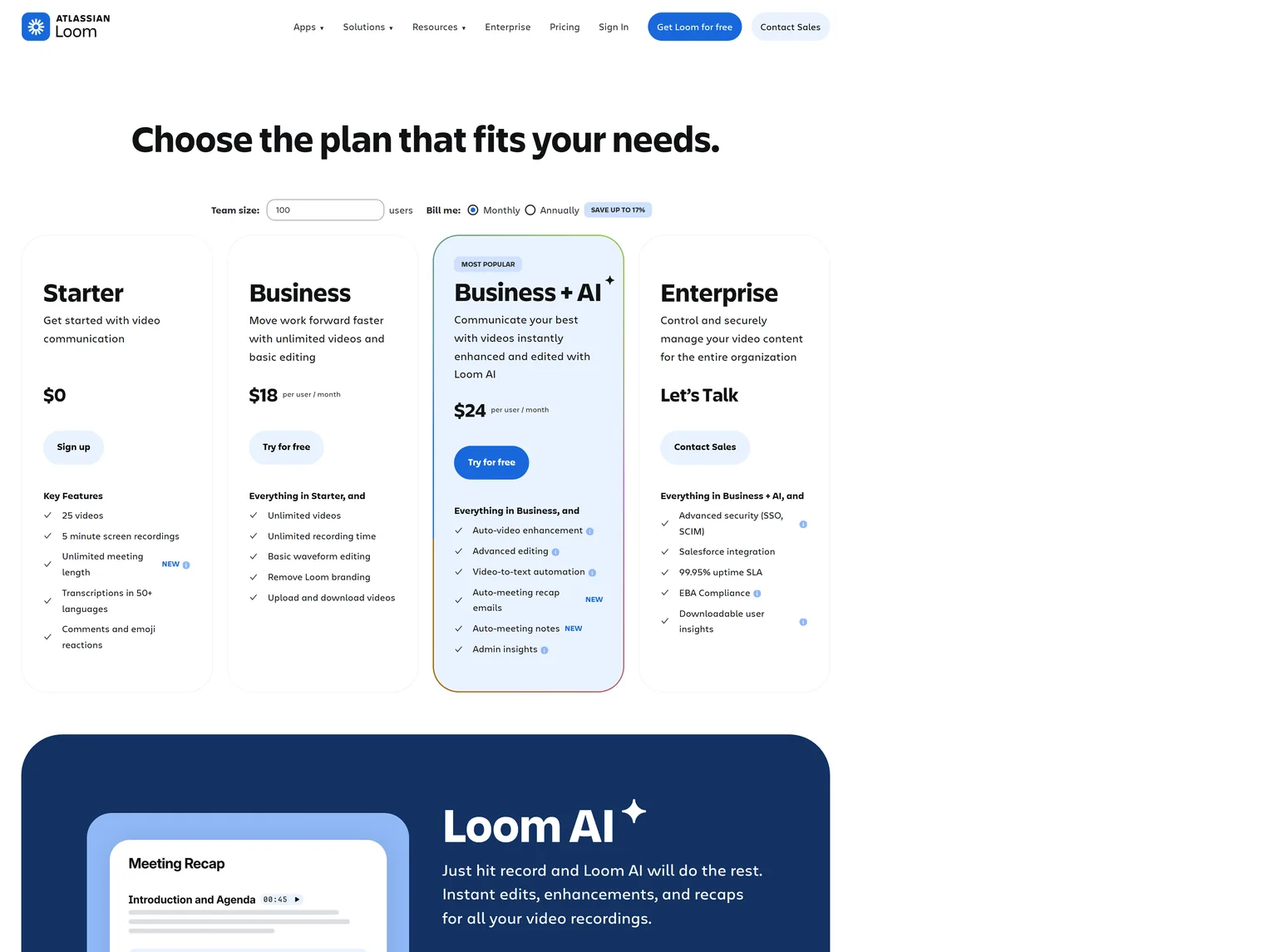
Starter costs $0, and its workspaces hold up to 50 members with recordings capped at 5 minutes per video. Business costs $18 per user a month billed monthly, with unlimited videos, unlimited recording time and Loom branding removed. Business + AI costs $24 per user a month and adds auto-video enhancement and filler word removal. Enterprise is priced on request.
What the same money buys
A founder who records a few short updates a week pays nothing on Loom. A marketing team of five on Loom Business pays five times the per-user price for recording seats. GuideClarity's Business plan costs $99 a month as one plan price, and it produces the videos and launch content rather than the recordings.
Edge Tie, because Loom costs nothing for one person sending short videos, while GuideClarity lists one plan price where Loom charges per user.
GuideClarity vs Loom output
GuideClarity wins on output for marketing. Loom gives you one recording and a share link, which is its whole point. GuideClarity turns one product release into a demo video, a short, a blog post, social posts, screenshots and a release announcement. Each asset is shaped for its channel, so nothing needs reformatting before it goes out.
What comes out of GuideClarity
The video gets polish on its own. GuideClarity adds smart auto-zoom, studio voiceover, captions and chapters, and background music and transitions. Its Shorts Studio makes vertical videos for TikTok, Reels and YouTube Shorts. It also generates documentation automatically from product recordings and creates SEO and AI-optimized blog posts from existing videos. The features page says it can turn any video into 10+ assets for landscape, vertical, blog, social and email.
The GuideClarity features page shows each output with an example.
What comes out of Loom
Loom produces the recording, hosted on a Loom page with comments and a transcript. Business includes uploading and downloading videos, so you can take the file elsewhere. The video looks like what you recorded. That is honest and fast, and it suits internal work. It is not a launch package. Our content repurposing workflow shows what it takes to turn one recording into many channels by hand.
Edge GuideClarity, because one feature becomes the video, the shorts, the docs and the blog post, where Loom gives one recording.
GuideClarity vs Loom use cases
Loom wins on range of use cases. Loom works for almost any message a team sends, internal or external. Stand-up updates, code reviews, bug reports, sales follow-ups and support answers all fit. GuideClarity does one job. It turns SaaS product features into marketing, onboarding and support content for customers.
Where each one fits
| Job | Better fit |
|---|---|
| A quick update for a teammate | Loom |
| Feedback on a design or a bug | Loom |
| A personal video to one prospect | Loom |
| A launch video for a new feature | GuideClarity |
| Shorts and a blog post for the same launch | GuideClarity |
| Help docs that match the shipped product | GuideClarity |
Personal videos to prospects are a common Loom job. Our guide to personalized video demos covers how sales teams run them at scale.
Edge Loom, because it covers internal messages, feedback and sales follow-ups, while GuideClarity focuses on product content for customers.
GuideClarity vs Loom editing
Editing is a tie, because the two take opposite approaches. GuideClarity edits for you. It adds zooms, voiceover, captions, chapters and music without a timeline. Loom gives you light manual control. Loom Business includes basic waveform editing, Business + AI adds advanced editing, and Loom lists editing by transcript. Which is better depends on whether you want to edit at all.
GuideClarity editing
GuideClarity adds smart auto-zoom, studio voiceover, captions and chapters, and background music and transitions automatically. The team reviews the result and can tweak it before publishing. There is no manual timeline to learn, which is the point for a busy marketing team.
Loom editing
Loom trims and cuts on a waveform or a transcript. Business + AI adds auto-video enhancement and filler word removal, which cleans up a take without re-recording. The edits stay close to the raw recording, so the video still sounds like you.
Edge Tie, because GuideClarity gives polish with no editing, while Loom gives manual control over your own recording.
GuideClarity vs Loom collaboration
Loom wins on collaboration. It is built around the conversation that happens under a video. Loom includes comments and emoji reactions and lists viewer insights, so you see who watched and what they said. Free workspaces are generous too, since Starter workspaces hold up to 50 members. GuideClarity's public pages describe plans for individuals and teams, but not comment threads or viewer analytics.
How teams work in each
In Loom, a video is a message. People reply with comments and reactions, and the sender sees who watched. Transcripts make videos searchable, and Starter includes transcriptions in 50+ languages. In GuideClarity, the team reviews generated content, tweaks it and publishes it to its own channels. The conversation happens where the content is published, not inside GuideClarity.
Edge Loom, because comments, reactions and viewer insights make each video a two-way conversation.
GuideClarity vs Loom security and integrations
Loom wins on security and integrations, because it lists them on its pricing page. Loom Enterprise adds SSO and SCIM and a Salesforce integration, and Enterprise includes a 99.95% uptime SLA. Loom also lists a Slack integration. GuideClarity's public pages do not describe SSO, SCIM or integrations, so there is nothing to compare on its side today.
What this means for buyers
Large companies with an IT review will find Loom's enterprise terms ready to check. A SaaS marketing team that publishes to its own site, blog and social channels will care less, because GuideClarity's output leaves the tool as finished files and posts. Ask GuideClarity directly if your security review needs SSO or specific terms.
Edge Loom, because SSO, SCIM, a Salesforce integration and an uptime SLA are listed on its pricing page.
GuideClarity vs Loom: which should you choose
Choose by the audience of the video. For customers seeing a new feature, GuideClarity wins, because it makes the demo video and the launch content from the product. For teammates and quick one-to-one videos, Loom wins, because recording and sharing take seconds and the free plan is generous. The two do not compete for the same minute of your day.
GuideClarity strengths and weaknesses
Strengths
- Builds the product demo video and explainer video from the product.
- One feature in, a whole launch kit out, with shorts, docs and a blog post.
- Polish without editing, from auto-zoom to voiceover and captions.
- One plan price for a team on Business.
- A free plan to test on a real feature.
Weaknesses
- Built for SaaS product content, not for physical products or other businesses.
- Not for everyday team messages or quick feedback videos.
- Not for agencies that film brand or talking-head videos.
Loom strengths and weaknesses
Strengths
- A share link the moment you stop recording.
- A generous free plan for short videos.
- Comments, reactions and viewer insights.
- Enterprise security and integrations listed on its pricing page.
Weaknesses
- Every video needs a person to record it.
- Priced per user on paid plans.
- No launch assets such as shorts, docs or blog posts.
- If you ship features often and want the launch video, shorts and blog post the same day, pick GuideClarity. It builds them from the product.
- If you send quick updates and feedback to teammates, pick Loom. Recording and sharing take seconds.
- If you want polished product videos without learning an editor, pick GuideClarity. Zooms, voiceover and captions are added for you.
- If your sales team sends personal videos to prospects, pick Loom. A face and a voice beat a polished video there.
- If your company needs SSO and an uptime SLA today, pick Loom Enterprise. Its terms are listed on the pricing page.
- If you want other recorders to weigh against Loom, see our Loom alternatives page.
Frequently asked questions about GuideClarity vs Loom
Is Loom better than GuideClarity?
Loom is better for quick video messages to teammates and prospects, and its free Starter plan allows 25 videos of 5 minutes. GuideClarity is better for customer-facing product content, because it builds the demo video, shorts, docs and blog post from your product. So Loom vs GuideClarity is not a straight swap. It depends on who watches the video.
Can Loom make product demo videos?
Yes, if you record them yourself. Loom captures your screen and camera and gives you a link, and Business + AI adds auto-video enhancement and filler word removal. The demo still depends on your script and your take. GuideClarity builds the demo video from the product, with auto-zoom, voiceover, captions and chapters added for you, and makes the launch content from the same feature.
Is there a free version of GuideClarity or Loom?
Both have one. GuideClarity's free plan includes 3 video guide recordings with AI voiceover and 6 marketing videos. Loom's Starter plan is free with 25 videos per person and 5 minute screen recordings. Loom's free plan suits frequent short messages. GuideClarity's free plan suits running one real feature through it before paying.
Can I use GuideClarity and Loom together?
Yes, and the two fit together well. Loom handles the daily conversation, such as updates, reviews and sales follow-ups. GuideClarity handles the launch, with the demo video, explainer, shorts, docs and blog post for each feature. They solve different problems, so there is little overlap in what you pay for. Our Loom alternatives page covers tools that replace Loom itself.
Does GuideClarity need a screen recording?
Not always. The homepage says GuideClarity explores your product and captures the key screens after a release. The features page also describes a path that starts from a single recording, with no manual editing required. In both cases the team reviews and publishes. Loom always starts from your own recording.
How did you verify the prices on this page?
We opened each vendor's pricing page in a browser on September 27, 2026 and saved its text. A script then checked every quoted price and limit against that saved page. Loom's annual toggle shows totals for a large team, so we quote its monthly per-user prices. We took our own screenshots the same day, and the Sources section lists every page.
Sources and verification
Every fact above was read on the pages below on September 27, 2026. The vendor's own page wins over any third-party listing when they disagree. Prices change, so check the vendor before you buy.
- GuideClarity pricing page, checked September 27, 2026.
- GuideClarity homepage, checked September 27, 2026.
- GuideClarity features page, checked September 27, 2026.
- Loom pricing page, checked September 27, 2026.
- Loom homepage, checked September 27, 2026.
Recording product demos in Loom every time you ship a feature? GuideClarity generates the demo video, the explainer video, the shorts, the blog post and the social posts from your live product.
The free plan includes 3 video guide recordings with AI voiceover, so you can run a real feature through it before paying.