TL;DR
VEED vs Descript depends on what you edit. VEED is better for short social videos, because it runs in the browser with templates, subtitles and AI generation, from a lower yearly price. Descript is better for long spoken video such as podcasts and tutorials, because you edit the video by editing its transcript. Descript also lists stronger enterprise security.
- Pick VEED if you make social clips, ads and subtitled videos, and want AI to generate videos from an idea.
- Pick Descript if you record and edit podcasts, interviews or talking-head videos and want to cut them like a document.
- Pick GuideClarity if you want product demo videos and explainer videos generated from your live SaaS product, plus the docs, shorts and blog post.
VEED vs Descript at a glance
The table compares VEED and Descript on the points buyers check first. Starting price is the cheapest paid plan in US dollars per person a month, billed yearly, which is how both pricing pages open. A tinted cell marks the side with the edge. We read every price and limit on each vendor's own page on September 27, 2026.
| Criterion | VEED | Descript |
|---|---|---|
| Best for | Social video, subtitles and AI generation | Long spoken video edited by transcript |
| Starting price | $10 a month, billed yearly | $16 a month, billed yearly |
| Free plan | Yes, start for free | Yes |
| Editing style | Browser timeline and templates | Edit the transcript like a document |
| Subtitles and translation | Translate to 50+ languages on Pro | 30+ languages on Business |
| AI generation | About 1,500 AI videos on Creator | AI editing of your recordings |
| Recording | Free online screen recorder | Recording and remote recording built in |
| Security | GDPR and CPPA compliance stated | SOC 2 Type II, SSO, SCIM on Enterprise |
| Biggest limitation | Less suited to long spoken edits | Media hours and AI credits are metered |
How we compared VEED and Descript
VEED and Descript are both AI video editors, but they start from different places. We compared them on the seven things buyers argue about in reviews and in the questions people search. Those are editing style, price, subtitles and translation, AI generation, recording, collaboration and security. Both vendors' own pages are the only sources for facts.
- Own screenshots. Every homepage and pricing screenshot on this page is ours, taken on September 27, 2026 at 1440 pixels wide.
- Verified facts. Every price, limit and plan detail comes from the vendor's own page, and a script re-checked each one on September 27, 2026. The Sources section lists each page.
- An edge on every criterion. Each section ends with the side that wins it and the one fact that decides it. A tie is called when the answer depends on the team.
- No affiliate links. No vendor on this page pays us for a mention or a click.
GuideClarity publishes this page. It is not one of the two tools compared. Where it fits and where it does not is stated in its own section, with the same directness as the strengths and weaknesses of VEED and Descript.
What VEED and Descript are
VEED in brief
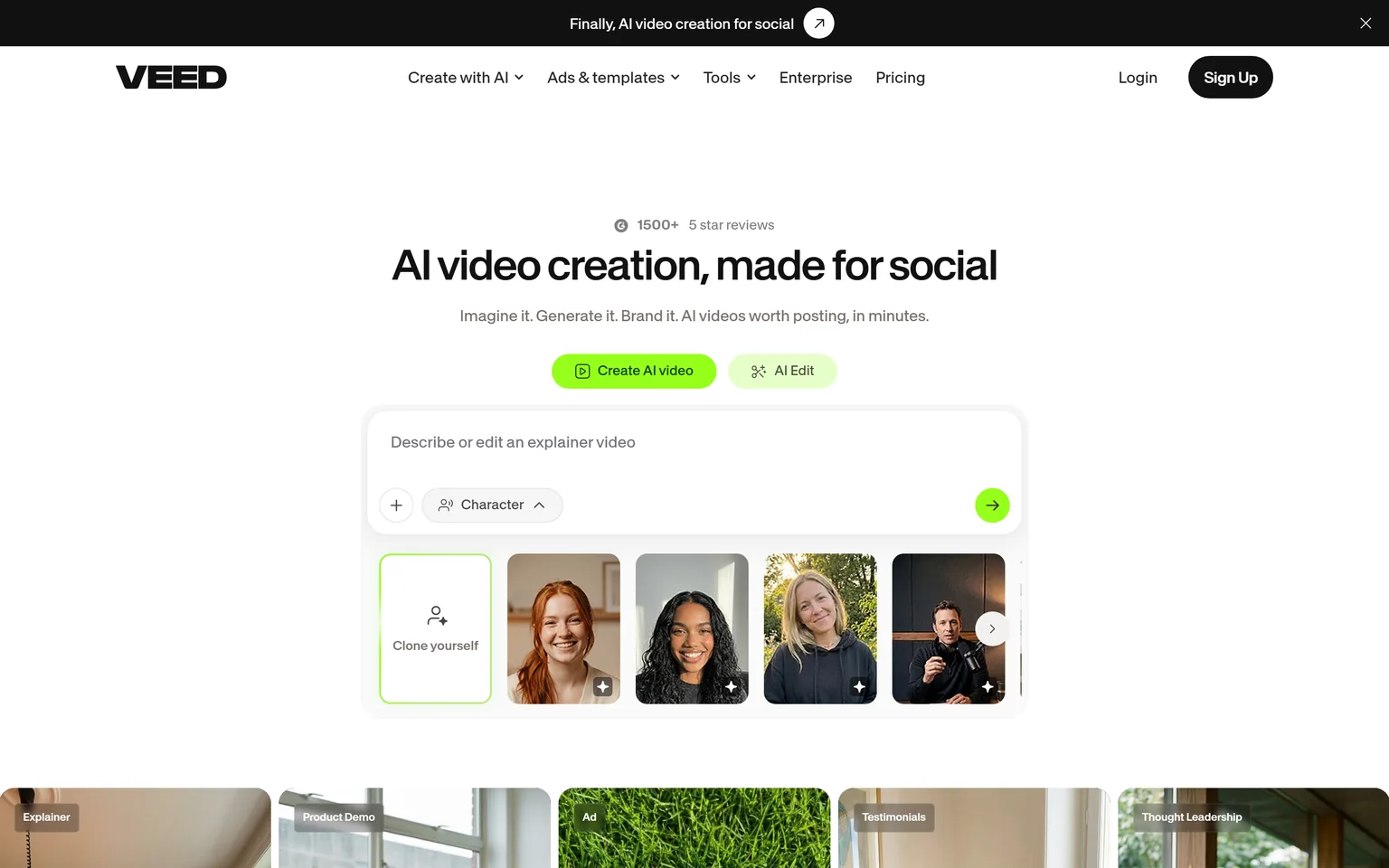
VEED calls itself AI video creation made for social. It is a browser video editor with templates, auto subtitles, translation and an AI studio that generates videos from a prompt. It applies your colours, fonts, logos and voice to every video. Marketers, social teams and creators who post short videos often are its core buyers.
Descript in brief
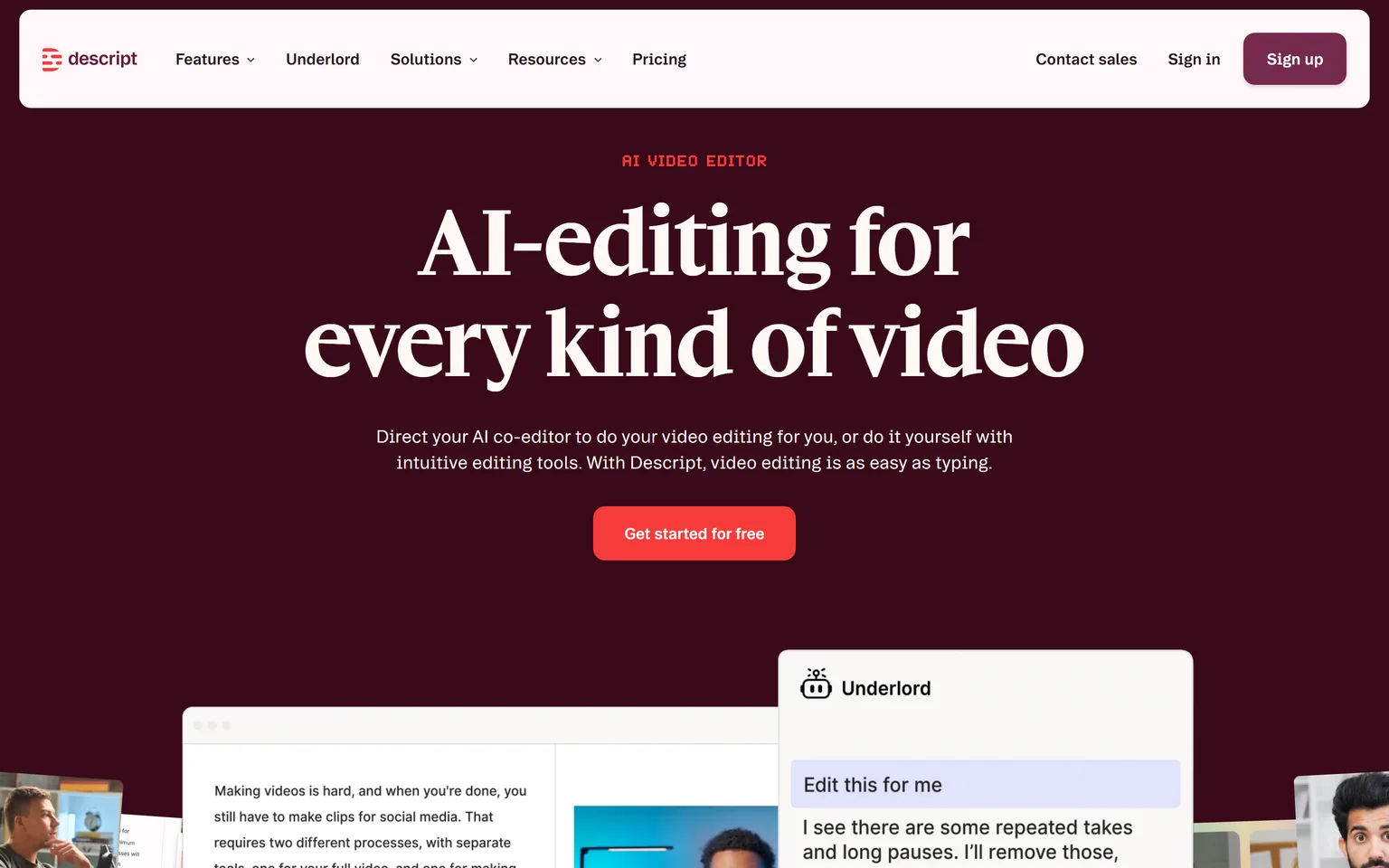
Descript is a recorder and editor built around the transcript. With Descript, video editing is as easy as typing. You record or drop in a file, Descript writes the transcript, and you cut words to cut the video. Its AI co-editor, Underlord, handles clean up on request. Podcasters, educators and teams that make talking-head video are its core buyers.
VEED vs Descript editing
Descript wins on editing when the video is mostly talking. Descript transcribes any recording and lets you edit the video by editing the text. Deleting a sentence deletes that part of the video. VEED edits on a classic browser timeline with templates, text and effects, which is faster for short visual clips but slower for a long interview.
How editing works in Descript
You drop in a recording, and the transcript appears in seconds. You cut filler words, reorder paragraphs and fix retakes as if you were editing a document. The timeline is still there when you need it. Hobbyist includes AI tools such as Studio Sound, Remove Filler Words and Create Clips, plus AI Speech with custom voice clones, so you can fix a misspoken word without re-recording.
How editing works in VEED
VEED opens a browser editor with a timeline, templates and a large catalog of stock audio and video. You drag clips, add text and apply a brand kit. It suits ads, reels and explainers built from short scenes. For a one hour podcast, scrubbing a timeline is slower than editing a transcript.
Edge Descript, because editing the transcript is the fastest way to cut long spoken video.
VEED vs Descript pricing
VEED wins on price. Both sell per-user plans and both pages open on yearly billing. VEED Creator costs $10 per user a month billed yearly, while Descript Hobbyist costs $16 per person a month on annual billing. VEED's next plan also costs less than Descript's. Both let you start free.
VEED pricing
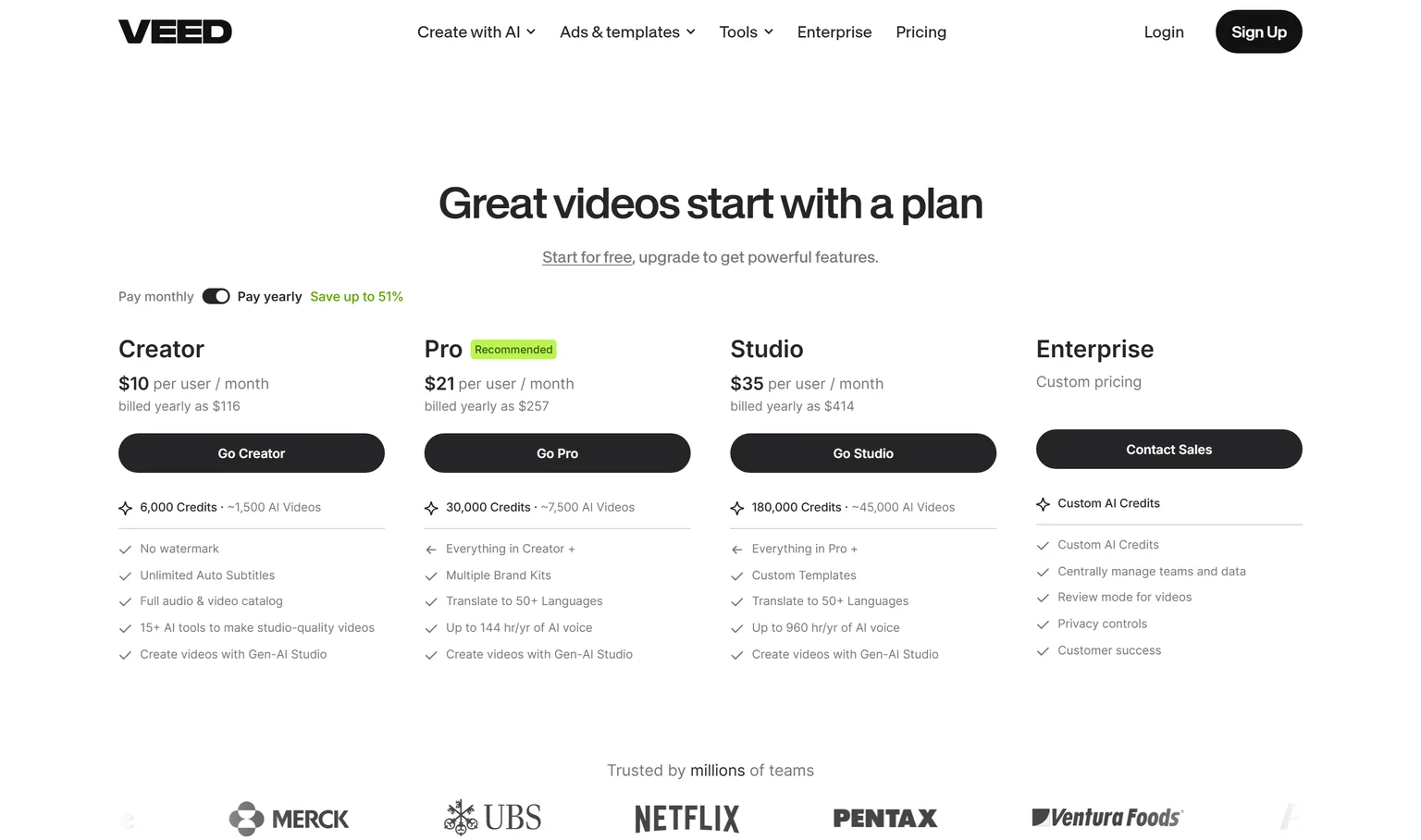
Creator costs $10 per user a month, $116 a year, with no watermark. Pro costs $21 per user a month, $257 a year. Studio costs $35 per user a month, $414 a year. Enterprise is custom priced. VEED says yearly billing saves up to 51%.
Descript pricing
Hobbyist costs $16 per person a month on annual billing, or $24 monthly. Creator costs $24 per person a month on annual billing, or $35 monthly. Business costs $50 per person a month on annual billing, or $65 monthly. Hobbyist includes 10 media hours and 400 AI credits a month.
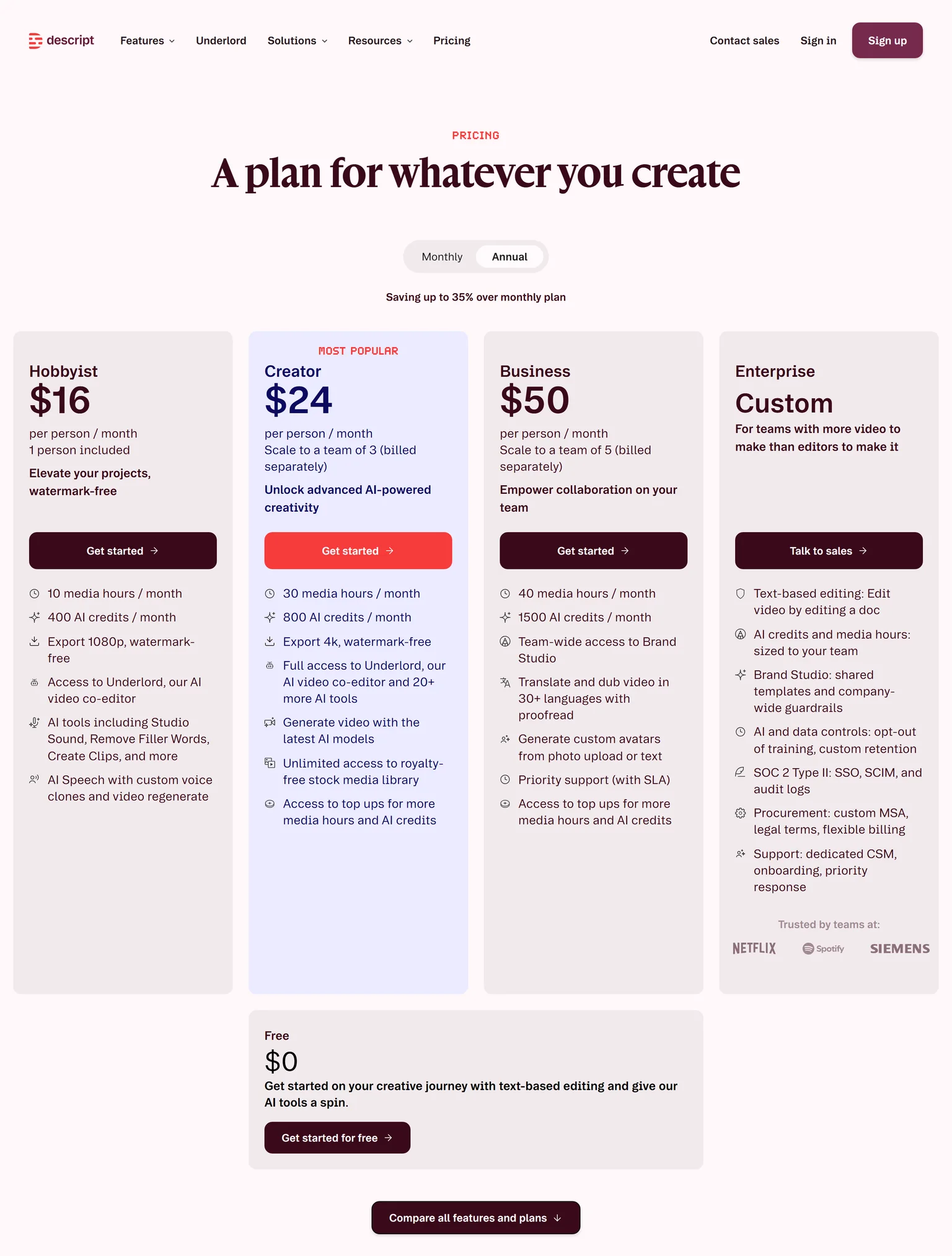
What the same money buys
A solo creator on yearly billing pays less on VEED Creator than on Descript Hobbyist. Descript meters work in media hours and AI credits. VEED meters AI work in credits, with 6,000 credits on Creator, about 1,500 AI videos. Heavy editors of long recordings should check Descript's media hours before they commit. Descript Creator includes 30 media hours a month and 4K watermark-free export.
Edge VEED, because its entry plan costs less per user than Descript's on yearly billing.
VEED vs Descript subtitles and translation
VEED wins on subtitles and translation. Creator includes unlimited auto subtitles, and Pro adds translation into 50+ languages. Descript's translation sits higher up, since Business translates and dubs video in 30+ languages with proofreading. For teams that post the same video in several languages, VEED gets there on a cheaper plan.
Subtitles in each
VEED's homepage promotes subtitles designed to keep viewers watching. Descript adds captions from the transcript it already has, and you can export them with the video. Both work well for accessibility.
Translation and dubbing
VEED translates on Pro and above. Descript translates and dubs on Business, with a proofreading step before export. A marketing team that localizes every reel will reach translation sooner on VEED.
Edge VEED, because unlimited auto subtitles come on its entry plan and translation on its second plan.
VEED vs Descript AI video generation
VEED wins on AI generation, while Descript's AI is aimed at editing. VEED's studio generates a video from an idea or a prompt, with about 1,500 AI videos on Creator. Pro includes up to 144 hours a year of AI voice, and Studio up to 960 hours. Descript uses AI to clean, cut and fix videos you recorded.
AI in VEED
VEED's homepage puts generation first. It says imagine it, generate it, brand it. You describe a video, pick a character or a template, and VEED builds the draft. AI voices, avatars and brand kits fill in the rest. This suits ads and social posts where no one wants to film.
AI in Descript
Descript's Underlord works on footage you already have. It removes filler words and retakes, fixes eye contact and lighting, and cuts clips for social. Business also generates custom avatars from a photo upload or text. The focus is making a real recording better, not replacing it.
Edge VEED, because it generates whole videos from a prompt, while Descript's AI mainly improves recordings.
VEED vs Descript recording
Descript wins on recording. It is a recorder and an editor in one app, and it lists remote recording for interviews and podcasts with guests. VEED also records. It offers a free online screen recorder that captures the screen, webcam and sound in one click. For a podcast with a remote guest, Descript covers the whole job. Our guide on making a SaaS demo video that converts shows what a recorded demo needs.
Recording in each
In Descript, the recording lands straight in the editor with its transcript ready. Remote guests can join the recording from their own computer. In VEED, the browser recorder is quick for a screen walkthrough or a talking-head clip, and the result opens in the same editor. Neither needs a separate recording app.
Edge Descript, because recording, remote guests and transcript editing sit in one workflow.
VEED vs Descript collaboration
Descript wins on collaboration for small teams. On Descript you can send a link and get comments right on the video, and paid plans scale to a team, with Creator scaling to a team of 3 and Business to a team of 5. VEED's formal review mode and central team management sit on Enterprise.
Team work in each
Descript's comments on a shared link fit the review loop of a podcast or tutorial, where an editor and a host go back and forth. VEED's brand kits keep a team's videos consistent, and Pro adds multiple brand kits. For approvals across a large company, VEED Enterprise adds a proper review mode.
Edge Descript, because comments on a shared link and team scaling come on its paid plans.
VEED vs Descript security
Descript wins on security, because it lists more on its pricing page. Descript Enterprise lists SOC 2 Type II with SSO, SCIM and audit logs. VEED says it practices data protection by design and complies with GDPR and the CPPA, and Enterprise adds privacy controls. Both suit a normal company. Descript is easier to clear through a strict IT review.
What this means for buyers
Security teams usually ask for a SOC 2 report and single sign-on first. Descript names both on its Enterprise card. VEED names its privacy compliance on its enterprise page. Ask VEED sales for its audit reports if your review needs them.
Edge Descript, because SOC 2 Type II, SSO, SCIM and audit logs are listed on its Enterprise plan.
VEED vs Descript: which should you choose
Choose by the video you make most. For short social videos with subtitles and AI generation, VEED wins, and its entry plan costs less. For podcasts, interviews and tutorials where people talk, Descript wins, because you edit the transcript. Descript also leads on recording, comments and security. Both are strong editors for their own kind of work.
VEED strengths and weaknesses
Strengths
- A lower entry price per user on yearly billing.
- Unlimited auto subtitles on the entry plan.
- Translation into 50+ languages from Pro.
- Generates whole videos from a prompt.
Weaknesses
- Slower than transcript editing for long spoken video.
- Review mode and team management wait for Enterprise.
- Fewer security details listed on its pricing page.
Descript strengths and weaknesses
Strengths
- Edit video by editing the transcript.
- Recording and remote recording in the same app.
- Comments on a shared link.
- SOC 2 Type II, SSO and SCIM on Enterprise.
Weaknesses
- A higher entry price per person.
- Media hours and AI credits are metered.
- Translation and dubbing wait for Business.
- If you post reels, ads and short social videos, pick VEED. Templates and subtitles do most of the work.
- If you edit podcasts, interviews or long tutorials, pick Descript. Editing the transcript saves hours.
- If you publish in several languages on a budget, pick VEED. Translation starts on Pro.
- If your IT team needs SOC 2 and SSO, pick Descript Enterprise.
- If you ship SaaS features and want the launch videos and content generated from the product, pick GuideClarity.
Where GuideClarity fits between VEED and Descript
VEED and Descript both edit video you bring or generate. GuideClarity starts from your SaaS product. It generates the product demo video and the explainer video from the live product, then the docs, shorts, blog post and social posts from the same feature. It is best for SaaS teams that want marketing content without editing. Podcasters, creators and ad teams are better served by Descript or VEED.

GuideClarity pricing
The free plan includes 3 video guide recordings with AI voiceover and 6 marketing videos. Pro costs $59 a month billed monthly, or $49 a month billed annually. Business costs $99 a month. Every paid plan carries a 14-day money-back guarantee.
Strengths
- Builds the product demo video and explainer video from the product.
- One feature in, a whole launch kit out, with shorts, docs and a blog post.
- No timeline and no transcript editing. Review and publish is the work.
- A free plan to test on a real feature.
Weaknesses
- Built for SaaS product content, not for podcasts, vlogs or ads.
- Not a general video editor for footage you shot yourself.
GuideClarity vs VEED and Descript
VEED and Descript make you faster at editing. GuideClarity creates SaaS product videos and marketing content automatically, so it removes the editing for one job. It turns one release into a demo video, a short, a blog post, social posts, screenshots and a release announcement. The GuideClarity features page lists every output. Our guide to AI explainer videos for SaaS shows where each kind of tool fits.
Frequently asked questions about VEED vs Descript
Is Descript better than VEED?
Descript is better for long spoken video, because you edit the video by editing its transcript and recording is built in. VEED is better for short social video, subtitles and AI generation, and Creator costs $10 per user a month billed yearly. So in Descript vs VEED, the winner is the one that matches the video you make most.
Is there anything better than Descript?
For editing spoken video by transcript, Descript is a strong pick. For other jobs, other tools fit better. VEED is quicker for social clips and subtitles. Our Camtasia alternatives page covers screen recording editors, and our Loom alternatives page covers quick video messages. For SaaS product videos, GuideClarity generates them from the product.
What is better than VEED?
It depends on the job. Descript is better for podcasts, interviews and tutorials, and it lists SOC 2 Type II, SSO and SCIM on Enterprise. For a SaaS team whose videos are product demos and launch content, GuideClarity generates them from the live product with no editing. VEED stays strong for social video and subtitles.
Is Descript actually good?
Yes, for the work it is built for. With Descript, video editing is as easy as typing, and its AI tools clean audio, remove filler words and cut clips. The catch is metering. Hobbyist includes 10 media hours and 400 AI credits a month, so heavy users often need a higher plan.
Is there a free version of VEED or Descript?
Both let you start free. VEED says you can start for free and upgrade for more features. Descript has a free plan to start with text-based editing. Paid plans raise the limits. VEED Creator includes no watermark, and Descript Hobbyist exports 1080p without a watermark.
How did you verify the prices on this page?
We opened each vendor's pricing page in a browser on September 27, 2026 and saved its text. A script then checked every quoted price and limit against that saved page. Both pages open on yearly billing, so we quote yearly prices, with Descript's monthly prices where its page shows them. We took our own screenshots the same day.
Sources and verification
Every fact above was read on the pages below on September 27, 2026. The vendor's own page wins over any third-party listing when they disagree. Prices change, so check the vendor before you buy.
- VEED pricing page, checked September 27, 2026.
- VEED homepage, checked September 27, 2026.
- VEED enterprise page, checked September 27, 2026.
- VEED screen recorder page, checked September 27, 2026.
- Descript pricing page, checked September 27, 2026.
- Descript homepage, checked September 27, 2026.
- GuideClarity pricing page, checked September 27, 2026.
- GuideClarity homepage, checked September 27, 2026.
Editing product demos in VEED or Descript every time your SaaS ships a feature? GuideClarity generates the demo video, the explainer video, the shorts, the blog post and the social posts from your live product.
The free plan includes 3 video guide recordings with AI voiceover, so you can run a real feature through it before paying.