

A content repurposing workflow turns one source asset into several channel-native pieces on a repeatable schedule. For SaaS teams, the best source is a screen recording of the product. One clean 5 to 10 minute recording can feed seven outputs, from a demo video to an onboarding tooltip. Content repurposing is cheap at the recording step. The real work is adapting each output to its channel.
What is a content repurposing workflow?
Most SaaS teams already have plenty of great content to repurpose. It is sitting right there in their product screen recordings. A content repurposing workflow is the repeatable system that turns one recording like that into several new pieces. Each piece is rebuilt for a different format, channel or audience. The workflow settles four things. It sets the source you start from, the outputs you owe, who adapts each one, and how you measure the return.
The recording is the right starting point in 2026 because it already holds the click path, the voiceover and the visuals. Every downstream format needs those three things. A blog post loses the visuals. A live shoot adds cost.
The idea is older than most SaaS companies. Daniel Jacobson and his team at NPR coined "Create Once, Publish Everywhere" (COPE) in 2009. Their system fed the website, the apps and partners from one content store. COPE solved distribution. "Record once, publish everywhere" is the SaaS variant. The input is a product recording, and the hard part is adaptation, not plumbing.
Content repurposing vs cross-posting: why tailoring is the job
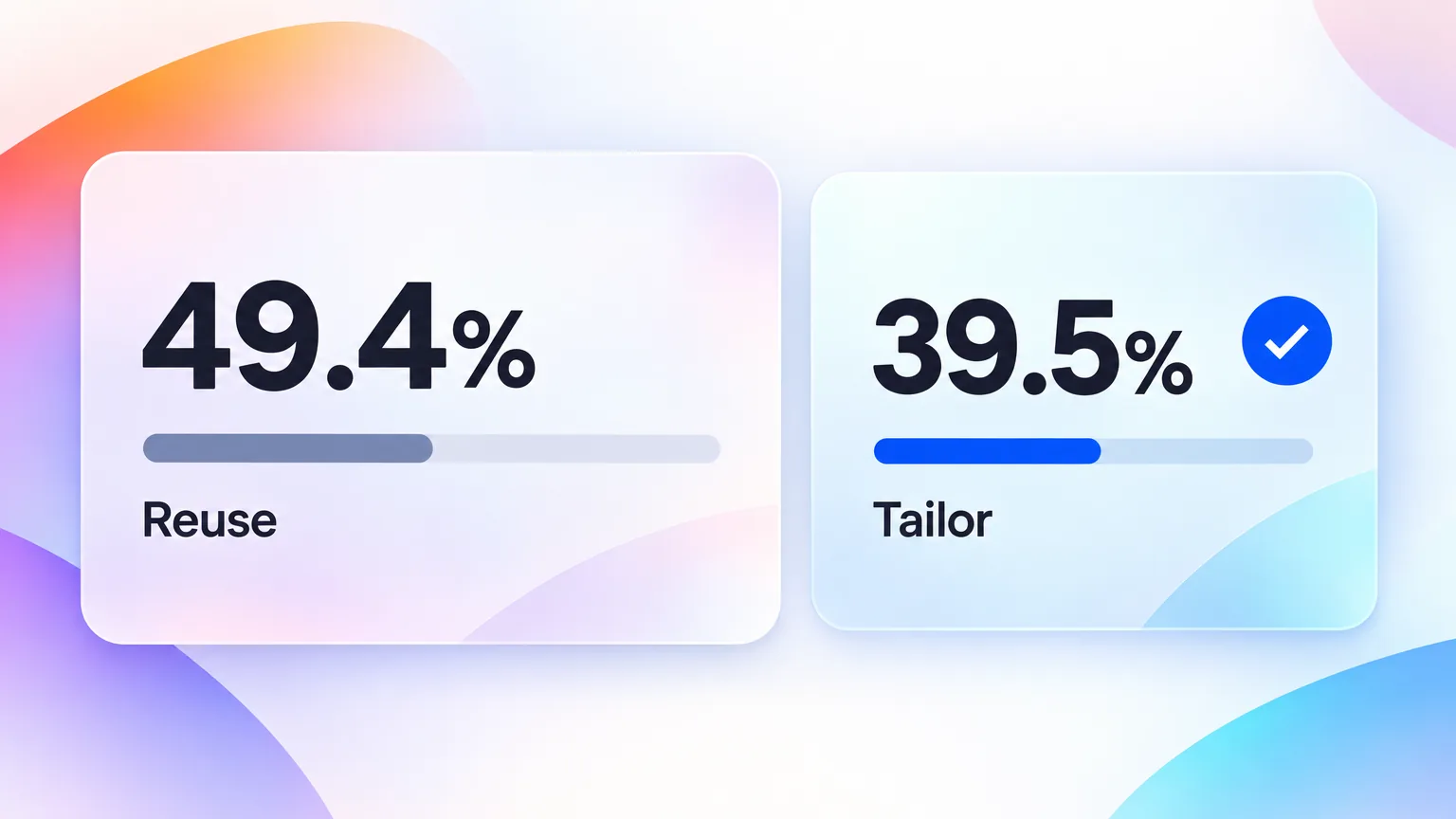
Content repurposing rebuilds an asset for each platform's format, length and intent. Cross-posting publishes the same asset unchanged in several places. The two sound alike, but they produce different results. HubSpot's 2026 State of Marketing report surveyed 1,500+ marketers. It found that 49.4% reuse the same content across platforms, while 39.5% tailor the content for each platform. Half the market is cross-posting and calling it repurposing.
A practitioner in Reddit's r/content_marketing community said it plainly. "Writing a LinkedIn post based on a YouTube video isn't reformatting. It's a complete rethink."
| Cross-posting | Content repurposing | |
|---|---|---|
| What changes | Nothing, or only the caption | Format, length, hook and call to action |
| Effort per extra channel | Minutes | 20 to 90 minutes |
| Fits the channel's native format | Rarely | By design |
| Typical failure | Horizontal video on a vertical feed | Brand voice drifting between channels |
The rule for a SaaS team is simple. Cross-post only where the audience and the format match. The same demo on YouTube and on your homepage is a fair example. Repurpose everywhere else.
The exception is worth knowing. Cross-posting is fine in three cases:
- The same asset serves the same intent, like a demo on YouTube and on a pricing page.
- One channel mirrors another, like a podcast feed and its YouTube upload.
- The asset is time-sensitive and speed beats polish, like a launch-day announcement.
Everywhere else, an unchanged post tells the audience you did not make it for them.
Why content repurposing pays for SaaS teams in 2026
Content repurposing pays because the costly part of SaaS content is knowing what to say. A recording captures that knowledge once. Every derivative reuses the product insight, the script and the visuals, so the seventh format costs a fraction of the first. Three shifts made that math stronger in 2026, and all three come from primary surveys.
- Video carries the return. HubSpot's 2026 report ranks short-form video first for ROI at 48.6%. A product recording is the cheapest way to feed that format every week.
- AI removed the editing bottleneck. The Content Marketing Institute and MarketingProfs found that 95% of B2B marketers now use AI-powered applications, and 87% say productivity improved. The same survey found only 58% saw quality improve. That gap is exactly what a repurposing workflow has to close.
- Buyers are spread across channels. Wistia's 2026 State of Video report found that over half of companies repurpose video into social clips. LinkedIn (67%), Instagram (49%) and YouTube (41%) are the top destinations.
Here is the part most guides skip. Teams rarely fail for lack of ideas. They fail on capacity. Manual repurposing turns one recording into a week of editing for one marketer. So a content repurposing workflow has to start from a single source and a fixed output map, not a fresh plan for every launch.
This math does not apply if your message is still moving. A team without product-market fit rewrites its positioning every few weeks. Repurposing a recording across seven channels then spreads a message you will soon retire. Fix the positioning first. Then repurpose the recordings that survive it.
The "record once" input: what to record first
A screen recording beats a blog post or a live shoot as the source for SaaS content. It shows the real UI, the real click path and the real outcome. Every downstream asset, from a help center article to a LinkedIn clip, can be cut or transcribed from it. Not every recording repurposes equally, though. Four recording archetypes cover almost every SaaS source asset.
| Recording archetype | Length | Best downstream outputs | Watch out for |
|---|---|---|---|
| Product demo | 5 to 10 min | Demo video, blog post, sales follow-up, social clips | Too many features in one take |
| Feature deep-dive | 2 to 4 min | Help center article, onboarding tooltip, release email | Recording an unfinished UI |
| Customer story walkthrough | 10 to 20 min | Case study, LinkedIn clips, sales enablement | Needs customer approval before reuse |
| Founder or PM point of view | 5 to 15 min | Blog post, newsletter, thought leadership clips | Weak visuals, so lean on the transcript |
Record for repurposing from the start. Speak each step as a self-contained sentence. Pause for a beat between steps. Keep one workflow per take. Those pauses become the cut points for every clip later. The guide to making a SaaS product demo video that converts covers recording craft in detail.
A day-one recording checklist
- Write the output map on one line above the script, so every take serves it.
- Use a clean browser profile with no bookmarks, extensions or personal tabs.
- Set the screen to 1920 by 1080 and zoom the app to 110 to 125 percent, so text survives a vertical crop.
- Seed the product with realistic demo data, never real customer names.
- Say each step as one sentence, then pause for two seconds before the next click.
- Record one workflow per take, and start a new take instead of fixing a mistake mid-flow.
The "publish everywhere" output map: 7 formats from one recording
The output map is the list of assets one recording owes the business. Seven formats cover the SaaS funnel from discovery to retention, listed in the table below. Each output changes something different about the source, so each one gets its own time budget before anyone hits record.
| Output | Channel | What changes from the recording | Planning estimate |
|---|---|---|---|
| Long-form demo video | YouTube, homepage | Trim, captions, chapters | 45 min |
| Help center article | Knowledge base | Steps become text plus screenshots | 30 min |
| SEO blog post | Blog | Transcript becomes an argument with headings | 90 min |
| Social clips (30 to 60 s) | LinkedIn, Instagram, YouTube Shorts | Vertical crop, hook in the first 3 seconds | 40 min for 3 clips |
| Email excerpt | Newsletter, release email | One insight plus a GIF or thumbnail | 20 min |
| Sales follow-up snippet | Sales email, CRM | 60 to 90 second cut of the relevant feature | 15 min |
| In-app onboarding tooltip | Product | 20 to 45 second clip tied to one action | 25 min |
These estimates are planning figures for an AI-assisted team, not measurements. Your numbers will differ by tool and by review process.
Which outputs to cut when time is short
Not every recording deserves all seven outputs. When the week is tight, keep the outputs closest to revenue and cut the rest.
| Output | Keep it when | Cut it when |
|---|---|---|
| Help center article | The recording shows a real user task | The feature is still in beta |
| Sales follow-up snippet | Reps get asked about this feature | The feature never comes up in calls |
| Social clips | The recording has one visual "aha" moment | The value is only visible over several minutes |
| SEO blog post | A search query matches the topic | Nobody searches for it, so a help article is enough |
| Onboarding tooltip | The feature is part of first-week activation | The feature is for power users only |
Two outputs have their own deep dives. The onboarding format is covered in the SaaS user onboarding video playbook. Repurposing content for social media gets its own spoke on cutting long-form demos for TikTok and Reels.
Content repurposing tools: manual, AI-assisted, or automated
Content repurposing tools fall into three tiers, and most SaaS teams need one tool per tier rather than one tool for everything. Manual editors give you control. AI-assisted tools cut transcription and clipping time. Automation tools handle distribution. Choose the stack before you run the workflow, because the generate stage depends on it. Prices were checked on each vendor's pricing page on September 23, 2026.
| Tier | Example tool | What it does in the workflow | Price (monthly) |
|---|---|---|---|
| Manual plus AI editing | Descript | Text-based editing, transcripts, captions | Free plan, paid from $16 per user billed annually (Descript) |
| AI clipping | OpusClip | Finds short clips in long video, reframes to vertical | Free, Starter $15, Pro $29 (OpusClip) |
| Recording to finished assets | GuideClarity | Turns a raw screen recording into a polished product video, tutorial and marketing content | Free plan available |
| Distribution automation | Repurpose.io | Auto-publishes and resizes across social accounts | Starter $35, Pro $79, Agency $179 (Repurpose.io) |
The right stack depends on volume. A team shipping one recording a month can run everything in Descript. A team shipping weekly needs a clipping tool and a distribution tool. Otherwise the adapt stage, stage 4 of the workflow below, becomes the bottleneck. For a full vendor comparison, see the SaaS demo video software buyer's guide and the GuideClarity features page.
Which tool tier fits your team
| Team situation | Start with | Add next | Skip for now |
|---|---|---|---|
| One marketer, one recording a month | A text-based editor like Descript | Nothing yet | Distribution automation |
| Small team, weekly recordings | An editor plus an AI clipping tool | A distribution tool | Custom integrations |
| Product marketing owns docs and demos | A recording-to-assets tool like GuideClarity | A clipping tool for social | Separate tools per format |
| Many social accounts across regions | A distribution tool like Repurpose.io | An AI clipping tool | Manual posting |
The trade-off is control versus speed. Each tool you add saves hours but adds a place where brand voice can drift. Add a tier only when the stage it covers is your real bottleneck.
The 5-stage content repurposing workflow, stages 1 to 3
A content repurposing workflow for SaaS runs in five stages. You plan, record, generate, adapt and then distribute. The first three stages produce a clean master asset and its raw derivatives. Getting them right decides whether stages 4 and 5 take an afternoon or a whole week. Do not rush the planning step.
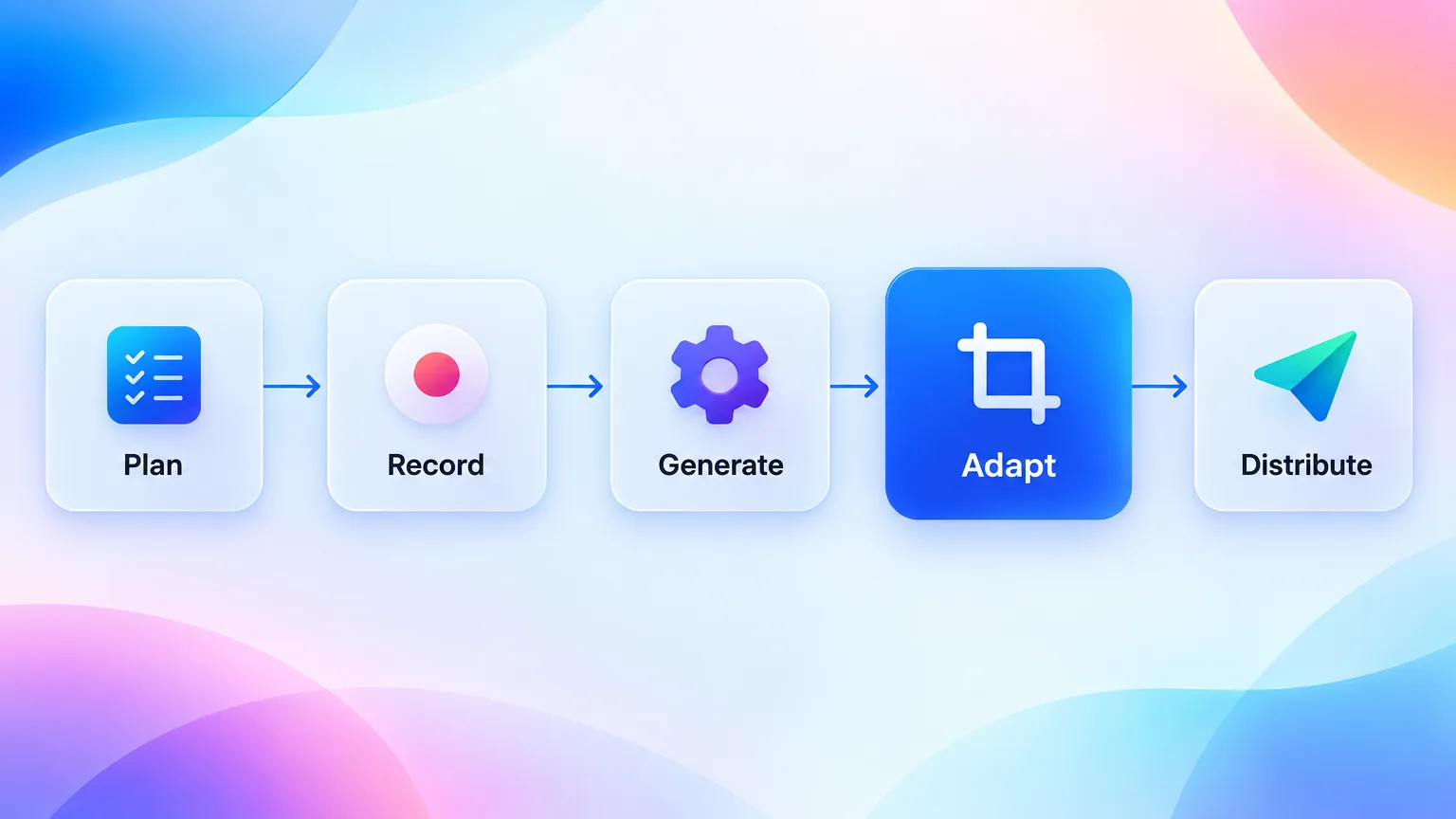
- Plan the output map before recording. Pick the source archetype and list the outputs it owes. A feature deep-dive owes a help article, a tooltip clip and a release email. Writing the list down first stops the recording from wandering.
- Record one clean take. Use a quiet room, a clean browser profile and a scripted click path. Pause for a beat between steps. The pauses become cut points for every clip.
- Generate the raw derivatives with AI. Transcribe the recording, segment it into steps, then add captions and a voiceover pass. This is where ai content repurposing earns its keep. The tools compared above, Descript, OpusClip and GuideClarity, automate the transcription, step detection and clip suggestions that used to take hours.
Stage 3 produces raw material, not finished assets. A transcript is not a blog post. An auto-suggested clip is not a LinkedIn post either. The 2026 guide to AI video generation for SaaS teams draws that same line between automation and editing.
Stages 4 and 5: adapt and distribute
Stages 4 and 5 turn raw derivatives into channel-native assets and put them in front of buyers. Adaptation is the step most teams skip. In the HubSpot data, adaptation is the step that separates the 39.5% who tailor from the 49.4% who only reuse. Distribution then spreads the assets over weeks, so one recording keeps working long after launch day.
- Adapt each output to its channel. Rewrite the hook for each platform. Crop to 9:16 for vertical feeds. Wistia found that 76% of teams adjust the aspect ratio depending on where they post. Turn the transcript into an argument, not a paste. Give each asset one call to action that fits where it lives.
- Distribute and measure on a calendar. Schedule the outputs over two to three weeks instead of one burst. Tag every asset with its source recording, so performance rolls up to the input. A distribution tool such as Repurpose.io can automate posting once the assets exist.
Adaptation is also where strategy meets operations. A content repurposing strategy only works inside the wider content production workflow. The recording, the review and the publishing calendar should live in one content workflow with one owner, not in five people's inboxes.
Worked example: one insight, three channels
Take one insight from a product demo, such as "The report you build in week one updates itself every Monday." Here is how the adapt stage reshapes it.
| Channel | Hook | Length | Call to action |
|---|---|---|---|
| LinkedIn clip | "Stop rebuilding the same report every Monday." | 35 seconds, vertical, captioned | Comment for the template |
| Release email | "Your Monday report now builds itself." | 80 words plus a GIF | Open the report |
| Help center article | "How to schedule a weekly report" | 6 numbered steps with screenshots | Try the next workflow |
The fact stays the same in all three. The hook, the length and the ask change, because each channel serves a different moment in the buyer journey.
Illustrative example: one product demo into 7 deliverables
One 8-minute product demo can become 7 deliverables in about 5.5 hours of human time. This is an illustrative scenario, not a measured case study. It runs the five stages above end to end, using the planning estimates from the output map. It assumes an AI-assisted stack and one marketer doing all the adaptation work.
| Step | Output | Planning estimate |
|---|---|---|
| Record | 8-minute master demo | 30 min including retakes |
| Generate | Transcript, step segments, captions, clip suggestions | 15 min of machine time plus 15 min review |
| Adapt | Demo video with chapters | 45 min |
| Adapt | Help center article | 30 min |
| Adapt | SEO blog post | 90 min |
| Adapt | Three social clips | 40 min |
| Adapt | Email excerpt, sales snippet, onboarding tooltip | 60 min |
| Total | 7 deliverables | About 5 hours 25 minutes |
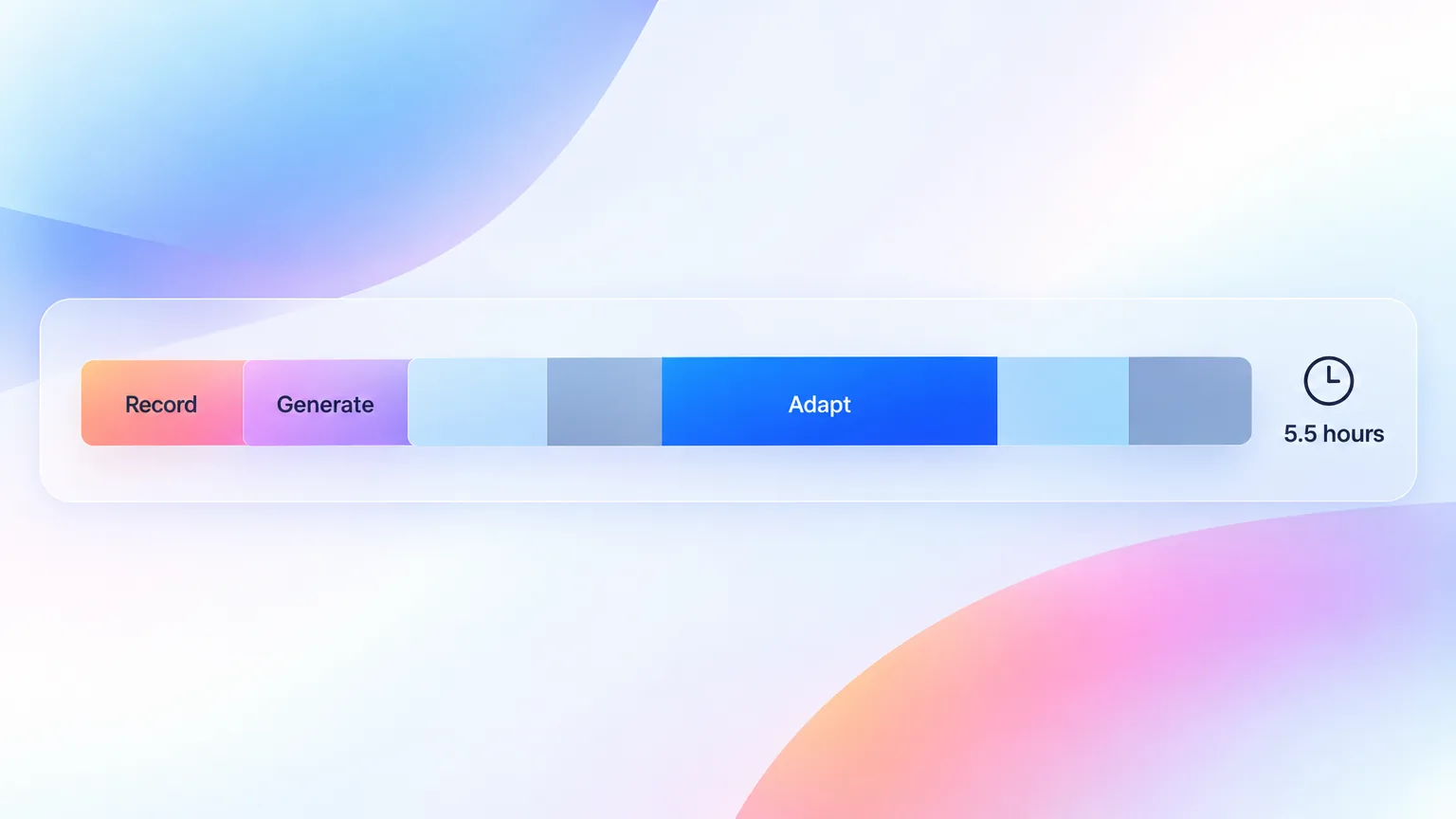
The original plan for this guide assumed 4 hours. The honest total lands closer to 5.5 hours once review time is counted. The comparison that matters is against producing the same seven assets from scratch, where each output needs its own script, shoot or screenshots.
Two assumptions drive the total. First, the blog post takes longest, because a transcript needs a real argument added. Second, the social clips are fast only when the recording has clean pauses between steps.
How to turn this into your own benchmark
Run the workflow once with a timer. Log start and stop times for each output in a shared sheet, and include review rounds. After three recordings, replace the planning estimates with your medians. The medians become your capacity plan, and they show which output is worth automating first.
Where content repurposing breaks
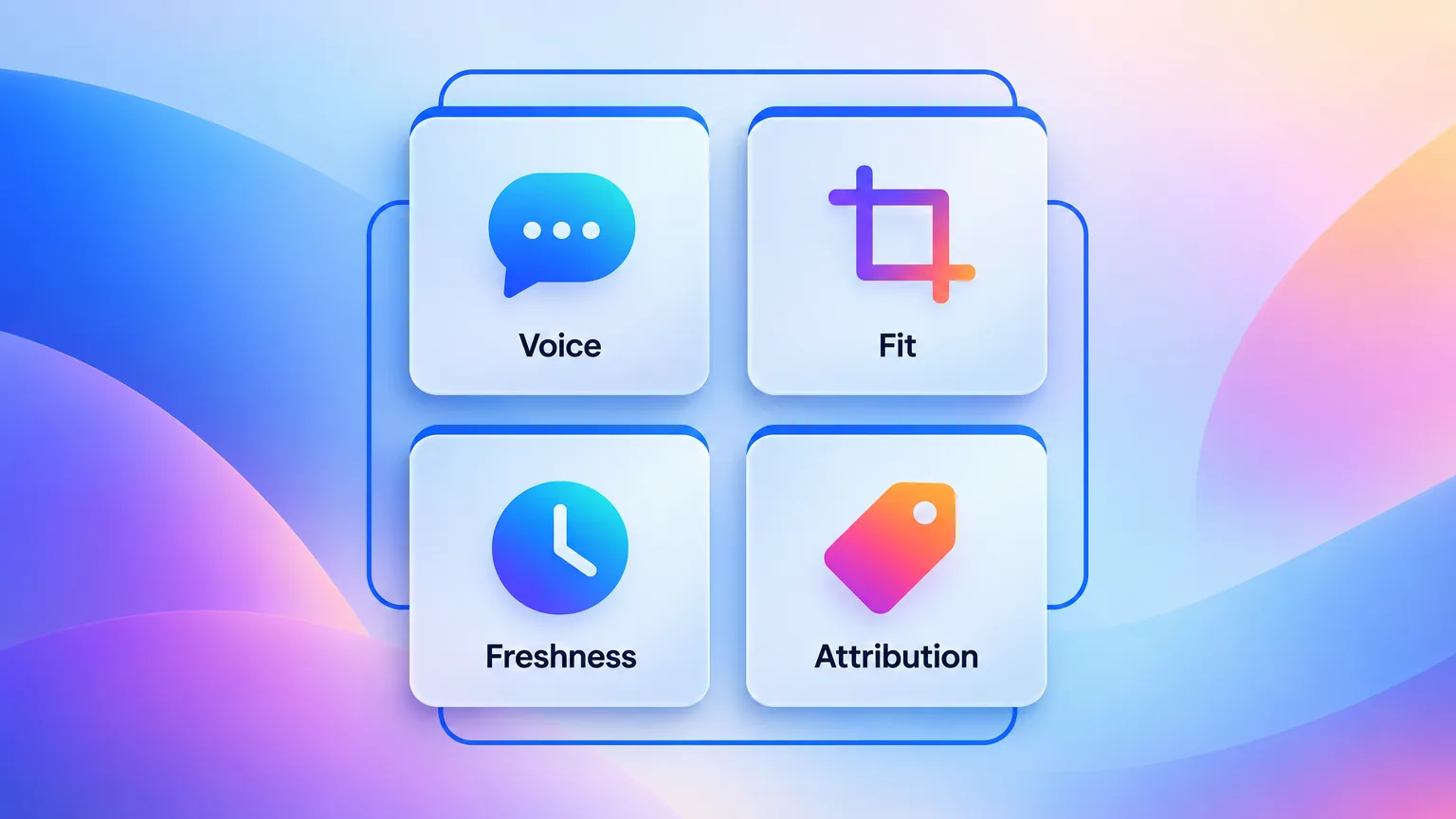
Content repurposing usually breaks in four places. Those are brand voice, channel fit, freshness and attribution. Each failure has a cheap fix if you plan for it before the first recording. Skip the planning and the same four problems show up in every launch, usually after the assets are already live.
- Brand voice drift. Five channels and three editors produce five voices. The fix is one short voice guide that every adapted asset is checked against.
- Channel-mismatched cuts. A horizontal demo posted to a vertical feed looks like an ad made for another platform. The fix is to crop and re-hook every clip for its channel.
- Stale snippets. The product ships and the tooltip clip still shows last quarter's UI. The fix is to tag every derivative with its source recording, then re-record the source when the feature changes.
- Attribution chaos. Seven assets with no shared tag cannot tell you which recording drove pipeline. The fix is one UTM campaign per source recording.
Content atomization raises the stakes. Content atomization is the practice of breaking one asset into its smallest reusable units. Without a source tag, it makes all four failures more likely. The atomization spoke in this cluster covers that framework in depth.
A five-minute check catches most of these. Before any derivative goes live, ask four questions:
- Does it sound like the voice guide?
- Is it cropped and hooked for this channel?
- Does it show the current UI?
- Does it carry the source recording's UTM tag?
Measuring whether content repurposing paid off
A content repurposing workflow paid off when its derivatives produced more attention or pipeline per hour than new content would have. Measure it at the level of the source recording, not the individual post. A single viral clip proves little. A recording whose seven derivatives beat your net-new content per hour proves the workflow works.
Track three numbers per recording:
- Hours invested. Count recording, generation review and adaptation time.
- Reach and engagement. Add up views, clicks and watch time across all derivatives.
- Pipeline touched. Count the opportunities where a contact engaged with any derivative. Pull them from your CRM.
Divide reach and pipeline by hours invested. Then compare the result with your average for net-new content. If a recording's derivatives beat net-new content per hour for two quarters, add more recordings to the calendar. The ROI spoke in this cluster goes deeper on what 30 SaaS teams actually saved.
Worked example: the per-hour math
Here is the math with illustrative numbers, not measurements. One recording took 5.5 hours in total. Its seven derivatives earned 11,000 views and touched 4 pipeline opportunities. That is 2,000 views and 0.73 opportunities per hour. A net-new blog post from the same team took 6 hours, and it earned 1,800 views and 1 opportunity. That is 300 views and 0.17 opportunities per hour. On those numbers, the recording wins on both counts.
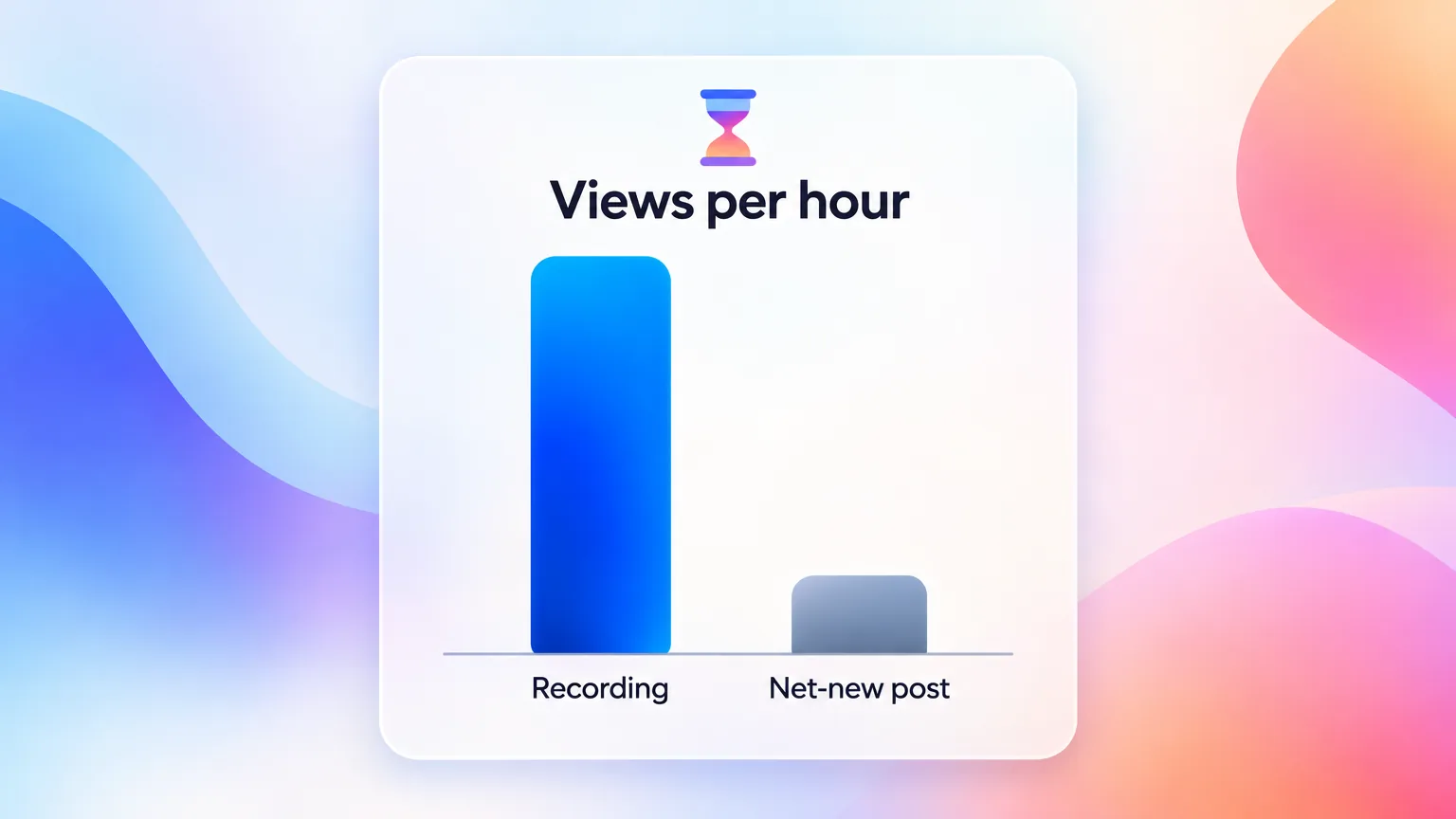
That is the whole argument behind record once, publish everywhere. The recording is the cheap part. The seven adaptations are the work, and the per-recording numbers tell you whether that work paid off.
Key Takeaways
- Start from a recording. A product screen recording is the strongest SaaS source, because it already holds the click path, voice and visuals.
- Tailor, do not just reuse. HubSpot's 2026 data shows 49.4% of teams reuse the same content while only 39.5% tailor it per platform.
- Plan 7 outputs before recording. Demo video, help article, blog post, social clips, email, sales snippet and onboarding tooltip.
- Run five stages every time. Plan, record, generate, adapt, distribute.
- AI speeds the generate stage only. Descript and OpusClip cut transcription and clipping time, but adaptation still needs a human editor.
- Budget the blog post longest. A transcript needs an argument added, which takes about 90 minutes in the illustrative plan.
- Measure per recording. Compare reach and pipeline per hour invested against net-new content.
Frequently Asked Questions
What is content repurposing?
Content repurposing is turning one existing asset into new pieces for different formats, channels or audiences. A product demo can become a help article, social clips and an email. Unlike cross-posting, repurposing rebuilds each piece for its channel. US searches for "what is content repurposing" grew 120% year over year by September 2026, according to DataForSEO.
How is content repurposing different from cross-posting?
Cross-posting publishes the same asset unchanged on several platforms, while content repurposing changes the format, length, hook and call to action for each one. HubSpot's 2026 State of Marketing report found that 49.4% of marketers reuse the same content across platforms. Only 39.5% tailor it per platform. Tailored assets fit each feed's native format.
How do you do content repurposing?
Pick one strong source asset, list the outputs it owes, and adapt each output to its channel. For SaaS teams, the source is usually a screen recording. Plan the output map, record one clean take, and generate transcripts and clips with AI. Then adapt each asset by hand, distribute on a calendar, and measure results per source recording.
What are the best AI tools for content repurposing?
The best AI tools for content repurposing depend on the stage of the workflow. Descript handles text-based editing and transcripts from $16 per user a month billed annually. OpusClip finds and reframes short clips from $15 a month. GuideClarity turns raw screen recordings into finished product videos and tutorials. Repurpose.io automates distribution from $35 a month.
How long does it take to repurpose a video into 7 formats?
In an illustrative AI-assisted plan, one 8-minute product demo becomes 7 deliverables in about 5.5 hours of human time. That total includes recording and review. The blog post takes longest at roughly 90 minutes. Your total depends on review steps and how clean the source recording is.
What is a good content creation workflow for a small SaaS team?
A good content creation workflow for a small SaaS team starts from one weekly source recording and a fixed output map. One person owns the calendar. AI handles transcription and clipping. One editor adapts every output. One weekly source keeps all seven assets on the same message.
How do you repurpose video for LinkedIn?
Cut a 30 to 90 second clip around one insight, crop it to square or vertical, and burn in captions. Most feeds autoplay muted, so captions carry the message. Rewrite the post text as a standalone point, not a summary of the video. Wistia's 2026 data shows LinkedIn is where 67% of teams post their video clips.
Should every piece of content be repurposed?
No, only content that proved demand or captures durable product knowledge deserves a full set of derivatives. A core feature demo qualifies. Content tied to a one-off event does not. Neither does a UI that is about to change.
What to Read Next
For the recording itself:
- How to make a SaaS product demo video that converts. The one-clean-take discipline this workflow depends on.
For the formats downstream of the recording:
- SaaS user onboarding video playbook. The in-app tooltip output, mapped to activation.
For the tooling layer:
- The 2026 guide to AI video generation for SaaS teams. What AI automates in the generate stage.