TL;DR
Descript vs Trupeer comes down to editing a video yourself against letting AI rebuild it. Descript is better for creators and teams who edit any kind of recorded video, because you edit by editing the transcript and plans start lower. Trupeer is better for screen walkthroughs, because its AI rewrites your narration, voices it and writes a guide from the same recording.
- Pick Descript if you edit podcasts, talking-head videos or screen recordings and want full control at a low per-person price.
- Pick Trupeer if you record software walkthroughs and want an AI voice, a written guide and translations without editing.
- Pick GuideClarity if you want product demo videos and explainer videos generated from your live SaaS product, plus the docs, shorts and blog post.
Descript vs Trupeer at a glance
The table compares Descript and Trupeer on the points buyers check first. Starting price is the cheapest paid plan in US dollars a month, with yearly billing on both. A tinted cell marks the side with the edge. We read every price and limit on each vendor's own page on September 29, 2026.
| Criterion | Descript | Trupeer |
|---|---|---|
| Best for | Editing any recorded video | AI-narrated screen walkthroughs and docs |
| Workflow | You edit the transcript | Record, then AI rebuilds it |
| Starting price | $16 per person a month, yearly | $40 a month, yearly |
| Editing | Text-based editing plus a timeline | Trim, split, skip, sync and crop |
| AI voices | Custom voice clones on Hobbyist | Voice clones on Enterprise |
| Written guides | Drafts blog posts and show notes | DOC, PDF and Markdown guides |
| Languages | Dubbing in 30+ languages on Business | 100+ languages and accents |
| Team seats | Up to a team of 5 on Business | 3 creator seats on Scale |
| Exports | 4K on Creator | MP4 with captions |
| Security | SOC 2 Type II, SSO and SCIM | ISO 27001, SOC 2 and GDPR |
| Biggest limitation | No step-by-step guides from a recording | Higher price and short recordings on Pro |
How we compared Descript and Trupeer
Descript is a video editor that works from a transcript, and Trupeer turns a rough screen recording into an AI-narrated video and a guide. So the choice is about how much editing you want to do. We compared them on nine things buyers weigh. Those are workflow, price, editing, AI tools, documentation, languages, collaboration, exports and security.
- Own screenshots. Every homepage and pricing screenshot on this page is ours, taken on September 29, 2026 at 1440 pixels wide.
- Verified facts. Every price, limit and plan detail comes from the vendor's own page, and a script re-checked each one on September 29, 2026. The Sources section lists each page.
- An edge on every criterion. Each section ends with the side that wins it and the one fact that decides it.
- No affiliate links. No vendor on this page pays us for a mention or a click.
GuideClarity publishes this page. It is not one of the two tools compared, but it competes with both for product videos. Where it fits and where it does not is stated in its own section, with the same directness as the strengths and weaknesses of Descript and Trupeer.
What Descript and Trupeer are
Descript in brief
Descript is an AI video and audio editor. It transcribes any recording and lets you edit the video by editing the text. Its AI editor, Underlord, can turn a raw recording into a tight cut. Podcasters, YouTubers and marketing teams use it for every kind of video, from interviews to screen recordings.

Trupeer in brief
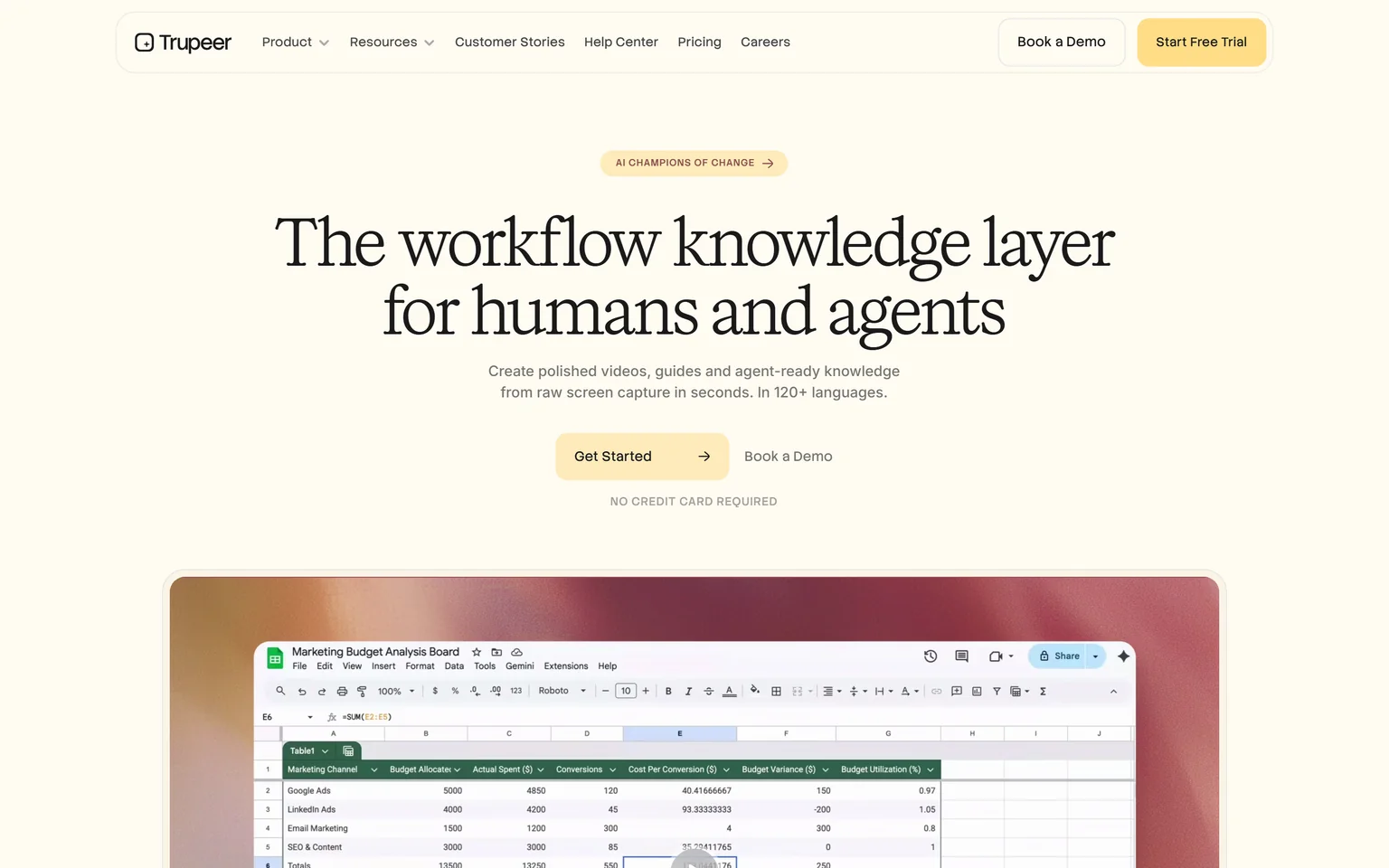
Trupeer creates polished videos, guides and agent-ready knowledge from raw screen capture, in 120+ languages. You record a rough walkthrough, and its AI fixes the script, adds a voice and builds a document. Training, support and product teams use it. We compare its rivals on our Trupeer alternatives page.
Descript vs Trupeer workflow
Trupeer wins on workflow for screen walkthroughs. You hit record on a screen and talk through it, using the Chrome extension or an upload. Trupeer then polishes the script and voices it for you. Descript gives you an instant transcript that you edit like a document, so you still make every cut yourself or ask its AI to do it.
How a Descript project runs
You record in Descript or drag in a file. Descript lists screen recording and remote recording among its features. Then you delete words to cut video, remove filler words and fix the audio. Underlord can turn a raw recording into a tight cut when you ask it. The result keeps your own voice and face.
How a Trupeer project runs
You record a rough take, and Trupeer does the rest. It adds an AI voiceover, AI captions and auto zoom, and it builds a written guide from the same clicks. A stumble never needs a retake, because you fix the script text and regenerate the voice.
Which fits your work
If the video has people on camera, Descript fits better. If it only shows software, Trupeer gets you to a finished video with less effort. Our guide on making a SaaS demo video that converts covers what a good walkthrough needs.
Edge Trupeer, because it turns a rough screen recording into a narrated video with no editing step.
Descript vs Trupeer pricing
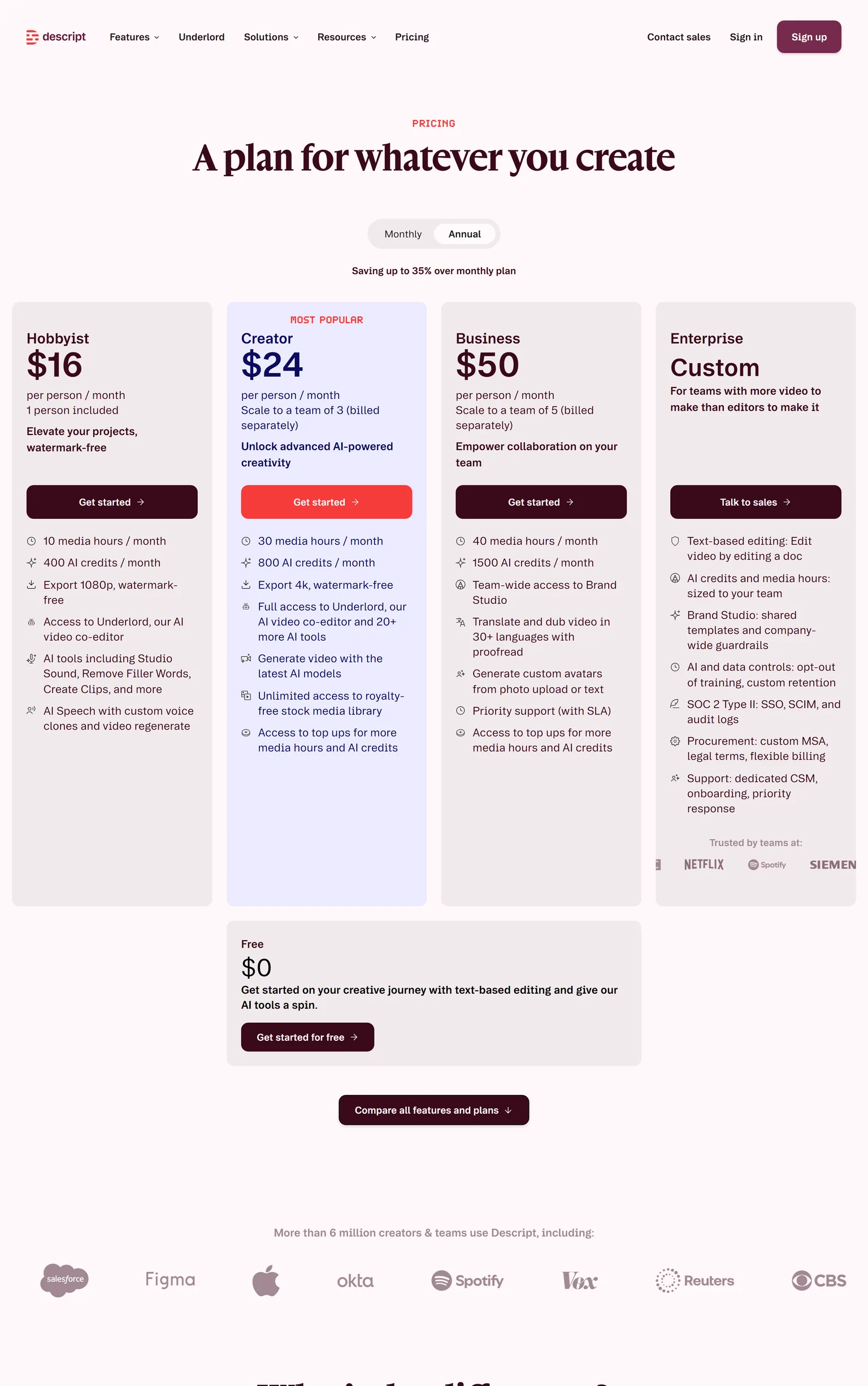
Descript wins on price. Descript Hobbyist costs $16 per person a month on annual billing, or $24 monthly. Trupeer Pro costs $40 a month billed yearly, or $49 billed monthly. Descript's paid plans start lower, and Trupeer's Free plan lasts 10 days.
Descript pricing
Descript's Free plan includes 60 media minutes a month, 100 one-time AI credits and 720p export. Hobbyist includes 10 media hours and 400 AI credits a month and exports 1080p without a watermark. Creator costs $24 per person a month on annual billing, or $35 monthly. Business costs $50 per person a month on annual billing, or $65 monthly.
Trupeer pricing
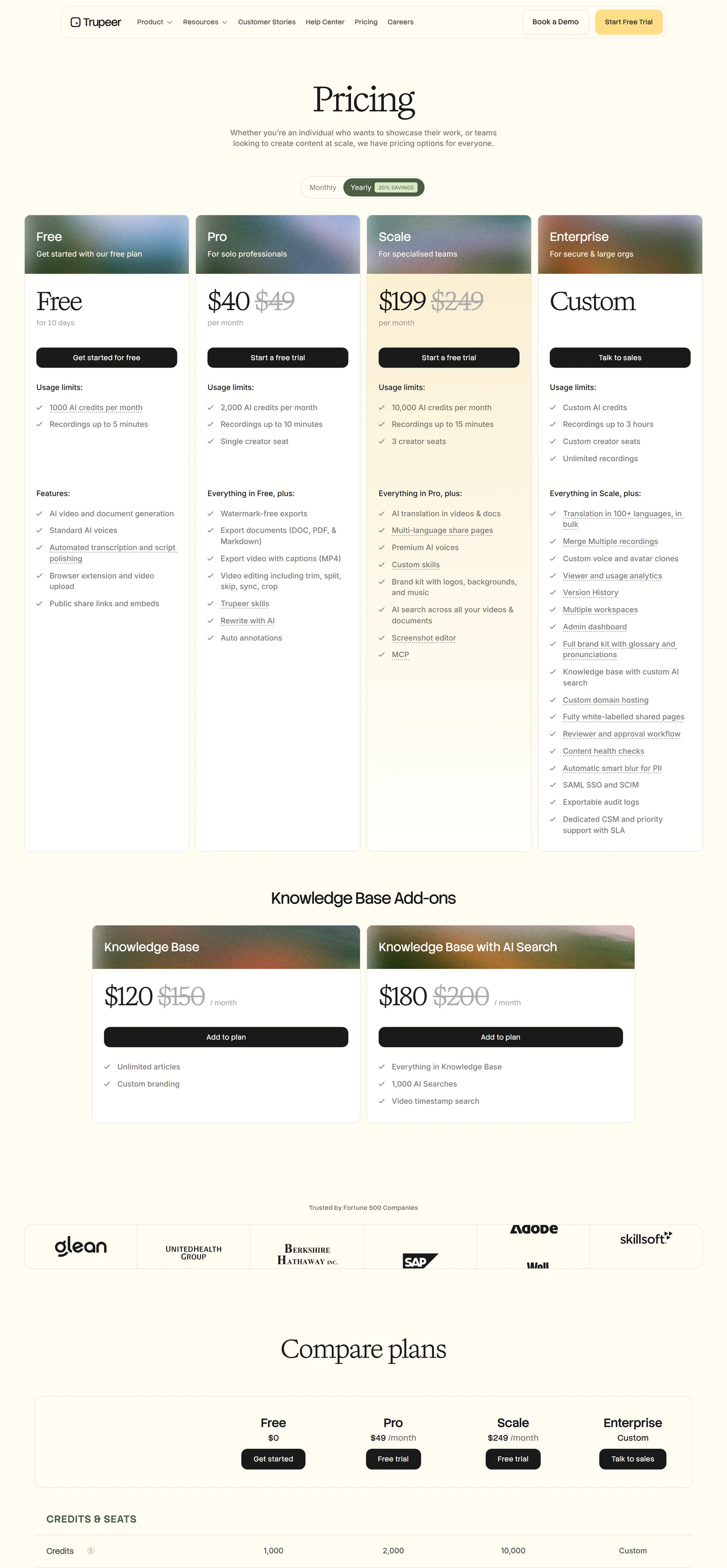
Trupeer Pro includes 2,000 AI credits a month, recordings up to 10 minutes and a single creator seat. AI video costs 100 credits per minute, so Pro covers a modest amount of new video each month. Scale costs $199 a month billed yearly or $249 monthly. Extra credits cost $4 per 100 AI credits.
What the same money buys
Two people on Descript Hobbyist still cost less than one Trupeer Pro seat. Trupeer's price buys the AI voice, the written guides and the credits for generation. Trupeer's unused credits do not roll over, so match the plan to your monthly output.
Edge Descript, because its paid plans start at less than half of Trupeer Pro.
Descript vs Trupeer editing
Descript wins on editing, because editing is its whole job. Descript says video editing is as easy as typing. You cut by deleting words, and the timeline is there for fine control. Trupeer Pro adds editing with trim, split, skip, sync and crop, and auto annotations, which is enough for a walkthrough but not for a produced video.
Clean-up tools
Descript Hobbyist includes Studio Sound, Remove Filler Words and Create Clips. Studio Sound removes background noise and enhances voice in one click. These matter when you record your own voice in a normal room. Trupeer avoids the problem by replacing your voice with an AI one.
Brand and templates
Descript Business gives the team access to Brand Studio. Trupeer Scale adds a brand kit with logos, backgrounds and music. Both keep videos on brand, but Descript reaches it on a cheaper plan per person.
Edge Descript, because its text-based editor and timeline give far more control than Trupeer's basic cuts.
Descript vs Trupeer AI tools
Descript wins on the range of AI tools. Descript Hobbyist includes AI Speech with custom voice clones, and Business generates custom avatars from a photo upload or text. Trupeer offers custom voice and avatar clones only on Enterprise. Trupeer's AI is narrower but more automatic, because it adds the voiceover, captions and zooms without being asked.
What each AI does
Descript's AI helps you edit. Underlord turns a raw recording into a tight cut, and the Hobbyist plan adds filler word removal. Trupeer's AI replaces the edit. It rewrites the script, voices it and offers lifelike avatars without a camera.
Which matters to you
If you want your own cloned voice on a small budget, Descript gets you there on its entry plan. If you never want to touch the edit, Trupeer's defaults do more. Descript Creator adds 4K export, which matters if those AI edits end up on a big screen.
Edge Descript, because voice clones and avatars come on cheaper plans than Trupeer's Enterprise tier.
Descript vs Trupeer documentation
Trupeer wins on documentation, because Descript does not build step-by-step guides. Trupeer's Free plan includes AI video and document generation, and Pro exports documents to DOC, PDF and Markdown. Descript can draft social posts, blog posts and show notes from a recording, which is text about a video rather than a how-to guide.
How Trupeer builds a guide
Trupeer detects each step, adds smart screenshots and annotations, and follows your own template. An AI document costs 50 credits. Its Knowledge Base add-on costs $120 a month billed yearly, with unlimited articles. Trupeer also lists SCORM export for training systems.
Who needs this
Support and training teams want a written guide next to each video, so people can skim the steps. Trupeer builds both from one recording. A podcaster or YouTuber will not need a manual. Our content repurposing workflow shows how one recording becomes several formats.
Edge Trupeer, because it turns each screen recording into a formatted guide as well.
Descript vs Trupeer languages
Trupeer wins on languages. Trupeer generates voiceovers and translations in 100+ languages and accents, and Scale adds AI translation in videos and docs. Descript Business translates and dubs video in 30+ languages with proofreading. Descript transcribes in 25 languages on every plan, which helps if you record in a language other than English.
What translation costs
Trupeer translation costs 100 AI credits per minute for each target language, and Scale includes two languages while Enterprise includes ten. Descript puts dubbing on Business, at a per-person price. A small team translating a few videos may pay less on Descript.
What this means for global teams
Trupeer also translates the written guide, so a help center gets both formats in each language. Scale adds multi-language share pages. Machine translation still needs a native speaker to check product terms.
Edge Trupeer, because it covers more languages and translates the guide along with the video.
Descript vs Trupeer collaboration
Descript wins on collaboration for small teams. Descript lets you send a link and get comments right on the video. Creator scales to a team of 3, and Business scales to a team of 5, each person billed separately. Trupeer Pro has a single creator seat, and Scale includes 3 creator seats at a much higher price.
Review and approval
Trupeer Enterprise adds a reviewer and approval workflow, viewer analytics and exportable audit logs. That suits large training teams with sign-off rules. Descript keeps review simple, with comments on a shared link.
What this means for teams
A team of three on Descript Creator pays less than half of a Trupeer Scale plan. A company that needs formal approval on every guide will find that on Trupeer Enterprise.
Edge Descript, because a small team can share projects and comments at a lower price per person.
Descript vs Trupeer exports and sharing
Descript wins on exports. Descript Creator exports 4K without a watermark, and Descript exports timelines to Adobe Premiere, Final Cut Pro, Pro Tools and Logic. Creator and Business export web links up to 3 hours long. Trupeer exports MP4 with captions and shares through public share links and embeds.
Watermarks on free plans
Trupeer Free plan videos carry a Trupeer watermark on export and embed. Watermark-free exports start on Pro. On Descript, Hobbyist exports 1080p without a watermark.
What this means for marketing
A video team that finishes work in Premiere can start in Descript and hand off the timeline. Trupeer suits help centers and training pages, where a captioned video and a guide sit together. Our SaaS demo software buyers guide covers where each format works.
Edge Descript, because it exports 4K and hands timelines to professional editors.
Descript vs Trupeer security
Trupeer wins on security, by a small margin. Trupeer's homepage says it is ISO 27001, SOC 2 and GDPR certified, and Enterprise adds automatic smart blur for PII. Descript is SOC 2 Type II certified, supports SAML SSO and SCIM, and is GDPR compliant. Both cover the checks most security reviews ask for.
Why the blur matters
Screen recordings of internal tools often show customer names and emails. Trupeer blurs that data automatically on Enterprise. In Descript you would hide it yourself in the edit. Trupeer Enterprise also adds SAML SSO with SCIM, and Descript Enterprise lists SSO, SCIM and audit logs.
Edge Trupeer, because it adds ISO 27001 and blurs personal data in recordings automatically.
Descript vs Trupeer: which should you choose
Choose by how much editing you want to do. If you edit podcasts, interviews or screen videos and want full control at a low price, Descript wins. If you record software walkthroughs and want AI to narrate, document and translate them, Trupeer wins. Some teams edit marketing videos in Descript and build training in Trupeer.
Descript strengths and weaknesses
Strengths
- Edit video by editing the transcript.
- Studio Sound and filler word removal.
- Voice clones on the entry plan.
- 4K export and timeline export to Premiere.
- Low per-person pricing and a free plan.
Weaknesses
- No step-by-step guides from a recording.
- You still do the editing, or direct the AI.
- Fewer translation languages than Trupeer.
Trupeer strengths and weaknesses
Strengths
- AI voiceover and script rewrite by default.
- Guides in DOC, PDF and Markdown.
- 100+ languages and translation on Scale.
- ISO 27001 and PII blur on Enterprise.
Weaknesses
- A much higher starting price.
- The free plan lasts 10 days.
- Basic editing next to Descript.
- If you edit podcasts or talking-head videos, pick Descript.
- If you want to clean up your own voice and cut filler words, pick Descript.
- If you record software walkthroughs and dislike editing, pick Trupeer.
- If you need a written guide and translations for each video, pick Trupeer.
- If you are weighing either against other tools, see our VEED vs Descript, Loom vs Trupeer and Synthesia vs Trupeer comparisons.
- If you ship SaaS features and want the launch videos and content generated from the product, pick GuideClarity.
Where GuideClarity fits between Descript and Trupeer
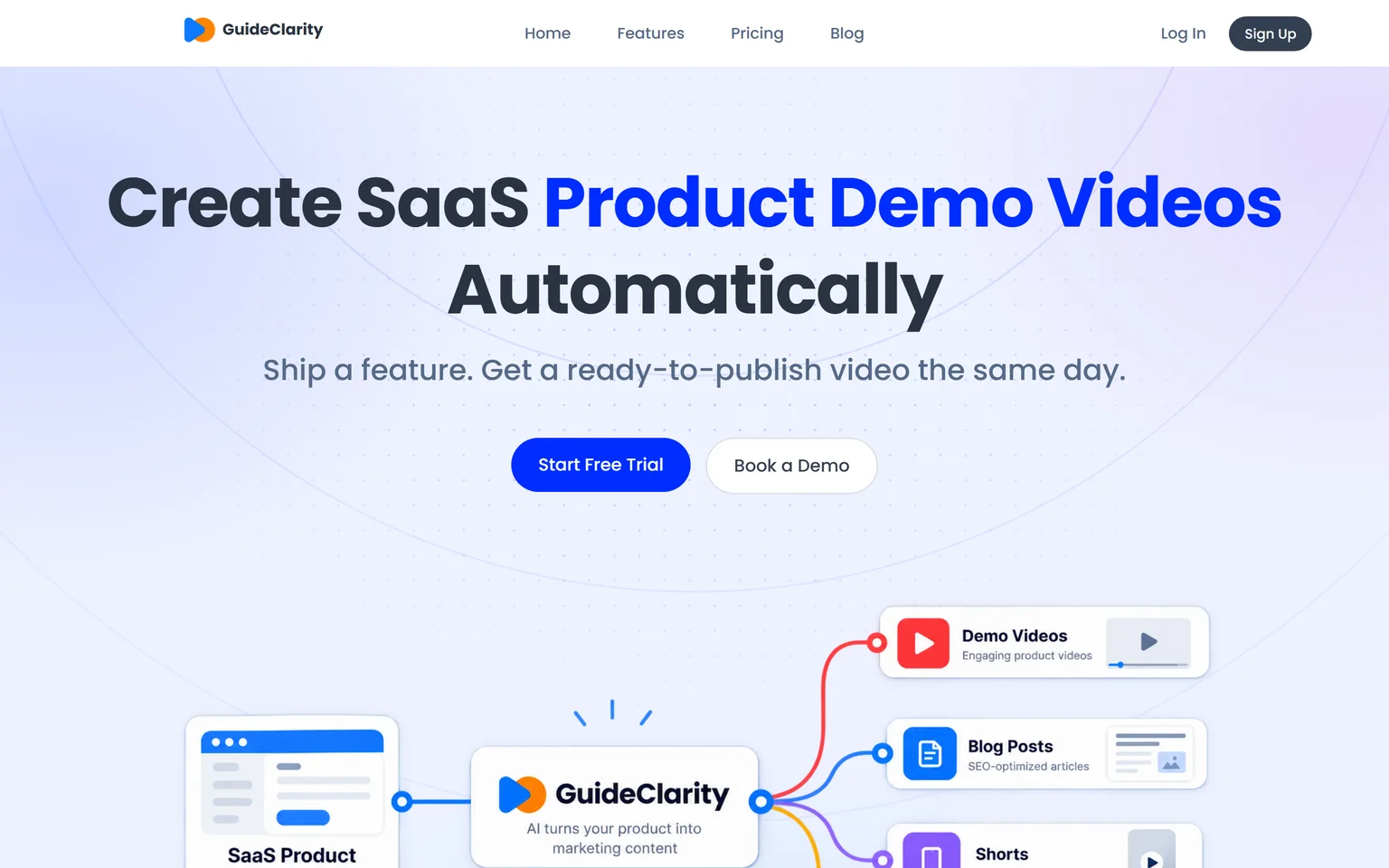
Descript and Trupeer both start from a recording. GuideClarity starts from your product. It generates the product demo video and the explainer video automatically from your live product URL, then the docs, shorts, blog post and social posts. It suits SaaS teams that ship often. Teams that edit podcasts or document third-party software should pick Descript or Trupeer.
GuideClarity pricing
The free plan includes 3 video guide recordings with AI voiceover and 6 marketing videos. Pro costs $59 a month billed monthly, or $49 a month billed yearly. Business costs $99 a month. Paid plans carry a 14-day money-back guarantee.
Strengths
- Builds the product demo video and explainer video from the product.
- One feature in, a whole launch kit out, with shorts, docs and a blog post.
- No recording, scripting or editing step for the team.
- A free plan to test on a real feature.
Weaknesses
- Not a general video editor. Podcasts and interviews fit Descript.
- Focused on your own SaaS product, not on training for third-party tools.
GuideClarity vs Descript and Trupeer
GuideClarity creates SaaS product demo videos automatically. It turns one release into a demo video, shorts, a blog post, social posts, screenshots and an announcement. Nobody records or edits the screen. The GuideClarity features page lists every output. Our guide to AI explainer videos for SaaS shows where these videos help.
Frequently asked questions about Descript vs Trupeer
Is Trupeer better than Descript?
Trupeer is better for screen walkthroughs, because it adds an AI voiceover, captions and zooms and exports guides on Pro. Descript is better for editing any recorded video, with text-based editing from $16 per person a month on annual billing. So in Trupeer vs Descript, the kind of video decides.
Is Descript actually good?
Yes, for editing. Descript transcribes any recording and lets you edit the video by editing the text, and Studio Sound cleans up your audio in one click. It suits podcasts, interviews and screen videos. It does not write step-by-step guides, so training teams often pair it with a documentation tool.
How much does Descript cost per month?
Descript Hobbyist costs $16 per person a month on annual billing, or $24 monthly. Creator costs $24 on annual billing, or $35 monthly. Business costs $50 on annual billing, or $65 monthly. A free plan lets you start with text-based editing, and Enterprise is priced by sales.
Which is cheaper, Descript or Trupeer?
Descript is cheaper. Descript Hobbyist costs $16 per person a month on annual billing. Trupeer Pro costs $40 a month billed yearly, or $49 monthly. Trupeer's price includes the AI voice, written guides and generation credits. Descript's cheaper plans still include AI voice clones and clean-up tools.
Who are Descript's main competitors?
Descript competes with other editors such as VEED, and with screen tools such as Trupeer and Loom. Trupeer fits teams that want AI narration and guides. GuideClarity generates product demo videos from a live SaaS product with no recording. Our VEED vs Descript page compares the closest editor.
Is Descript better than Loom?
Descript is better when you want to edit and polish a video. Loom is built for quick screen messages that you record and send as they are. Many teams record fast updates in Loom and produce finished videos in Descript. Our Loom alternatives page compares more options with verified prices.
How did you verify the prices on this page?
We opened each vendor's pricing page in a browser on September 29, 2026 and saved its text. A script then checked every quoted price and limit against that saved page. Descript shows monthly and annual prices together, and so does Trupeer, so no toggle was needed.
Sources and verification
Every fact above was read on the pages below on September 29, 2026. The vendor's own page wins over any third-party listing when they disagree. Prices change, so check the vendor before you buy.
- Descript pricing page, checked September 29, 2026.
- Descript homepage, checked September 29, 2026.
- Trupeer pricing page, checked September 29, 2026.
- Trupeer homepage, checked September 29, 2026.
- GuideClarity pricing page, checked September 29, 2026.
- GuideClarity homepage, checked September 29, 2026.
Tired of recording and editing every product video? GuideClarity generates the demo video, the explainer video, the shorts, the blog post and the social posts from your live product.
The free plan includes 3 video guide recordings with AI voiceover, so you can run a real feature through it before paying.